If you’ve ever dreamed of earning income online, now is the perfect time to start a digital product business.
But first, what exactly is a digital product? Simply put, a digital product is any product you can sell or share online without physical inventory. These include things like eBooks, templates, software, courses, and music files. Basically anything that can be downloaded or accessed online.
Why are so many entrepreneurs switching to digital? Because digital products don’t require shipping, storage, or manufacturing. They’re low-risk, high-reward, and infinitely scalable.
This guide will walk you through every step of launching a successful digital product business from scratch in 2025. From understanding what a digital product is to exploring over 100 profitable ideas, plus access to free digital products you can legally resell, we’ve got you covered.
Used by 1000s of experts to launch online schools and courses

A digital product is anything that is digital and soldable. Any intangible asset or media file that can be sold and distributed online. It exists in a digital format and can be downloaded, streamed, or accessed after purchase without needing physical shipping or packaging.
Here are some common types of digital products:
Also Read:- Selling Digital Products Online : A Comprehensive Guide to Online Success
| Aspect | Digital Products | Physical Products |
| Definition | Intangible items like apps, eBooks, or courses | Tangible goods like clothes, books, or furniture |
| Creation | Made with code or media tools | Made from raw materials |
| Delivery | Instant via internet | Requires shipping or in-store purchase |
| Cost & Scale | Low to produce, high scalability | Higher production cost, limited by inventory |
| Updates | Easy and instant | Requires remanufacturing |
| Innovation | Evolving via AI, VR, automation | Evolving via smart tech, 3D printing, sustainability |
| Future | Virtual products, global reach, personalized AI | Smarter goods, greener materials, hybrid experiences |
Selling digital products in 2025 is not just a trend. It’s a smart business move backed by industry growth and consumer behavior.
Once created, digital products can be sold repeatedly without additional production cost. That’s the magic of passive income.
With just a website or marketplace profile, you can reach customers around the world and make sales even while you sleep.
These trends show that there has never been a better time to start a digital product business.
Some digital products generate more revenue and demand than others. Let’s look at the top contenders:
If you have expertise in any subject, you can package it into a course using platforms like Teachable or Thinkific.
Designers can sell templates for Canva, Photoshop, or PowerPoint. These include: Social media packs, Presentation decks and Resumes and CVs.
Freelancers and startups love tools that save time. Think Chrome extensions, project management tools, or budgeting apps.
With the rise of ChatGPT, GPT Store, and Jasper AI, selling curated prompt packs and automations is a goldmine in 2025.
Moms, teachers, and professionals buy planners, journals, calendars, and habit trackers every day.
Need inspiration to start a digital product business in 2025? Here's a mega list of 100+ high-potential digital product ideas, organized by category and audience:

One way to jumpstart your journey is by using free digital products you can resell without making them from scratch.
Private Label Rights (PLR) give you the ultimate flexibility. With PLR, you're allowed to modify the content, rebrand it with your own name, and resell it as if you created it yourself. This makes Private Label Rights ideal for building credibility, authority, and a unique brand presence—especially if you're starting out.
Master Resell Rights (MRR), on the other hand, let you resell the digital product as-is, usually without any modifications. However, these rights typically don’t extend to your customers, meaning your buyers can’t resell the product unless it’s explicitly allowed in the license.
Here are some trusted platforms that offer high-quality free PLR and MRR products across various niches:
| Platform | Best For | Highlights |
| PLR.me | Coaches, therapists, educators | Professionally designed wellness and coaching content |
| IDPLR.com | Entrepreneurs, marketers | 12,500+ PLR and MRR products, including software, videos, and templates |
| Resell Rights Weekly | Side hustlers, digital resellers | Free and premium membership with frequent updates |
| PLRDatabase.net | Content creators, bloggers | Weekly updated library with fresh PLR materials |
| Pixabay & Pexels | Designers, content marketers | Royalty-free images, videos, and graphics to use in your products or promotions |
Note: Always read the license before using any PLR material, and make sure you're allowed to modify or resell it.
Building a successful digital product brand takes planning. Here’s how to go from zero to launch:
1. Choose Your Niche
Pick a niche based on your knowledge, passion, or existing audience.
Examples: Fitness, Finance, Marketing, Education, Productivity
2. Validate Your Idea
Use Google Trends, Reddit forums, and competitor research to ensure there’s demand. Pre-sell if needed!
3. Create the Product
Use tools like: Canva for design, Notion for organizing content, ScreenPal for recording videos, Google Docs for writing etc.
4. Pick a Platform
Choose where to host and sell:
| Platform | Best For | Why Use It? |
| BuddyBoss | Online communities + course hosting | Build a branded learning app or community. Perfect for selling memberships, events, or courses. |
| MemberPress | Paid memberships and gated content | Sell premium content, lock pages or courses, and manage subscriptions on your own WordPress site. |
| LearnDash | Structured online courses on WordPress | Ideal for educators. Add lessons, quizzes, certificates, and drip content with full control. |
| Teachable | Online courses | Easy to use for instructors. Offers course builder, quizzes, and student progress tracking. |
| Gumroad | Digital downloads | Great for selling eBooks, music, art, or code. Simple interface and fast setup. |
| Podia | Courses + memberships | All-in-one tool for creators: sell courses, host communities, and manage email marketing. |
| Shopify | Full e-commerce setup | Best for digital + physical products. Built-in store, payments, and apps for growth. |
| Etsy | Templates, planners, and printables | Ideal for designers and crafters. Good audience for digital downloads like journals or templates. |
See how People Use BuddyBoss to Build their community, course and membership sites.
5. Build Your Website
To start selling, set up a professional website using WordPress, Wix, Shopify or Buddyboss if you have a community or a course. Focus on key pages like your homepage, product listings, about section, contact form, and a smooth checkout. Keep the design clean, mobile-friendly, and fast-loading to make a great first impression and drive conversions.
6. Launch & Market
Once your site is live, market your products using a mix of SEO, Pinterest, and email marketing for organic growth. Boost your reach with paid ads on platforms like Facebook and Google. Build an email list early, it’s your most valuable tool for long-term sales and customer engagement.
Your Own Website! Selling on your own site gives you full control, higher margins, and branding freedom. Use Shopify, BuddyBoss + WooCommerce, or Podia.
If you're just starting out or want additional sales channels, marketplaces can be a great way to reach new customers fast. Here's a comparison of the most popular platforms:
| Marketplace | Why It Stands Out |
| Etsy | Massive built-in audience and strong search visibility |
| Gumroad | Extremely easy to use with fast setup for digital products |
| Creative Market | Best for creatives—designers, photographers, and artists |
| Payhip | Low transaction fees and flexible pricing options |
| Sellfy | Built specifically for digital-first creators and businesses |
1. What Are The Best Platforms To Sell Digital Products?
For simplicity, use Gumroad or Etsy. For full control, use Shopify or Buddyboss.
2. How Much Can I Earn Selling Digital Products?
Earnings range from $500/month to $100,000+/year depending on niche, traffic, and pricing.
3. Do I Need To Know How To Code?
Not at all! Tools like Canva, Notion, and Teachable require zero coding skills.
4. Can I Resell Someone Else's Digital Products?
Yes, if they are licensed as PLR or MRR. Always check usage rights.
5. How Do I Protect My Digital Products From Being Copied?
Use PDF watermarks, license agreements, and digital delivery platforms with limited access.
6. What Types Of Digital Products Sell The Fastest?
Templates, planners, and online courses are typically quick-sellers with high demand.
If you've been waiting for the “right time” to build your business, this is it. With the tools and ideas laid out above, starting a digital product business in 2025 is simpler and more profitable than ever.
You don’t need to be a tech wizard or have a big audience. Pick one product idea from the list and take the first step today.
Already have a course? Try building your own site to sell the course to your learners.
Try BuddyBoss demo sandbox and see how your course site will look like.
Your potential customers speak a variety of languages but your website only speaks English.
While your English content may convert beautifully, consider that 75% of internet users prefer browsing in their native tongue. Hiring translators or managing separate versions is expensive and time-consuming.
What if there was a way to break down these barriers without breaking your budget or requiring you to become a polyglot overnight?
Especially for those who are using WordPress with the BuddyBoss Platform or BuddyBoss App to reach new global markets.
Artificial Intelligence has revolutionized content translation, making it possible for any business owner to reach global audiences without speaking a word of their target languages.
Modern AI translation goes far beyond the clunky, obviously-machine-translated text of yesterday. Today's AI understands context, maintains your brand voice, and delivers translations that feel natural to native speakers.
The beauty of AI translation lies in its simplicity for the end user. You don't need to understand French to know that your French website is converting visitors. You don't need to speak German to see that your German blog posts are ranking on the first page of Google.
AI handles the linguistic heavy lifting while you focus on what you do best; running your business.
✅ Translates 40+ languages
✅ Maintains brand voice
✅ Works with blog posts, WooCommerce, forms, and now… your BuddyBoss App
This technology removes the biggest barrier to international expansion: the assumption that you need to be multilingual to serve multilingual markets.
For WordPress website owners, WPML (WordPress Multilingual Plugin) has emerged as the gold standard for AI-powered multilingual support. This isn't just another plugin but a comprehensive solution that transforms your single-language WordPress site into a multilingual powerhouse.
WPML integrates seamlessly into your existing WordPress dashboard, creating a unified system where you can manage multiple languages without the complexity of maintaining separate websites.
Once installed, it adds language options to every piece of content on your site, from pages and posts to custom fields and media files.
It handles language-specific URLs, ensures proper hreflang tags for SEO, manages language switchers, and even adapts your site's layout for right-to-left languages when needed. Everything happens within your familiar WordPress environment, so there's no need to learn new platforms or workflows.
And for BuddyBoss users, WPML doesn't just translate your WordPress site. It also integrates with the BuddyBoss App, syncing translated content automatically across your mobile app.
That means learners, members, or community users can experience your app in their native language without extra setup. Your translated WordPress content now syncs automatically to the app, giving users a fully localized experience on both web and mobile.

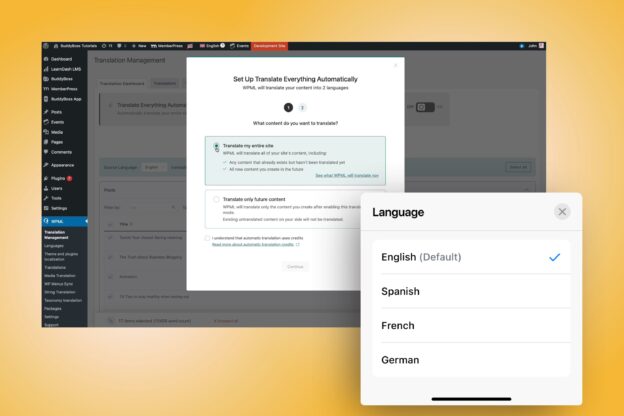
Here's where WPML truly takes the spotlight: its automatic translation capabilities powered by advanced AI. Once you've set up your target languages, WPML can translate your entire website automatically to blog posts, product descriptions, about pages, contact forms, and even dynamic content.
The process is remarkably straightforward. You write your content in your primary language (presumably English), hit publish, and WPML's AI translation engine goes to work. Within minutes, that same content exists in French, German, Spanish, or any of the supported languages.
But it's not just about translating existing content. Every new blog post you publish, every product you add, every page you create automatically gets translated into your chosen languages. Your multilingual presence grows organically with your English content, ensuring you never miss an opportunity to connect with international audiences.
The AI understands context, industry terminology, and even maintains your brand's tone across languages.
It's sophisticated enough to handle technical documentation, creative marketing copy, and everything in between.
One of WPML's most compelling features is its generous credit system. When you purchase WPML, you receive 90,000 automatic translation credits that's enough to translate approximately 2,000 pages of content across multiple languages.
To put this in perspective, most business websites have between 50-500 pages of content. With 90,000 credits, you could translate a 200-page website into four different languages and still have credits left over for ongoing content creation.
For most businesses, this initial credit allocation covers their entire multilingual transformation and provides a runway for months or even years of additional content.
This credit system makes AI translation incredibly cost-effective compared to traditional professional translation services, which can cost $0.10−0.30 per word. With WPML, you're looking at pennies per page, making international expansion accessible to businesses of all sizes.
Here's something that might surprise you: ranking on the first page of Google is often significantly easier in non-English languages, especially for specific markets and industries.
While everyone's fighting for English keywords, French, German, Italian, and other language markets often have less competition.
When you translate your content into these languages, you're not just reaching new audiences, you're entering less saturated search landscapes.
Your well-optimized English content, when properly translated and localized, often performs exceptionally well in international search results.
WPML handles the technical SEO aspects automatically. It creates proper href lang tags, manages language-specific URLs, ensures search engines understand your site structure, and maintains your SEO value across all language versions. You get the SEO benefits without needing to understand the technical complexity behind international SEO.
Perhaps the most liberating aspect of AI translation through WPML is that you don't need to speak, read, or understand your target languages to succeed in those markets.
The AI handles translation accuracy, cultural nuances, and local expressions.
You can monitor your French website's performance through analytics without reading French.
You can see which German blog posts are performing best without understanding German.
The plugin provides English-language reporting and management interfaces, so you always know what's happening across all your multilingual properties.
This separation of linguistic complexity from business management means you can expand internationally without hiring multilingual staff, without learning new languages, and without the traditional barriers that have kept global expansion limited to large enterprises.
WPML recently launched an exciting new feature that extends multilingual support beyond websites to mobile applications. This automatic multilingual switching capability means your mobile app can now seamlessly detect user language preferences and present content in their preferred language.
Whether you're running a WooCommerce store with a mobile app, a content-driven app, or any other WordPress-connected mobile application, WPML now ensures your mobile presence matches your website's multilingual capabilities. Users get a consistent, localized experience whether they're browsing your website or using your mobile app.
This feature represents the future of multilingual digital experiences—seamless, automatic, and invisible to the end user while being incredibly powerful for business owners.
The barriers to international expansion have never been lower. With AI translation through tools like WPML, you can reach global audiences, rank in international search results, and grow your business beyond English-speaking markets all without speaking a foreign language yourself.
Your competitors might still be debating whether international expansion is worth the complexity and cost. While they're hesitating, you could be capturing market share in French, German, Spanish, and other valuable markets.
Ready to explore how AI-powered multilingual support can transform your business? Discover WPML's automatic translation capabilities and see how easy international expansion can be.
Visit https://wpml.org/documentation/automatic-translation/ to get started with your multilingual journey today.
When it comes to running a successful BuddyBoss site or app, your hosting choice can make or break your platform's success.
Unlike traditional WordPress blogs, BuddyBoss powers dynamic communities, learning platforms, and mobile apps that demand specialized server configurations, real-time performance, and robust infrastructure.
Over the years, we’ve worked with a variety of hosting setups. From cloud-based VPS solutions to dedicated servers to power BuddyBoss sites of all shapes and sizes.
We've also tested configurations that sync seamlessly with the BuddyBoss App, which adds another layer of technical complexity.
Through this hands-on experience, we’ve gained a deep understanding of what works, what doesn’t, and which hosting setups offer the best performance, reliability, and value, especially for BuddyBoss-powered platforms.
In this article, we’ll break down 4 tested and verified hosting types:- Managed Cloud VPS, Self-Managed Dedicated, and Managed Dedicated Hosting and explain how each one stacks up in terms of cost, setup, and performance.
We’ll also share why, for most creators, educators, and community builders, Rapyd.cloud is the smartest hosting choice, especially if you're using the BuddyBoss App.
Let’s dive in.
To recommend you the best buddyboss hosting, we held some requirements a hosting should have for BuddyBoss.
Why?
Because BuddyBoss platforms are fundamentally different from static websites. They serve personalized content to logged-in members, handle real-time interactions, manage complex database queries, and support mobile app synchronization.
Which is the reason why you need to prioritize some technical requirements and performance considerations.
Technical Requirements
Performance Considerations
Also Read:- How to Set Up And Customize Your BuddyBoss App for Maximum Member Retention
| Provider | Ease of Use | Hosting Type | Min Box (≥4C/16GB) | Rec Box (≥8C/32GB) | Notes (BuddyBoss optimization) |
| Rapyd.cloud | ★★★★★ | Managed Dedicated Hosting (BuddyBoss-optimized) | Plan 4: 6C/16GB – $299/mo | Plan 5: 8C/20GB – $349/mo | Built for BuddyBoss. Fully optimized with CDN, caching, and app-ready setup. |
| Cloudways | ★★★★☆(Fully managed) | Managed Cloud (DigitalOcean, AWS, etc.) | DO16GB: 6C/16GB – $149/mo | Premium DO16GB: 8C/16GB – $170/mo | Not BuddyBoss-optimized; needs tuning. BuddyBoss says it doesn’t fully extract performance. |
| Hetzner + RunCloud | ★★★☆☆ | Self-managed VPS + Web Panel | CX42: 8C/16GB – ~$32/mo (incl. RunCloud) | CX52: 16C/32GB – ~$44/mo (incl. RunCloud) | High-performance and affordable, but manual setup required. Not BuddyBoss-specific. |
| Kinsta | ★★★★☆ (DIY setup) | Premium Managed WordPress | Business 2: 12C/8GB – $225/mo | Dedicated server: ≥16C/32GB – from $300/mo | Premium support and features. Needs Redis add-on. Not BuddyBoss-optimized by default. |
Now, let's explain all the details one by one.

Type: Fully Managed Dedicated Hosting
Serious community builders, membership site owners, and non-tech founders who want a hassle-free, high-performance solution
Rapyd.cloud is built by BuddyBoss experts, with every server configuration made to meet the platform’s specific performance needs.
It comes pre-configured for mobile app support, offering seamless real-time sync, and API caching right out of the box.
With expert support from a team that understands BuddyBoss inside and out, you can skip the hassle of explaining their stack or dealing with generic WordPress troubleshooting. The fully managed experience includes automatic updates, robust security patches, and performance monitoring, all backed by a scalable infrastructure designed to support growing communities.
Rapyd also integrates LiteSpeed Enterprise and Object Cache Pro, delivering top-tier speed and optimized performance even with dynamic, member-specific content.
While Rapyd.cloud offers powerful capabilities, it does come at a higher price point compared to other regular WordPress hosting. It also offers less server-level customization than self-managed setups. Though for most users, that’s a benefit rather than a drawback.
As a newer platform, it may not yet have the brand recognition of long-established hosts, but it's backed directly by the BuddyBoss team, giving it a strong foundation and focused expertise.
Real customer data shows the impact of switching to Rapyd:
KC360 (BuddyBoss community for Third Culture Kids): Achieved a 100%+ performance boost after migrating from Cloudways. The platform experienced faster loading times, enhanced security, and exceptional support. They were also able to save costs by dropping their previous security service due to Rapyd's included Web Application Firewall (WAF).
“There are always tweaks and challenges to overcome with migrating and installing upgraded WordPress technology… but the technical support has been second to none.” – KC360
English Pro Tips (IELTS exam preparation platform with 35,000+ students): Experienced a 300% increase in load times when switching from Cloudways to Rapyd. The platform saw higher user retention and improved scalability for their dynamic e-learning environment.
“I was previously with CloudWays. I wanted to be with a hosting provider that understood dynamic membership and eLearning websites.” – Eli Hardie Howes, Founder of English Pro Tips


👉 If you’re planning to launch or grow your BuddyBoss App and want an easy, reliable hosting solution that’s tailor-made for your needs, Rapyd is our top recommendation.
Thinking of switching? Let the Rapyd.cloud team handle the heavy lifting. With their free white-glove migration, you can move your BuddyBoss site seamlessly. No downtime, no data loss, and no headaches. You’ll also get a 3-day free trial to test the speed, support, and performance before committing. No risk! Just a faster, smoother experience built for BuddyBoss.
Go ahead, migrate for free and see the difference.
When you sign up for an annual plan, Rapyd gives you 2 months completely free. A great deal if you're launching a serious BuddyBoss site and want long-term stability.
Type: Managed Cloud VPS
Best For: Users who want a balance of ease and flexibility without deep server knowledge

Cloudways offers a user-friendly dashboard that simplifies both server and application management, making it easy even for non-technical users.
With one-click installs for WordPress and other popular apps, setup is quick and hassle-free. As your site grows, you can easily scale resources like RAM, CPU, and storage.
It also provides access to major cloud providers such as DigitalOcean, AWS, and Google Cloud, along with built-in security features like firewalls and automated backups to help protect your data.
However, since it runs on shared cloud infrastructure, performance can vary depending on the activity of neighboring users.
Customization options at the OS or server level are also limited, which may be restrictive for more advanced users. Most importantly, it’s not tailored for BuddyBoss, meaning it lacks the specific server-level optimizations required for real-time sync, API caching, and mobile push notifications used in the BuddyBoss App.
Type: Dedicated Server + Self-Managed Control Panel
Best For: Developers, agencies, or tech-savvy who want full control and customization

With Hetzner + RunCloud hosting setup, you get complete control over your hardware and software stack, allowing you to choose everything from server specs and operating system to custom configurations.
It's one of the most cost-effective ways to access powerful dedicated servers, with providers like Hetzner offering some of the best pricing in the industry.
This level of control means you can fine-tune your server for optimal performance based on your exact requirements. Pairing it with a control panel like RunCloud can simplify server management, providing a cleaner UI for application deployment, backups, and performance monitoring.
However, this approach does require a solid understanding of server administration. You’ll be responsible for everything—initial setup, security patches, updates, and ongoing monitoring.
It also takes longer to get started, making it less suitable for those who want to launch quickly. And since there’s no dedicated BuddyBoss support, you’ll need to manually configure elements like push notifications, cron jobs, and caching, which can be time-consuming and prone to errors if you're unfamiliar with the platform.
Type: Managed WordPress Hosting
Best For: Performance-focused WordPress websites, bloggers, small businesses, and non-app-based BuddyBoss platforms

Kinsta hosting solution is built on Google Cloud infrastructure, delivering fast load times, high availability, and reliable performance.
It offers excellent 24/7 support from WordPress-trained engineers, making it a solid choice for site owners who need dependable assistance.
Key features include automatic daily backups, free staging environments, site cloning tools, and built-in security measures like DDoS protection, uptime monitoring, and hack fixes.
The user dashboard is clean, intuitive, and designed with both beginners and developers in mind, making site management simple and efficient.
This host is not optimized for mobile app-specific features such as push notifications or real-time sync, which are essential for platforms like the BuddyBoss App.
To get those working, you’ll need to invest in additional setup or integrate third-party tools. It can also become expensive as your traffic grows, since pricing is based on monthly visits, a model that adds up quickly for active communities.
Additionally, users looking for deep server-level customization may find the available control limited compared to VPS or dedicated solutions.
While platforms like Cloudways and Kinsta may appear budget-friendly at first glance, the value proposition quickly fades as your site grows.
These shared VPS solutions often scale poorly for high-performance platforms like BuddyBoss. As you move up to the server specs required to handle mobile sync, background jobs, and active user communities, the monthly costs can skyrocket, often outpacing more powerful, dedicated options like Rapyd.
Worse yet, some of these providers restrict you from using essential plugins (caching, backup, or performance tools) because they believe they degrade performance, limiting your flexibility and forcing you to compromise on features your community may actually need.
That’s where Rapyd.cloud truly stands out. It offers a rare combination of raw performance, BuddyBoss-specific optimizations, and white-glove support, all wrapped in a fully managed solution.
No more worrying about server setup, updates, or whether your hosting can keep up with your app’s demands.
With Rapyd, you get power, performance, and peace of mind—without ever having to touch a command line. It’s hosting designed to let you scale with confidence and launch with ease.
Ready to Make the Switch?
We’ve partnered with Rapyd to help you get the best setup possible.
👉 Click here to check out Rapyd.cloud now and launch your app on a foundation built just for it.
Speak The Language of Your Community Members With App Multilingual Support!
The $4.8 Trillion Opportunity Hiding Behind Your English-Only Interface
Your product works. Your users love it. You're growing steadily in English-speaking markets. So why change anything?
Here's why: While you're optimizing conversion rates by fractions of percentage points in saturated English-speaking markets, entire countries are waiting for someone or anyone to speak their language. Literally.
Turn a language barrier into a launchpad. If your product, course, or community site is only available in English, you're not just missing users but you're missing entire economies.
Spain's digital economy is worth over 120 billion. Germany′ succeeds 200 billion.
France? Nearly $180 billion. Yet most SaaS products treat these markets as afterthoughts, if they consider them at all.
The opportunity isn't just big, it's surprisingly accessible. You don't need to rebuild your product, hire country managers, or establish local offices.
Sometimes, the difference between struggling in a crowded English market and dominating a less competitive local market is as simple as enabling the right language settings.

Going multilingual opens doors to untapped global markets, helping you reach more customers in their native language. It boosts engagement, trust, and conversions without needing a second language yourself. These are some of the business benefits of going multilingual:-
When users see their native language in your interface, something powerful happens. It's not just comprehension, it's connection. You're signaling that you built this product for them, not despite them.
Consider the psychology at play. A user discovering your app in German doesn't just think “Oh, they translated this.
” They think “Finally, someone who gets it.”
That emotional shift transforms how they perceive your brand, how likely they are to convert, and how enthusiastically they'll recommend you to others.
When users can navigate, understand features, and troubleshoot in their native language, several things happen:
In regulated industries, multilingual support isn't just nice-to-have its table stakes. Financial services in Germany require German-language disclosures.
Healthcare platforms in France need French compliance documentation. E-commerce in Spain demands Spanish terms of service.
But here's what most people miss: these compliance requirements are actually competitive moats in disguise.
While your English-only competitors see regulatory complexity, you see market entry barriers that keep out lazy competition.
We did a little research and found that it's not just communities or a group forum but there are multiple brands and organizations who once faced a language barrier now rules the market.
When Netflix expanded beyond English-speaking markets, they didn't just translate, they transformed.
By investing in local content creation and full platform localization for markets like India, Japan, and South Korea, Netflix achieved something remarkable: their international revenue now exceeds their domestic US market.
The numbers tell the story: Netflix grew from 33 million international subscribers in 2014 to over 230 million by 2023.
Their Korean content strategy alone including shows like “Squid Game” drove massive global engagement while dominating local markets.
In India, they adapted pricing to local purchasing power and created Hindi, Tamil, and Telugu content, capturing a market that traditional global streaming services couldn't crack.
The Strategic Win: International markets became Netflix's primary growth engine, not just a secondary revenue stream.
Airbnb didn't just translate their platform for China, they rebuilt it.
They integrated WeChat and Alipay payments, completely redesigned the user experience for Chinese preferences, and even changed their name to “Aibiying” (爱彼迎), meaning “welcome each other with love.”
This wasn't surface-level localization. They adapted their entire business model.
They focused on group bookings (popular in Chinese culture), emphasized family-friendly accommodations, and created local partnerships for customer service.
The Strategic Win: Where many Western tech companies failed in China, Airbnb succeeded by becoming genuinely Chinese, not just Chinese-translated.
WhatsApp achieved something unprecedented in Brazil: 99% smartphone penetration with 148 million users.
But the real victory came in business adoption. 96% of Brazilian SMBs use WhatsApp for customer communication, generating $5.28 billion in business app revenue in December 2022 alone.
This success came from understanding that in Brazil, WhatsApp is not just a messaging app for them but the internet.
They localized not just language but business practices, enabling everything from customer service to payment processing through the platform.
The Strategic Win: They didn't just win the consumer market; they became the backbone of an entire country's small business economy.
Here's the strategic insight most product teams miss: competing in less saturated local markets can be exponentially easier than fighting for incremental growth in crowded English-speaking ones.
In Silicon Valley's echo chamber, everyone's fighting for the same English-speaking audience. Meanwhile, Spanish software buyers are choosing from a much smaller pool of options.
German enterprise customers are evaluating fewer alternatives. French consumers are settling for tools that don't quite fit their needs because nothing better exists in their language.
Today's multilingual support goes far beyond Google Translate integration. Modern platforms need:
These aren't luxury features, they're the foundation of serious international growth. Here at BuddyBoss we understand the seriousness of having multilingual support for your members.
With this thought in mind, BuddyBoss has recently released a new feature- App Multilingual Support that supports everything from Pre-installed Languages to Single-Dashboard Control.
| Must-Have Feature | Delivered by BuddyBoss App? |
| 20+ Pre-installed Languages | ✅ Yes – instantly available |
| CSV Import for Content Translation | ✅ Yes – via new settings UI |
| User Language Switching | ✅ Yes – language selector built in |
| Localization of Legal/Compliance | ✅ Yes – includes content blocks |
| Dashboard-Level Control | ✅ Yes – manage from WP backend |
Your members can now switch to their favourite language anytime and connect with the members.
The best part? Implementing comprehensive multilingual support isn't the massive undertaking it used to be. Modern App Multilingual Support features handle the technical complexity while you focus on strategy and growth.
The functionality exists. The user flows work. The value proposition is proven. You're simply making it accessible to people who think, work, and buy in languages other than English.
Watch this tutorial and learn how you can add the multilingual support option in your BuddyBoss App:-
How to Add Multiple Language Options to the BuddyBoss App
Or Follow these instructions below to get started with Buddyboss Multilingual app support:-
Here’s how to do it:
Update the App Plugin to the latest version and ensure your BuddyBoss App subscription is active.
Step 2. Go to BuddyBoss App > Translations in your WordPress dashboard.
Step 3. Choose any of the pre-installed languages, or upload your own CSV file to customize wording.
Step 4. Set a default language or enable user language switching inside the app.
Step 5. Use dynamic placeholders to customize system text (e.g. notifications, login screens).
Step 6. Publish changes — and your users will instantly see the updated language in the mobile app.
Consider your current growth trajectory. You're probably optimizing for incremental improvements in familiar markets—tweaking conversion funnels, A/B testing button colors, fighting for marginal gains in competitive landscapes.
Now consider this alternative: What if you could access entirely new user bases with fundamentally less competition? What if your biggest growth opportunity wasn't optimizing what you have, but expanding who can access it?
The math is compelling:
Your community and courses are ready for global growth. Your features work. Your value proposition is clear. The only barrier between you and international markets might be the language barrier you've built around your own success.
While your competitors debate international expansion strategies, you could be serving German
users, converting Spanish customers, and building market share in France.
Multilingual support isn't just about translation but it's about transformation. It transforms how global users perceive your brand, how effectively they can use your product or content, and how enthusiastically they'll choose you over alternatives.
Ready to turn language barriers into launchpads?
The markets are waiting. The technology is ready. The question isn't whether multilingual support will drive growth, it's whether you'll capture that growth before your competition discovers what you've been missing.
So are you ready to capture international audiences and expand your brand on another level?– Try BuddyBoss Multilingual Support Today
Ever wonder why some apps just stick with you, while others get deleted after a day? It's all about mobile app engagement.
In today's crowded app stores, just getting people to download your app isn't enough. You need to give them a reason to come back, again and again. This article will walk you through some smart ways to keep users interested and make your app a must-have on their phones.
Key Takeaways

You want to make your app Engaging? Then let's talk about gamification.
We all like a little challenge, a bit of recognition, and a clear sense of progress. Gamification uses these elements to make your app more engaging.
See how BuddyBoss integrates with gamification tools like GamiPress- Read Here
Okay, so onboarding. It's super important. Think of it like the first impression your app makes. Mess it up, and users are gone. Nail it, and you've got them hooked. It's that simple.
A smooth onboarding flow is key to retaining new users. If people can't figure out how to use your app quickly, they're not going to stick around. Nobody has time for complicated apps these days.
Don’t forget these:
Remember LinkedIn's progress bar. After they implemented a progress bar to encourage profile set-ups, conversions increased by 55%! That's a huge win just from making the onboarding process more engaging.
Also, consider how many steps it takes to create an account. Every added step of onboarding results in a 20% increase in user churn! So, the easier you make it to sign up, the better.

Personalized messaging is all about making your users feel seen and understood.
Generic messages are like junk mail easily ignored. But a message tailored to a user's specific interests or behavior? That's something they're more likely to pay attention to.
Personalized messaging can significantly boost user engagement and satisfaction.
But why does it matter?
It shows you value your users' time and attention.
It makes your app feel more like a personal assistant than just another app.
It can lead to higher conversion rates and increased loyalty.
Think about how you can use data like location, past behavior, and preferences to create messages that resonate with each individual user.
For example, if a user frequently browses a certain category of products, you could send them a notification about a sale in that category. Or, if a user hasn't used your app in a while, you could send them a personalized welcome back message with a special offer.
Here's a simple example of how personalization can make a difference:
Personalization in Email Scenarios
| Scenario | Generic Message | Personalized Message |
| Abandoned Cart | Don't forget about your cart! | Still thinking about that blue sweater? It's waiting for you! |
| New User Onboarding | Welcome to our app! | Welcome, [User Name]! Ready to explore [Specific Feature Based on Initial Interest]? |
| Location-Based | Check out our new deals! | Welcome to [City]! Enjoy 15% off at [Local Restaurant]! |
By taking the time to personalize your messaging, you can create a more engaging and rewarding experience for your users, which can lead to increased loyalty and long-term success.
From push notifications to private groups BuddyBoss App have it all.
You want people to actually use your app, right? One way to do that is to build a community right inside it. It sounds like a big deal, but it doesn't have to be.
People are already on their phones, already using your app… why not give them a place to connect with others who are doing the same thing?
Users who can connect with friends inside your app are more likely to keep coming back. It's just human nature. We like to share experiences, get opinions, and feel like we're part of something.
There are a few ways to approach this. You could add a dedicated community section, or even just in-app chat functionality. Let the community grow organically. You might be surprised at what happens. Think about it like this:
It's all about creating a space where people feel welcome and encouraged to interact. If you do it right, you'll see a big boost in user engagement and retention.
Want to build an app your community will actually use? Try the demo.
I think we all know the basics of loyalty systems, but let's really think about how to make them work.
What makes you stick with a loyalty program? Is it just the discounts? Or is it the feeling of progress, the sense of accomplishment as you climb the ranks? It's usually a mix of both, right? So, how do we build that into our apps?
Clearly Defined Tiers: Make it super obvious what the tiers are and what you need to do to get to the next one. No one wants to hunt for that information.
Meaningful Rewards: The rewards have to be worth the effort. A 1% discount on something no one wants isn't going to cut it. Think exclusive content, early access, or even just bragging rights.
Gamification Elements: Add points, badges, or progress bars to make it feel like a game. People love seeing that number go up.
Tiered loyalty programs are a great way to reward your most engaged users. It's a way to show them that you appreciate their loyalty and encourage them to keep coming back. Plus, it can be a great way to boost user referrals and get new people into your app.
Let's look at an example. Imagine a language learning app. The tiers could be something like:
Learning App Reward Tiers
| Tier | Requirements | Rewards |
| Beginner | Just sign up! | Access to basic lessons. |
| Intermediate | Complete 5 lessons per week for a month. | Unlocks intermediate lessons, removes ads. |
| Advanced | Complete 10 lessons per week for 3 months. | Access to advanced lessons, personalized feedback, community access. |
| Fluent | Complete all lessons and pass a test. | Certificate of fluency, featured on the app, exclusive content. |
See how the rewards get better as you climb the tiers? That's the key. You want people to feel like they're actually getting something valuable for their effort. And don't forget to personalize the experience! Use data to tailor the rewards to each user's interests and goals. That's how you create a loyalty program that people actually care about.
Custom avatars? They're a bigger deal than you might think. It's all about letting users express themselves and feel more connected to your app.
A generic profile picture is boring. A custom avatar? That's personality.
Giving users the ability to create and use custom avatars can significantly boost engagement. It's a simple way to make your app feel more personal and less like just another piece of software. People like to feel unique, and avatars help them do that.
Why you should consider adding custom avatars:
Increased User Engagement: People spend time creating and tweaking their avatars.
Stronger Sense of Identity: Users feel more connected to their profiles.
Improved Community Interaction: Avatars make it easier to recognize and remember other users.
There are tons of ways to implement this. You could offer a simple avatar builder with basic customization options, or go all-out with detailed character creation tools. The key is to make it fun and easy to use.
Games like The Sims or even something simple like Bitmoji – people love playing around with these things. For effortless personalization, consider integrating with third-party avatar services.
Competition can be a fantastic way to boost user engagement. It's human nature to want to win, and apps can tap into that desire to keep users coming back for more.
Competition helps frame tasks and give users purpose. This is especially important for apps where the core functionality involves repetitive actions.
Studies have shown that introducing a competitive element can significantly increase the likelihood of users completing tasks.
For example, a fitness app could have leaderboards showing who's walked the most steps, or a language learning app could rank users based on their quiz scores.
Any app can implement competition. Consider mobile app engagement strategies to keep users consistently finding value in the app. Here are some ways to incorporate competition:
Shared mobility app Forest rewards users who save the most CO2 by riding their e-bikes. By giving away prizes for winners, HumanForest is incentivizing user engagement, as well as avoiding 20 tonnes of carbon emissions in just 1 week!
Empty states aren't exactly the most thrilling part of app design, but trust me, they're important.
What does a user see when they first open your app, or when they clear their inbox, or when there's no data to display? That's your empty state. It's a chance to guide them, delight them, and keep them engaged.
Instead of just showing a blank screen or a boring “No items found” message, use this space wisely. Here's why:
So, don't neglect those empty states! They're a small detail that can make a big difference in user engagement.

Chatbots are becoming a pretty big deal in mobile engagement. People want answers fast, and they want them now.
Forget waiting on hold or sifting through endless FAQs. Chatbots can provide instant support and information, making users way happier.
Chatbots can handle a huge chunk of customer inquiries, freeing up your human agents to deal with more complex issues. It's all about efficiency and making sure users get what they need without the hassle.
Here's why chatbots are a smart move:
Mastercard is using chatbots to increase customer engagement. Far from being used only for complaints, Mastercard customers can converse with the bot to ask just about anything! Slush, a tech events organization, implemented the chatbot “Jenny”. In no time, the bot took on a whopping 67% of all support requests and created 55% more conversations! In short, one simple chatbot can show you how to increase user engagement!

People trust recommendations from friends way more than any ad you throw at them. It's like, if your buddy tells you about this awesome new coffee shop, you're probably gonna check it out, right? Same deal with apps.
A solid referral program can seriously boost your user base. But it's gotta be done right. You can't just slap something together and hope for the best. It needs to be easy to use, rewarding, and actually worth people's time.
The truth is people are busy. They're not gonna jump through hoops to refer a friend unless there's something in it for them. So, make it simple, make it worth it, and watch those referrals roll in. It's all about tapping into that network effect.
Don’t forget these things:
Make it easy to share. The referral process should be seamless and straightforward.
Offer incentives for both the referrer and the referee. Double-sided rewards are the way to go.
Promote your referral program within the app and through other channels like email and social media.
Think about how bill-splitting features and fast transfers are more valuable if the user’s friends use their app too. That's the power of referrals!
To boost referral marketing, you need to make it accessible and rewarding. Don't forget to continuously test different strategies to see what works best for your audience.
Every app has a story, whether you explicitly tell it or not. Think about it: what problem does your app solve? Why should users care? Crafting a compelling app story can significantly boost mobile app engagement.
A well-defined app story helps users understand the value proposition and creates an emotional connection, leading to increased loyalty and engagement.
Here's how you can think about your app's story:
By weaving these elements into your app's messaging and design, you can create a narrative that resonates with your target audience. This makes your app more memorable and engaging.
You want users in your app, but nobody loves filling out forms. So, how do you make it less painful and more effective? Let's talk about it.
First off, keep it simple. Seriously. The fewer fields, the better. Only ask for what you absolutely need. Name and email might be enough to start. You can always get more info later.
Consider these points:
Think about the user's perspective. What's in it for them? Why should they bother creating an account? Make the benefits clear. Highlight the value they'll get from being a registered user. Maybe it's personalized content, exclusive features, or the ability to save their progress.
Also, think about timing. Don't force registration before users even get a chance to see what your app is about. Let them explore a bit first. Then, when they're hooked, gently nudge them to sign up. It's all about finding the right balance between getting users in and scaring them away.
People are bombarded with information daily, often unsure what to do with it. Overwhelming users can lead to the paradox of choice, where more options decrease the likelihood of a decision, and Hick's Law, where decision time increases with each choice. Both can hurt user engagement.
To avoid overwhelming users, focus on action, not just information. Keep it simple: one screen, one action.
To create an action-focused UX:
Consider this example:
UX Design Comparison: Information-Focused vs Action-Focused
| Step | Inefficient UX (Information-Focused) | Action-Focused UX |
| 1 | Presents a list of features | Asks user to set a goal |
| 2 | Explains each feature in detail | Guides user to track progress |
| 3 | Asks user to sign up for notifications | Prompts user to share achievements |
By focusing on actions, you can create a more intuitive and engaging experience that encourages users to take the next step.
It's easy for users to miss out on some of the best parts of your app. They might not even know a feature exists, or they might not understand how it can help them. That's where feature discovery comes in. The goal is to make sure users are aware of and can easily access all the cool things your app can do.
One of the biggest problems is that only a small percentage of features actually get used. I read somewhere that just 12% of a product's features attract the majority of user engagement. So, how do you make sure your users aren't missing out?
Here are a few ideas:
Think about it like this: you've built a house with all sorts of amazing rooms, but you haven't put up any signs.
People are just wandering around, using the living room and the kitchen, but they have no idea there's a home theater or a game room upstairs. Feature discovery is about putting up those signs and guiding people to all the cool parts of your app.
Would you keep using a tool that's broken or outdated? Probably not. Regular updates are essential for keeping users engaged and happy. They show you're actively working on improving the app, fixing bugs, and adding new features.
Outdated apps are more vulnerable to security threats, and nobody wants their personal data at risk. Regular updates patch those vulnerabilities and keep your users safe.
Plus, updates can improve performance, making the app faster and more reliable. Who doesn't want a smoother, quicker app experience?
A few things to remember:
So, we've gone over a bunch of ways to get people to stick with your app. It's not just about getting them to download it, right? It's about making them want to come back, again and again.
if your app is just sitting there, not really doing anything for folks, they'll probably forget about it pretty fast. But if you make it fun, useful, and maybe even a little bit personal, then you've got something good going on. It takes some work, sure, but seeing those users actually using your app, that's the real win.
What Does “User Engagement” Mean For My Mobile App?
It means how many people use your app and how often. It's about how much they click, look at things, and interact with your app. The more they do this, the more successful your app is.
Why Is A Mobile App Engagement Plan Important?
You need a plan to keep people using your app because if they like it, they'll tell others. Also, people who use your app a lot are more likely to spend money on it and stick around longer.
How Can I Tell If Users Are Really Engaged With My App?
You should look at how many people use your app every day or month, how long they stay on it, and how often they come back. Also, see which parts of your app they use the most.
How Do I Create A Good Mobile App Engagement Plan?
Start by figuring out what your app needs and what your users want. Get feedback from them and look at data. This helps you make a plan that makes your app easy and fun to use.
How Do I Keep Track Of How Well My Engagement Plan Is Working?
You should always be checking your plan. As your users change, your app should too. Keep an eye on things like how many people are using your app, how many stop using it, and which features are most popular.
Why Is It Better To Focus On Existing Users Rather Than Always Looking For New Ones?
It's much easier to keep users you already have happy than to find new ones. Engaged users are more likely to spend money and tell their friends about your app, which helps your app grow.
Building a thriving, branded online community once meant hiring developers, tweaking lines of code, and hoping your latest update didn’t break the whole site.
But times have changed. Today, if you're using the BuddyBoss platform, you can create a highly customized, beautiful, and functional community site without writing a single line of code.
This guide will walk you through everything you need to know about how to customize BuddyBoss platform in 2025. Whether you're launching a membership site, teaching online courses, or running a niche community, you’ll learn how to take full control visually and strategically without needing technical expertise.

When you think of customizing a website, coding might be the first thing that comes to mind. Lines of HTML, CSS tweaks, or hiring someone just to change a layout. But with the BuddyBoss platform, that’s no longer the reality
Visual Page Builders Have Revolutionized WordPress Customization
In the early days of WordPress, customization meant touching PHP files, editing CSS, and hiring developers for everything. Now? Tools like Elementor make it easy to drag, drop, and design professional-quality pages. And the best part? They work seamlessly with BuddyBoss.
BuddyBoss's Built-In Customization Tools
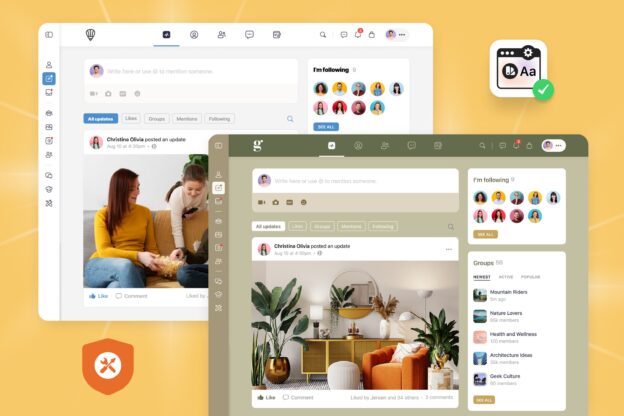
The BuddyBoss Theme Customizer allows you to edit everything from fonts to footers all within a visual, user-friendly dashboard. This means you can tweak your site’s design in real time without fear of breaking anything.
A Cost-Effective Alternative to Hiring Developers
Hiring a developer can cost hundreds or even thousands of dollars. By learning how to customize BuddyBoss platform yourself, you’re saving time, money, and gaining complete creative control.
Maintain Updates and Security Without Custom Code Conflicts
No-code customization means your site stays stable and secure with every WordPress or plugin update. Say goodbye to broken layouts and hello to peace of mind.
Our Comprehensive guide to install, configure and customize Buddyboss platform- Read Here
The beauty of working with the BuddyBoss platform is that you're never short on tools to bring your vision to life. Here’s some of them:-

Elementor is one of the most powerful page builders for WordPress, and it integrates beautifully with BuddyBoss.
Learn how BuddyBoss integrates with your favorite plugins and services- Read Here
BuddyBoss includes a powerful set of design tools out of the box.
Ready to roll up your sleeves and make your BuddyBoss platform truly yours? This section will walk you through the entire customization process from the basics to the advanced stuff. Whether you're just getting started or refining your community experience, each step is designed to help you unlock the full potential of BuddyBoss without touching a single line of code.
Now, once you’ve installed and updated your BuddyBoss theme you’ll move ahead to start your customization. But if you haven't, you can take help from this guide and do it now-Guide to install theme
Before diving into the creative part, it’s important to set the foundation.
Your community pages are the heart of the platform. Let them look and feel just right.
Member Profiles:
Group Pages:
Activity Feed:
Private Messaging:
If you’re offering courses via LearnDash, here’s how to make it shine.

LearnDash Integration:
Custom Course Pages:
Student Dashboards:
Quizzes and Lessons:
Want to Offer Courses on Your WordPress Site?
Buy Learndash | Integrate Learndash With BuddyBoss
For those looking to add polish and scale confidently.
Custom Templates:
Responsive Design:
Brand Consistency:
Performance Optimization:
Don’t Want to Spend Weeks Customizing Your BuddyBoss Platform? Our ready-made templates, widgets, and starter kits help you launch faster without sacrificing quality.
Design Best Practices
Common Customization Mistakes to Avoid
Even with the best tools and plugins, you might run into a few hiccups—but most issues can be resolved quickly with a few simple steps.
If your Elementor changes aren’t saving, start by clearing your browser and site cache, and check for plugin conflicts by disabling them one at a time. After updating WordPress or your theme, revisit the theme customizer, some design settings may need to be re-applied.
For mobile display glitches, use Elementor’s responsive editing panel to adjust padding, margins, or visibility settings for different devices. And if your site feels slow, tools like GTmetrix or PageSpeed Insights can help identify the problem and optimize your images, enable lazy loading, and use performance plugins like WP Rocket or LiteSpeed Cache to boost speed.
Once you've laid the foundation, it's time to take your customization to the next level and truly enhance your platform experience.
Start by running community surveys using tools like Typeform or Google Forms to gather feedback directly from your members, insights that can guide meaningful design improvements.
Consider implementing A/B testing with platforms like Split Hero or Nelio A/B Testing to experiment with different layouts, call-to-action buttons, and headlines to determine what engages your audience best.
To keep your community feeling lively and current, introduce seasonal themes, whether it’s festive banners, themed color palettes, or timely homepage updates.
And as your platform grows, focus on scalable design by creating reusable templates for new groups, courses, or landing pages, ensuring consistency while saving valuable time.
Can I Customize Buddyboss Platform Without Affecting Functionality?
Absolutely! Stick with visual builders like Elementor and tools like BuddyBuilder, and your changes remain securely stored in the page builder layer not in core code. Elementor, which fully supports BuddyBoss, lets you design pages visually without touching PHP or theme files. Similarly, BuddyBuilder works on top of BuddyBoss to let you customize community structures—profiles, groups, directories directly in Elementor . This way, your site stays functional and update-safe.
What Happens To My Customizations When Buddyboss Updates?
If you're using Elementor or the native theme customizer, your visual customizations remain intact. Since updates only affect the core theme files not your visual designs your edits like fonts, layouts, and color palettes remain untouched . Just remember to use Elementor revision history or settings backup plugins (such as the customizer export/import) to restore anything if needed.
Which Page Builder Works Best With Buddyboss?
Elementor is the top-recommended builder for BuddyBoss. It’s fully supported and integrates natively—right down to BuddyBoss-specific widgets making it a breeze to build member directories, activity feeds, group pages, and more visually.
Plus, the Element Pack add-on and BuddyBuilder take things further by providing specialized widgets and page templates for your community.
How Do I Ensure My Customizations Are Mobile‑friendly?
Elementor has built-in device previews and responsive controls. For every design, whether it's a button, layout section, or text block you can customize how it looks on desktop, tablet, and mobile. It’s simple to hide elements, adjust margins, and tweak font sizes to get everything looking polished across all screen types.
Can I Revert Changes If Something Goes Wrong?
Yes, absolutely. Elementor keeps track of all your edits with revision history, so you can roll back any change. Plus, if you use WordPress backup tools like UpdraftPlus, you can restore your entire site to a previous state if needed. This makes experimenting and customizing risk-free.
Customizing your BuddyBoss platform without coding is not only possible it’s fun, rewarding, and empowering. Whether you’re launching your first site or optimizing an established one, the tools available in 2025 make it easier than ever to create something unique.
Start small. Customize your homepage, tweak your member profiles, and explore templates. Before you know it, you’ll have a fully customized, beautifully branded community space that looks and feels like you.
🚀 Ready to build your dream community without code? Try BuddyBoss Now →
So, you've got this great idea, right? Maybe it's a cool template, an online course, or even some unique digital art. Turning that idea into something you can actually sell online can feel a bit like trying to build a spaceship with a screwdriver.
In fact, the global digital products market is projected to reach $331B by 2030, and creators are tapping in more than ever.
But honestly, it's not as hard as it seems, especially when you know about the right digital product creation tools. This article is all about helping you figure out what you need to get your digital goods out there and start making some money.
Key Takeaways
So, you're thinking about making and selling digital products? Awesome! It's a great way to share your knowledge and make some money. But before you jump in, let's talk about the basics. It's important to understand what digital products are, why they're cool, and how to find your niche.
Okay, first things first: what is a digital product? Basically, it's anything you can sell online that doesn't need to be physically shipped. Think ebooks, online courses, templates, music, or even graphics. The beauty of digital products is that you create them once and can sell them over and over again. Compared to physical products, there's no inventory to manage, no shipping costs, and a much wider reach. It's all about that passive income potential.
Digital products offer a fantastic opportunity to turn your skills and knowledge into a revenue stream. It's about identifying what you're good at and packaging it in a way that helps others.
Finding your niche is super important. You don't want to create a product that no one wants to buy! Here's how to find your sweet spot:
It's all about finding that intersection of your expertise and what people are willing to pay for. For example, if you're a skilled photographer and notice aspiring photographers struggling with editing, you might create Lightroom presets or editing tutorials.

Now comes the part where you actually make a digital product. Don't worry, you don't need to be a tech wizard. There are tons of tools out there to help you, no matter what kind of product you're creating. Let's break down some of the essentials.
Okay, first things first: what kind of content are we talking about? If you're writing an ebook, you'll need something different than if you're making a video course. For ebooks, good old word processors like Google Docs or Microsoft Word are solid choices. They're familiar, easy to use, and usually free or cheap.
If you're getting fancy, Scrivener is a popular option for writers because it helps you organize big projects. For video courses, you'll need screen recording software like OBS Studio (free!) or Camtasia (paid). And don't forget about editing software like DaVinci Resolve (also free!) to polish things up.
Visuals matter, even for things that aren't inherently visual. An ebook needs a cover, a course needs thumbnails, and everything needs branding. Canva is a lifesaver here. It's super easy to use, even if you're not a designer, and it has tons of templates.
If you're more advanced, Adobe Photoshop or Illustrator are the industry standards, but they have a steeper learning curve (and a higher price tag). Don't forget about stock photo sites like Unsplash or Pexels for free images, or paid options like Adobe Stock if you need something specific.
Want to make your product more engaging? Think about adding interactive elements! For courses, platforms like Teachable or Thinkific let you build quizzes, assignments, and discussion forums.
For ebooks, you could embed videos or interactive graphics. Even a simple PDF can be made more interactive with clickable links and a well-designed layout. The key is to think about how you can keep your audience engaged and make the learning experience more dynamic.

So, you've made something cool. Now, how do you actually sell it? Choosing the right platform is a big deal. It can affect everything from how much money you make to how much control you have over your brand. Let's break down some options.
Setting up your own e-commerce store gives you the most control. You get to decide how everything looks, feels, and works. This is great for branding and building a direct relationship with your customers. However, it also means you're responsible for everything – from website design to marketing.
Here are some popular options:
Shopify: A well-known platform with tons of apps and integrations. It's easy to use, but can get pricey as you scale. You can find many resources on selling digital products on Shopify.
Sellfy: Designed specifically for creators, Sellfy is user-friendly and offers built-in marketing tools. It's a good option if you want something simple and affordable. Sellfy offers essential features such as an effortless online store, product embedding, seamless PayPal/Stripe integration to ensure a smooth and secure experience.
WooCommerce: A WordPress plugin that turns your website into an e-commerce store. It's free, but you'll need to pay for hosting and other plugins. Some people find it a bit complicated.
Marketplaces offer a built-in audience, which can be a huge advantage, especially when you're just starting out. The downside? You'll likely face more competition and have less control over your branding. Marketplaces can be saturated and highly competitive.
Some popular marketplaces include:
Etsy: Great for selling handmade or vintage items, but also allows digital downloads. It has a large, active community of buyers.
Creative Market: Focuses on design assets like fonts, graphics, and templates. If you're a designer, this is a good place to start.
Amazon KDP: For digital products, Amazon KDP, Etsy, and Shopify seemed to be the best options as well.
Some platforms combine product creation and sales into one package. This can be super convenient if you want an all-in-one solution.
Examples include:
Gumroad: A simple platform for selling digital products directly to your audience. It's easy to use and doesn't require a lot of technical knowledge. Platforms like Gumroad and Payhip don’t require any upfront payment.
BuddyBoss: With BuddyBoss, you can build a complete course platform to deliver your content to learners in a structured, engaging way. It’s perfect for educators, coaches, and membership-based businesses. Beyond just courses, you can create private communities, discussion groups, member directories, and mobile apps—all under your own brand. BuddyBoss integrates smoothly with LearnDash, Elementor, and WooCommerce, giving you full control over the learning experience and monetization, without writing code.
Teachable: Focuses on online courses. It provides tools for creating and selling courses, as well as managing students.
Thinkific: Another platform for creating and selling online courses. It offers more advanced features than Teachable, but can also be more complex to use.
How do you get people to actually use your digital product? That's where marketing comes in. It's not enough to just have a great product; you need to make sure your target audience knows about it.
Think about who would benefit most from your tool. Are you targeting educators, designers, or small business owners?
Knowing your audience is half the battle. Once you know who they are, you can figure out where they hang out online and tailor your message to resonate with them.
Content Marketing: Create blog posts, tutorials, and case studies that showcase the value of your tool. Show, don't just tell.
SEO Optimization: Make sure your website and content are optimized for search engines so people can easily find you when they search for relevant keywords.
Email Marketing: Build an email list and send out regular newsletters with updates, tips, and special offers. Nurture those leads!
Provide value, be helpful, and show your audience that you care about their success.
Social media is a game-changer for marketing, but you have to use it strategically. Don't just spam your links everywhere. Instead, focus on building a presence on the platforms where your target audience spends their time. Share valuable content, engage with your followers, and run targeted ad campaigns to reach a wider audience.
Consider using platforms like Instagram, X, or even LinkedIn depending on your target demographic. Remember to use relevant hashtags to increase visibility. You can also run contests or giveaways to generate buzz and attract new followers. Social media is also great for passive income potential.
Building a community around your digital product creation tool is super important. A strong community can provide valuable feedback, help you improve your tool, and even become your biggest advocates.
Start a forum, a Facebook group, or a Discord server where users can ask questions, share tips, and connect with each other. Actively participate in the community, answer questions, and show that you value their input. Consider hosting regular webinars or online events to bring your community together and provide digital products training and support.

Okay, so you've got a great idea for a digital product. Now what? The key is to make the creation process as smooth as possible. This means setting up systems that help you produce content efficiently, without burning out. Think about it: the faster you can create, the more you can sell.
It's easy to get bogged down in the details, but remember the big picture. Focus on creating valuable content that solves a problem for your audience. Don't get lost in perfectionism.
Automation is your best friend when it comes to selling digital products. You don't want to be manually sending out ebooks or granting access to courses every time someone makes a purchase. Set up systems that handle this automatically. This frees up your time to focus on creating more products or marketing your existing ones.
Use an e-commerce platform that integrates with your email marketing software.
Set up automated email sequences to welcome new customers and provide support.
Use a tool like Zapier to connect different apps and automate tasks.
Creating and selling digital products isn't a one-time thing. You need to constantly be analyzing how your products are performing and gathering feedback from your customers. This will help you improve your products, create new ones that your audience actually wants, and ultimately, make more money.
Use analytics tools to track your sales, conversion rates, and website traffic, send out surveys to your customers to get their feedback on your products and read reviews and comments to see what people are saying about your products online.
So, you've put in the work, created amazing digital products, and now it's time to make some money! Let's talk about how to actually monetize those creations. It's not just about slapping a price tag on something; it's about strategy, understanding your audience, and finding the right approach to turn your hard work into a sustainable income stream.
Figuring out the right price is a balancing act. You want to make a profit, but you also don't want to scare away potential customers.
One common approach is value-based pricing, where you price your product based on the perceived value it offers to the customer. What problem does it solve? How much time or money does it save them? Another strategy is competitive pricing, where you look at what similar products are selling for and price yours accordingly. Don't be afraid to experiment with different price points to see what works best for your audience. Remember to factor in your costs, including any software subscriptions or marketing expenses.
Subscription models can provide a steady stream of income. Instead of selling individual products, you offer access to a collection of resources or ongoing content for a recurring fee. This works well for things like online courses, templates, or software tools. Bundling is another great way to increase sales. Offer a package deal where customers get multiple products at a discounted price. This encourages them to buy more and can increase your overall revenue.
Here's an example of how bundling could work:
| Product | Individual Price | Bundle Price (if bought together) |
| Ebook | $29 | |
| Template Pack | $49 | |
| Video Course | $99 | |
| Total (Separate) | $177 | $129 (Bundle) |
Use Case:- A designer selling a $49 template pack might bundle it with a $29 tutorial and $99 masterclass for $129 total — boosting both value and perceived savings.
Once you've got a handle on pricing and sales, it's time to think about scaling. This means finding ways to reach a larger audience and increase your revenue without significantly increasing your workload.
Consider automating some of your processes, such as email marketing or customer support. You could also explore partnerships with other creators or businesses to reach new markets.
Don't be afraid to reinvest some of your profits back into your business to fuel growth. For example, you could invest in better marketing, hire a virtual assistant, or develop new products.
Remember to keep an eye on your analytics to see what's working and what's not. This will help you make informed decisions about where to focus your efforts. Platforms like Gumroad can help you manage the sales process. Ultimately, scaling is about finding ways to work smarter, not harder, so you can continue to grow your digital product business and achieve your financial goals.
It's easy to get caught up in the excitement of creating and selling digital products. But, it's super important to think about how to protect your hard work. Nobody wants to see their creations stolen or copied without permission. Let's talk about some ways to keep your digital stuff safe.
Piracy is a real concern, especially when you're dealing with digital goods. One of the best defenses is to make it harder for people to steal your stuff in the first place. Think about it like locking your bike – it won't stop every thief, but it will deter most of them.
Here are a few things you can do:
It's impossible to completely eliminate piracy, but taking these steps can significantly reduce the risk. Think of it as an ongoing battle – you need to stay vigilant and adapt your strategies as needed.
Copyright is your friend. It automatically protects your original works as soon as you create them. But, understanding how it works is key. You can't protect something if you don't know your rights. It's also important to understand passive income potential and how copyright affects it.
Here's the deal:
Secure transactions are important for two reasons: protecting your customers and protecting yourself. If your customers don't feel safe buying from you, they won't. And, if your transactions aren't secure, you could be liable for fraud or other issues. It's important to use the best tools to create and sell digital products securely.
What you need to do:
So, there you have it. Making and selling digital stuff might seem like a lot at first, but it's really just about taking your ideas and putting them out there. You've got all these tools to help you, from making the actual product to getting it in front of people. Just pick something you know about, make it good, and don't be afraid to try. It's a pretty cool way to make some extra cash, or even build a whole business if you stick with it.
What Are Digital Products?
Digital products are things you can sell online that aren't physical. Think of them as electronic items like e-books, online classes, templates, or even special photos you can download. Unlike physical goods, you don't need to make them in a factory, ship them, or store them in a warehouse. This makes them much easier to create and sell to people all over the world.
How Do I Create My Very First Digital Product?
Making your first digital product might seem like a big task, but it's totally doable! Start by thinking about a problem you know how to solve or a skill you're really good at. For example, if you're great at designing, you could make templates for logos or business cards. Once you have an idea, gather the right tools (like software for design or writing) and spend time making your product the best it can be. Finally, pick a place online to sell it, like your own website or a special selling platform, and start telling people about it!
What Kinds Of Digital Products Can I Create And Sell?
The digital world is full of chances to create and sell all sorts of digital products. You could make and sell e-books, online courses, useful templates, how-to guides, stock photos, or even special spreadsheets. The key is to find something that people need or want and that you're good at making.
Can Selling Digital Products Really Make Me Money?
Selling digital products can be a great way to earn extra money, or it can even become your main job. Many creators start by selling digital items to add to their income, and some even build big businesses from it. It's a flexible way to use your skills and reach a wide audience.
What Are The Basic Steps To Create And Sell Digital Products?
To sell digital products, you need to do a few important things. First, figure out what people are looking for and if your product idea is a good fit. Then, set up a place to sell it online, like a simple online shop. After that, you'll want to tell people about your product, especially on social media, to attract customers.
How Can I Protect My Digital Products From Being Stolen?
Protecting your digital products means keeping them safe from being copied or used without your permission. This involves understanding things like copyright laws, which give you legal rights over your creations. You also need to make sure that when people buy your products, their payments are secure and their information is kept private.
Launching a membership site is exciting- but without a plan, it’s easy to hit costly roadblocks. From content gaps to retention fails, membership site mistakes can quietly chip away at your growth.
Knowing what these mistakes are beforehand can save you a lot of trouble. This article will go over some of the most frequent errors membership site owners run into, so you can try to avoid them and keep your site running smoothly.
Key Takeaways
One of the biggest membership site mistakes is neglecting the people who supported you before you launched. It's easy to focus on getting new members, but don't forget about the people who are already with you! These existing customers are your VIPs, and they deserve special treatment. Loyalty is hard to earn, so make sure you keep it.
Think about it: these members were with you before you even considered a membership model. They've been buying your stuff, using your services, and generally supporting you. A big change like switching to a membership can be jarring for them. They might not like the new system, or they might feel like they're not getting the same value as before.
Here's what you should do:
If you treat your existing customers right, they'll become your biggest advocates. They'll spread the word about your membership, and they'll help you attract even more new members.
It's super common for membership sites to kick things off with sweet deals to get people in the door. Makes sense, right? But here's where things can get tricky. After you've had some success, you'll probably raise your prices for new members. That's just part of growing. The problem? Some sites start treating those early members, the ones who got the lower price, like they're not as important as the new folks paying more. That's a bad move.
Those early birds took a chance on you when not many others would have. They deserve to keep their deal, and you should honor that. Think about it – they were there when you were just starting out. They believed in you. Don't make them regret it.
Here's a few ideas on how to keep those early birds happy:
One of the most damaging membership site mistakes is overlooking UX. User experience isn’t optional, it's the backbone of retention. A clunky interface, poor mobile view, or slow load time can drive away even your most excited new members. That’s why platforms like BuddyBoss prioritize seamless UX across devices.
If your membership site is clunky, confusing, or just plain annoying to use, people will leave. It's that simple. You could have the best content in the world, but if people can't easily access it, what's the point?
Prioritize a smooth, intuitive experience for your members.
Think about it from their perspective. What do they want to achieve when they log in? How can you make that process as easy and enjoyable as possible? Don't make them hunt for what they need. Don't bombard them with irrelevant information. Just make it easy to use.
Some things to keep in mind:
Site Navigation: Is it easy to find what you're looking for? Are the menus clear and logical?
Mobile Responsiveness: Does your site look and function well on phones and tablets? A lot of people will be accessing your site on mobile devices, so this is crucial.
Page Load Speed: Nobody likes waiting for a page to load. Optimize your site for speed to keep people engaged.
It's worth taking the time to review the UX mistakes that might be hindering your users.
It's easy to fall into the trap of creating content just for the sake of it. But if your members aren't finding it useful, they're not going to stick around. Relevance is key. You need to make sure that what you're putting out there actually addresses their needs and interests. Think about it – would you pay for something that doesn't help you?
Conduct regular surveys to understand what your members want. Analyze website data to see which content performs best and engage in community discussions to identify pain points and interests.
It's also important to remember that relevance can change over time. What was important to your members a year ago might not be as important now. That's why it's crucial to stay updated and adapt your content strategy accordingly.
Don't be afraid to experiment with new formats or topics, but always keep your audience's needs in mind. If you want to maintain and grow your membership site, you need to build and distribute great content that your members find valuable. Think of your core content pillars as a starting point, and then branch out from there. This will help you create a cohesive narrative and keep your members engaged.
One of the biggest mistakes I see is membership sites that never add anything new. It's like opening a restaurant and never changing the menu. People get bored! If members are paying monthly, they expect fresh stuff regularly. It doesn't have to be a complete overhaul every week, but a steady stream of new content keeps things interesting and shows you're still invested in providing value.
Think about it: would you keep paying for something that never changes? Probably not. So, keep those updates coming!
Keep it coming: Members expect new content. It's part of the deal.
Mix it up: Don't just add more of the same. Try different formats, topics, or perspectives.
Listen to your members: What are they asking for? What problems do they have? Use their feedback to guide your content creation. This is how you create a content strategy for your membership site.
It's easy to get caught up in the day-to-day of running a membership site, but don't let content creation fall by the wayside. Set aside time each week or month to plan and create new material. Your members will thank you for it.
And if you're struggling to find the time to create that steady stream of new material, leverage the right tools! In WordPress, you can use the AIOSEO AI Assistant to quickly generate fresh blog posts and ideas from simple text prompts in seconds.
One of the most overlooked membership site mistakes is putting all your energy into acquisition. Retention is where real success lies. It's easy to get caught up in the excitement of acquiring new members, but don't forget about the people who are already supporting you! Keeping your current members happy is just as important, if not more so, than attracting new ones.
Think of it this way: it's often cheaper and easier to retain an existing member than to acquire a new one. Plus, happy members are more likely to recommend your site to others, acting as organic promoters.
Neglecting retention is like constantly filling a bucket with a hole in the bottom. You're putting in effort, but you're not seeing the full results. Focus on plugging that hole!
Without strong retention, you’re constantly pouring water into a leaky bucket new members in, churned members out. A great membership model plugs the leak first.
A few things to keep in mind-
Engagement is Key: Keep your members engaged with fresh content, interactive features, and a sense of community. Decreasing engagement builds a community around your membership site.
Listen to Feedback: Pay attention to what your members are saying. What do they like? What do they dislike? Use their feedback to improve your site and make it more valuable to them.
Offer Incentives: Reward loyal members with exclusive content, discounts, or other perks. This shows them that you appreciate their continued support.
It's also a good idea to understand why members are leaving. An exit survey can provide valuable insights into areas where you can improve. Don't be afraid to ask for honest feedback – it's a chance to learn and grow.
One of the biggest mistakes you can make with a membership site is not listening to your community. Your members are your best source of information. It's easy to get caught up in your own ideas, but you need to pay attention to what your members are saying, what they need, and what they want.
Some of the best product decisions I’ve seen came from watching what people ask in support chats or post on community forums.
Your content will only be successful if it delivers what people want. Instead of guessing, ask them! Doing an exit survey and understanding why members are opting out can help you improve your strategies and retain more business.
Here are a few ways to keep your eyes and ears open :- Ask your members what they think. Use surveys, polls, and open-ended questions to gather their thoughts.
See what people are saying about your membership site on social media. This can give you valuable insights into their experiences.
Pay attention to support requests. The questions and issues that members raise in support requests can highlight areas where you need to improve.
Don't take it personally when someone cancels. Instead, see it as an opportunity to learn and improve.
What could you have done differently to keep them engaged? What are their pain points? Use this information to make your membership site even better.
It won’t take long to find the right balance. Test out a few strategies and stick to those that get the best results. Doing so will strengthen your customer base and build trust and loyalty to keep you going for the long haul.
Okay, so you've built this awesome membership site, people are signing up, and you're feeling pretty good. But here's the thing: if you don't have a solid content strategy, that feeling might not last. It's like throwing a party without planning any games or music – people will get bored and leave.
I made this mistake myself once while launching a content plan and learned the hard way why structure matters. A content strategy is your roadmap for keeping members engaged and coming back for more.
Members are paying for access to something valuable, and that usually means content. If you're just winging it, you'll quickly run out of ideas, the quality will drop, and members will start wondering why they're paying you every month. It's happened to me before when I tried to launch a social media strategy without a plan. Big mistake.
Here's what can happen without a content strategy:
So, take the time to develop a content strategy. It'll save you a lot of headaches in the long run and help you build and distribute great content that keeps your members happy and engaged.
It's tempting to constantly tweak and adjust your membership site, especially as you learn more and see what others are doing. But sometimes, the urge to innovate can backfire. But staying mindful of these common membership site mistakes can save you stress and keep your platform thriving.
Moreover, Ditching the core elements that made your membership successful in the first place is a big no-no. After all, those are the things that attracted your initial members and built your community.
You started with a specific value proposition. If you change it too much, you risk alienating the people who signed up for that original promise. It's like a band completely changing their sound – some fans will love it, but others will feel betrayed.
Do remember these things:
Don't abandon your core values: Remember why people joined in the first place. What problem were you solving? What unique value were you offering? Don't lose sight of that.
Small changes are better: If you need to make adjustments, roll them out gradually. This gives your members time to adapt and provides you with valuable feedback.
Listen to your audience: Regularly survey your members and pay attention to their comments and suggestions. They'll tell you what they want and what they don't want.
It's a balancing act. You want to keep things fresh and engaging, but you also want to stay true to your original vision. Don't be afraid to experiment, but always remember what made your membership website ideas successful in the first place.
It's easy to fall into the trap of feeling a bit miffed at those early members who are paying less than what you charge now. Maybe you've raised your prices since they joined, or they snagged a sweet deal during your launch. It's natural to think, “Hey, they're getting the same stuff for less!” I get it, I really do.
But the thing is that those members took a chance on you when you were just starting out. They believed in your vision before it was fully formed. They helped you get off the ground. They deserve that lower price. Seriously.
Instead of trying to squeeze more money out of them, think about how you can show them some love. These are the people who've been with you through thick and thin. They're your OGs. Don't make them regret their early support. It's important to remember that long-standing members are valuable assets to your community.
Here are a few ideas to show your appreciation:- Give them exclusive content or bonuses, offer them a special discount on other products or services or simply send them a heartfelt thank-you note. It goes a long way.
So, we've talked about a bunch of common slip-ups membership site owners make. It's easy to get caught up in the day-to-day and miss some of these things. But if you keep these points in mind, you're already way ahead of the game. Just remember to keep learning, keep an eye on what your members need, and don't be afraid to change things up when you need to. You got this!
Why Should I Care About My Current Customers When Starting A Membership Site?
Making sure your current customers feel special is super important. They're already with you, so treat them like VIPs. Keep them in the loop about changes, answer their questions, and make them feel like a valuable part of your community.
Is It Okay To Offer Special Deals When I First Launch My Membership Site?
It's common to offer low prices at the start to get people to join. But don't forget about those early members once your site grows. Keep giving them great value so they feel appreciated for joining you from the beginning.
How Important Is The Website's Design And How Easy It Is To Use?
Yes, user experience is key! Your website needs to be easy to use and enjoyable. If pages load slowly, information is messy, or the site is hard to navigate, people will leave. A good website makes members want to stick around.
What Kind Of Content Should I Provide To My Members?
If you're asking people to pay for content, it has to be really good and useful. Don't just make a lot of content; make sure it actually helps your members. If your content isn't top-notch, new members might not join, or existing ones might leave.
Do I Need To Keep Adding New Content After My Site Is Up And Running?
Membership sites aren't a ‘set it and forget it' kind of thing. You need to keep adding new content regularly. Members pay you every month, so they expect fresh, valuable stuff. If you don't update, they might feel like they're not getting their money's worth.
Should I Focus More On Getting New Members Or Keeping The Ones I Have?
It's easy to focus only on getting new members, but keeping your current members happy is just as important. A successful membership site is built on a strong community and members who stay for a long time. So, make sure you're always giving value to those who are already with you.
A lot of creators use Facebook Groups to connect with their audience. It seems easy, right? You just make a group, and people join. But for serious educators, these groups often fall short. They don't really have the tools you need, and it can be hard to stand out.
If you're trying to teach and build a real community, you might find that Facebook isn't quite enough. This article will explain why a dedicated community platform for educators is a better choice for those looking to make a lasting impact.
Key Takeaways
Note:- As of 2024, Facebook's average group engagement rate dropped by 35% year-over-year (Source: Social Media Today), and educators worldwide are voicing their frustrations in creator forums and support threads.
Facebook Groups can seem like a natural fit for educators looking to build a community. They're free, easy to set up, and most people already have a Facebook account. However, when it comes to creating a robust and effective learning environment, Facebook Groups often fall short. Let’s explore why a community platform for educators is a smarter investment.
Facebook Groups are designed for general social interaction, not specifically for education. This means educators have to MacGyver solutions for things that should be built-in. For example:
A community platform for educators offers these features by default, removing friction and streamlining the learning process for both instructors and students.
One of the biggest challenges with using Facebook Groups for education is the constant stream of distractions. Students are bombarded with notifications, updates from friends, and other irrelevant content.
It's hard to stay focused on learning when cat videos and political debates are just a click away. This is why understanding Facebook Community Standards is so important.
In contrast, a dedicated community platform for educators offers a focused environment that keeps learners engaged and on track—without the noise of the social media scroll.
While Facebook offers some moderation tools, educators have limited control over the overall environment. It's difficult to prevent spam, manage trolls, or ensure that discussions stay on topic.
Plus, Facebook ultimately owns the platform, meaning they can change the rules or shut down your group at any time. This lack of ownership and control can be a major concern for educators who want to build a sustainable and reliable learning community. You're essentially building your house on someone else's land.

Facebook Groups are okay for casual interactions, but if you're serious about your educational content, you need something more robust. It's about creating a space where you're not just another voice in the crowd, but the authority in your niche. Let's explore why a dedicated platform is a game-changer.
Think about it: Facebook is designed to keep people scrolling. A dedicated platform lets you foster genuine connections with your audience. It's not just about likes and comments; it's about building relationships.
You can create focused discussions, offer personalized support, and really get to know your members. This kind of engagement is hard to replicate in the noise of Facebook. Responding to members' posts and input is a great way to build trust and rapport.
Relying solely on Facebook ads for income? There are better ways! A dedicated platform opens doors to various monetization strategies. Think about offering premium content, exclusive courses, or membership tiers.
You can directly sell your knowledge and skills without Facebook taking a cut. This gives you more control over your income and lets you build a sustainable business around your educational content.
Your Facebook Group lives on Facebook's turf. They control the rules, the algorithm, and ultimately, your reach. With a dedicated platform, you own your space. It's your brand, your rules, and your community. This gives you long-term stability and lets you grow your audience without worrying about algorithm changes or platform restrictions.
Facebook Groups are okay, but if you're serious about teaching online, you need something more robust. A dedicated platform can offer features that Facebook simply can't match. Let's look at what makes a community platform truly ideal for educators.
The platform should allow you to organize your content in a way that promotes effective learning. Think beyond just a simple feed of posts. You need the ability to create modules, lessons, and resources that are easy for students to navigate. This might include:
Keeping your community safe and productive is key. You need tools to manage members, moderate discussions, and prevent spam or inappropriate content. This includes:
An ideal platform should have built-in tools to help you create and share different types of content. This could include video hosting, live streaming, and the ability to embed content from other sources. Integrated tools make it easier to:
What if your content, your courses, and your community lived in one place? Create a Unified Learning Experience with BuddyBoss
Facebook Groups are a good starting point, but they don't offer everything you need to build a thriving, professional learning community. It's time to think bigger and move beyond basic social networking to create something truly impactful.
A dedicated platform allows you to cultivate a professional learning network (PLN) that goes beyond casual interactions. Think of it as a space where educators can connect, collaborate, and learn from each other in a structured and meaningful way.
While Facebook Groups might offer limited monetization options, a dedicated platform opens doors to various income streams. You can offer premium content, courses, or membership tiers to generate revenue and sustain your community. Diversifying your income is key to long-term success.
On Facebook, your content is subject to their terms of service, and it can be difficult to protect your intellectual property. A dedicated platform gives you more control over your content and how it's used. You can set clear guidelines for usage and protect your work from unauthorized distribution. Think of it as securing your digital assets.
Consider these points:
Facebook groups can be okay, but when you're serious about education, a niche-specific community is where it's at. It's like the difference between shouting into a crowd and having a conversation with people who actually care about what you're saying. Let's break down why focusing on a specific niche is so important.
Niche communities allow for laser-focused engagement. You're not just throwing content out there and hoping someone bites. You're talking directly to people who are already interested in what you have to say. Think of it like this: if you're teaching advanced calculus, you don't want to be in a group for general math enthusiasts. You want the group full of people who are ready to tackle integrals and derivatives. This means your content is more relevant, and people are more likely to participate. It's about quality over quantity, every time. Niche communities foster customer engagement by creating a space where members feel understood and valued.
In a huge Facebook group, your voice can easily get lost in the noise. Everyone's vying for attention, and it's hard to stand out. But in a niche community? You're a bigger fish in a smaller pond. This means less competition for attention and increased visibility for your content. It's easier to establish yourself as an authority and build a following when you're not constantly fighting for eyeballs. Plus, people are more likely to remember you when you're one of the few experts in a specific area.
One of the biggest advantages of a niche community is the ability to provide tailored resources and support. You know exactly what your audience needs, so you can create content and resources that are specifically designed to help them. This could include:
By focusing on a specific niche, you can create a community that truly meets the needs of its members. This leads to higher engagement, greater satisfaction, and ultimately, better learning outcomes.
It's easy to think of online communities as just places to chat, but for educators, they're much more. They're an investment in your brand and future. Let's look at why.
Think about it: a Facebook group is fleeting. People come and go. A dedicated platform lets you build real relationships. It's about more than just answering questions; it's about creating a loyal following. These relationships translate into repeat students, referrals, and a stronger reputation. It's like planting seeds that grow over time.
On Facebook, your content is mixed in with everything else. A dedicated platform lets you control the narrative. You can organize your materials, highlight student successes, and really show what you're good at. It's your digital stage to shine. It's about presenting yourself as the go-to person in your field.
With a flexible community platform for educators, you can scale from a single course to a full academy without rebuilding everything from scratch. Think courses, workshops, or even membership tiers. It's much easier to manage and monetize these things when you have your own space. It's about creating a sustainable business model that grows with your audience.
It's a big step, moving your community from a familiar place like Facebook to a platform that's all your own. It can feel daunting, but the long-term benefits are worth it. Think of it as upgrading from a shared apartment to owning your own house. It takes work, but you have way more control and can build something lasting.
Moving your community doesn't happen overnight. You need a plan. Start by announcing the move well in advance. Explain why you're doing it – highlight the benefits of the new platform, like better organization, fewer distractions, and more ways to connect.
Offer incentives for people to join you on the new platform, such as exclusive content or early access to new material. Promote the new community consistently on your Facebook group, and make it easy for members to find and join you.
Consider running both communities in parallel for a short time to allow everyone to transition smoothly. Don't forget to actively engage on both platforms during the transition period to answer questions and address any concerns.
Your new platform needs to be ready to welcome your community. This means setting up the structure, defining the rules, and creating a welcoming atmosphere. Think about how you want your community to be organized.
Will you have different channels for different topics?
What kind of content will you feature?
Make sure the platform is easy to navigate and that members can easily find what they're looking for. Establish clear guidelines for behavior and moderation to ensure a positive and respectful environment.
A well-organized and welcoming space will encourage members to participate and build connections. Consider using a community platform for educators like BuddyBoss to help you get started.
It's not enough to just tell your members you're moving; you need to sell them on the idea. Explain the advantages of the new platform in a way that resonates with them.
Focus on how it will improve their learning experience, help them connect with other educators, and give them access to resources they can't find anywhere else.
Be transparent about the reasons for the move and address any concerns they may have. Highlight the features that are most relevant to them, such as the ability to ask questions, share resources, and collaborate on projects. Show them how the new platform will help them achieve their goals and become better educators.
So, we've talked a lot about Facebook groups and how they can be pretty good for getting your stuff out there. They're free, they let you connect with people who like the same things, and you can even get some good ideas from them.
But here's the thing: if you're really serious about what you do, just relying on Facebook groups isn't going to cut it. They're a nice starting point, a place to dip your toes in, but they're not the whole picture. Think of them as one tool in your toolbox, not the whole toolbox itself. To really make a mark and build something lasting, you'll need to look beyond just Facebook and try BuddyBoss the OG community platform for educators.
What Is A Facebook Group?
Facebook groups are online spots where people who like the same things can hang out. They're usually about a certain topic, like travel or writing. Some groups have special days for sharing posts or asking for help. Others are more relaxed, just for chatting with folks who have similar interests.
How Do You Make A Facebook Group?
Creating a group on Facebook is pretty simple. Just go to the left side of your Facebook page, click on “Groups,” then click “+ Create new group.” Give your group a name, like “Tech Fans,” and pick if you want it to be public or private.
Why Should I Create A Facebook Group?
Facebook groups are a good way to share what you do and build a loyal following without directly selling. If you have a business, you can make groups about topics related to what you offer. For example, if you sell pet food, you could make groups about dog grooming or different dog breeds. You can share helpful tips, and people will start to look to you for advice.
What's The Best Way To Act In A Facebook Group?
It's super important to be active and helpful in the groups you join. Don't just pop in, share your stuff, and leave. Try to answer questions, offer advice, and be a real part of the community. People notice when you're genuinely trying to help.
How Do I Find Good Facebook Groups?
When you're looking for groups, try to find ones where people actually talk and help each other, not just promote their own things. Some groups have lots of self-promotion, which isn't very useful. Look for places where conversations happen and members support each other.
How Many Facebook Groups Should I Join?
You don't want to join too many groups because it can get overwhelming. Pick about 3 to 5 groups where you can really be active and keep up with what's going on. This way, you can show up regularly and offer help without spending all your time on Facebook.
Lots of businesses are finding new ways to connect with their customers. One popular method is creating what are called “paid communities.” These are places where people pay to join, usually to get special content, connect with others who have similar interests, or get support. It's a smart way for companies to build a loyal group of followers and make some money at the same time. This article will show you 8 real-world examples of successful paid communities and what makes them work.
Key Takeaways

Sephora's Beauty Insider Community is a really cool example of how to do community marketing right. I mean, who doesn't love Sephora? They've got everything, and now they've got this awesome online space where beauty lovers can connect.
But what makes Sephora a great example of a paid community is that they don’t focus on just selling products but building a real community.
Sephora’s Beauty Insider program has over 25 million members (Forbes), showcasing the scale of their community-driven approach.
Think of it as a giant online beauty chat room, but way more organized and helpful. People share tips, post reviews, and basically just geek out about makeup and skincare. It's a smart move because it keeps customers engaged and coming back for more.
Plus, all that user-generated content? Goldmine for Sephora. They get tons of feedback and ideas straight from their target audience. It's like having a built-in focus group that's actually excited to participate.
I think the best part is that it feels genuine. It's not just Sephora pushing products; it's real people sharing their experiences and helping each other out. That's what makes it so effective. It builds trust and loyalty, which is huge in the beauty industry.
Here's a few things that make it work:
Sephora's marketing strategy is all about building community, and this is a prime example of that in action. It's a win-win for everyone involved.

Duolingo. We all know it, right? That little green owl pestering you to practice your Spanish at 11 PM? But seriously, it's a fantastic example of how to build a successful community around learning.
Duolingo uses gamification, personalization, and social features to make learning fun and effective. Users can choose from over 30 languages, set their own goals, earn points and badges, compete with other learners, and join clubs and forums.
Duolingo also leverages its community to create and improve its courses, by allowing users to contribute translations, suggest corrections, and vote for the best answers. They have built a loyal and active community of over 300 million users, who spend an average of 10 minutes per day on the app.
In 2024, Duolingo reported $531M in annual revenue — much of it from subscriptions (Source: Duolingo Investor Reports).
Duolingo shows how to use gamification, personalization, and social features to motivate and retain your community members, as well as to crowdsource content and feedback.
So far, Duolingo has become a leader and innovator in the field of language education and technology.
They generate revenue, retention, and referrals by offering a freemium model that allows users to access more features and content by paying a subscription fee or watching ads. They've created a loyal and engaged community of learners who share their progress, achievements, and feedback with others.

Salesforce Trailhead isn't exactly a paid community in the traditional sense, but hear me out. It's a brilliant example of how a company can build a thriving community around its product, which can indirectly lead to increased sales and customer loyalty. And that's what we're all about, right?
Trailhead is basically Salesforce's free online learning platform. It's packed with modules and projects that teach you everything you need to know about using Salesforce.
Users can connect with each other, ask questions, share their knowledge, and even earn badges and points for completing courses.
Salesforce is a complex platform. By providing a free, engaging, and gamified learning experience, they've created a space where users can support each other, learn from each other, and become invested in the Salesforce ecosystem.
This investment translates into increased product adoption, higher customer retention, and a pool of skilled professionals who are more likely to recommend Salesforce to others.
It's a smart move. By investing in their users' success, Salesforce has created a powerful marketing tool that drives growth and strengthens its brand. It's a win-win for everyone involved.
So, while you might not be able to directly replicate Trailhead's model (unless you're also a massive software company), the underlying principles are applicable to any business.
Create a space where your customers can connect, learn, and grow, and you'll be well on your way to building a successful community that benefits both your customers and your bottom line.

Reddit is like the internet's giant, chaotic town square, right? But within that chaos, there are these amazing little neighborhoods called subreddits. And guess what? You can actually advertise directly to those neighborhoods.
It's like putting up a billboard, but instead of hoping random people see it, you're putting it right in front of the people most likely to care.
For example, if you're selling gaming headsets, why not advertise in r/gaming? Or if you've got a new line of organic dog treats, r/dogs is your spot. It's all about finding your niche and speaking directly to them. This targeted approach can seriously boost your ad's effectiveness.
Reddit's advertising platform lets you get super specific with your targeting. You can choose which subreddits to show your ads in, and even target based on interests, location, and device. It's pretty powerful stuff.
Reddit’s subreddits act as micro-communities and brands are tapping into them via sponsored posts and community engagement.
Instead of blasting ads everywhere, businesses focus on niche groups like r/dogs or r/marketing, where they run AMAs, share offers, or build presence.
Reframed for paid community value:
Plus, because Reddit is all about community, ads that feel authentic and relevant tend to do way better than generic, sales-y ones. You really need to understand the culture of the subreddit you're advertising in.
Don't be that brand that comes in and just shouts about their product – participate, engage, and be a part of the community. Think of it as a community PPC.
Here's a few things to keep in mind:
To get started with Reddit ad examples, you'll need to create an account and familiarize yourself with their advertising platform. It might seem a little intimidating at first, but once you get the hang of it, it's a really effective way to reach a highly engaged audience.
Another example of paid communities is Facebook groups. We all know them, we're probably all in a few (or a lot). But have you ever thought about how powerful they can be for something like real estate? I mean, think about it – everyone wants to know what's happening in their neighborhood, right?
Local Facebook groups are goldmines for real estate agents. They're already filled with people interested in the area, whether they're looking to buy, sell, or just stay informed. It's way more targeted than just throwing up a generic ad and hoping for the best.

Here's the thing: you can't just barge in and start spamming listings. Nobody likes that. It's all about being a part of the community, offering real estate insights, and building trust. Share local news, answer questions about the area, and then sprinkle in your listings when it makes sense.
Here's a few ideas to get you started:
Read More:- Why Facebook Groups Aren’t Enough for Serious Creators

LinkedIn groups, you know, they're like the online version of those industry mixers, but without the awkward small talk over stale crackers. It's where professionals hang out, share stuff, and chat about what's new. For businesses, it's a goldmine for targeted advertising.
Here’s an example of it:- a software company wants to get the word out about their new project management tool. Instead of blasting ads everywhere, they join LinkedIn groups full of software developers, project managers, and agile enthusiasts.
They share helpful articles, case studies, and maybe even a funny meme or two (gotta keep it real, right?). By subtly showing how their tool can make life easier, they attract leads and get more people signing up.
Instagram might not be the first place you think of when you hear “community,” but hear me out. Influencer marketing is all about tapping into existing communities. Brands team up with influencers whose followers already match their target audience. It's like going to someone else's party to introduce yourself to their friends.

Here's a simple example:
Imagine a new brand of organic dog treats. They could partner with an Instagram influencer who focuses on pet care and healthy dog lifestyles. The influencer posts pictures of their own dog enjoying the treats, talks about the ingredients, and shares a discount code. Boom! Instant access to a community of dog lovers who trust that influencer's recommendations.
Things to keep in mind:
I've used Meetup.com a bunch to find local groups, and it's pretty cool. You can find anything from hiking clubs to tech meetups. But did you know businesses can actually sponsor these events? It's a smart way to get your name out there.

If you're sponsoring an event full of people who are already interested in what you're doing. It's like shooting fish in a barrel, but in a good way. Sponsoring Meetup.com events provides access to an engaged audience, with engagement levels peaking during active event participation.
How it could work:
Just make sure you're offering something that's actually useful or interesting to the attendees. Nobody likes a blatant sales pitch, so keep it cool and focus on building relationships.
So, there you have it! We've looked at a bunch of real-life examples, and it's pretty clear that paid communities are more than just a passing trend. They're a way for people to connect over shared interests, learn new things, and really feel like they belong somewhere.
Whether it's for business, a hobby, or just plain fun, these communities show us that when you bring people together around something they care about, good things happen. It's all about building a community where folks feel heard, supported, and excited to be a part of something bigger. Pretty cool, right?
What Exactly Is A “Paid Community”?
A paid community is a group of people who pay to be part of a special online space. They often get cool stuff like special content, direct access to experts, or a chance to talk with others who have the same interests. It's like a club you pay to join for extra benefits.
Why Do Businesses Bother Making Paid Communities?
Companies create these communities to give their best customers more value and to build a strong group of fans. It helps them make more money, keep customers happy, and get good ideas from the people who use their products or services most.
Are There Real Examples Of Successful Paid Communities?
Yes, totally! Think about places like Sephora's Beauty Insider Community, where makeup lovers share tips, or Duolingo, where language learners help each other out. Even big companies like Salesforce have special learning groups. These all show how well paid communities can work.
What Kind Of Perks Do Members Get In These Communities?
It depends on what the community is about. Some might offer special lessons, like Salesforce Trailhead. Others might give you early access to new products or discounts. Some are just great places to chat and get advice from people who know a lot about a certain topic.
What Makes A Paid Community Really Good?
Building a successful paid community means making sure people feel like they belong and get real value for their money. You need good leaders, interesting things to talk about, and reasons for people to keep coming back. It's all about making it a fun and helpful place.
Which Types Of Businesses Can Benefit From A Paid Community?
Many different kinds of businesses can use paid communities. This includes companies that sell things online, places that teach you new skills, and even groups that bring together people with special hobbies. If you have customers who love what you do, a paid community could be a great fit.
How Do Companies Keep People Interested In A Paid Community?
It's not just about getting people to pay. You also need to keep them interested. This means regularly adding new things, listening to what members want, and making sure everyone feels welcome. Happy members will stick around and even tell their friends.
What Are The Main Benefits For A Business That Creates A Paid Community?
Starting a paid community can help a business in many ways. It can make customers more loyal, bring in new sales, and even help the company understand what its customers really want. It's a smart way to grow and build stronger connections.
👉 Want to see how BuddyBoss helps creators launch scalable paid communities? Try our Community Sandbox for free.