
BWhen you’re building a membership site or a subscription program, there is a lot to take on board.
From planning your membership offer, to building a solid and secure site platform, you might be feeling swamped.
But there is one thing that you can’t ignore: your site is nothing without people.
To entice members you need to build a buzz about your unique, not-available-elsewhere, quality content.
And the way to do that is with a good content marketing strategy.
Content marketing can do three important things for your membership site:
You need a reliable content strategy framework, to guide you through the options and help you make some decisions.
So here it is. A detailed look at the world of content marketing: what you should create; how you should share it; and how to be patient enough to see the results of your hard work.
And, all the while, you need to keep an eye on maintaining a balance between content that is available for free alongside the wealth of information you can only get by subscribing.

Let’s start off with a couple of definitions…
“Content” – that describes the blogs, emails, whitepapers, videos, landing pages, social media posts or anything else that you create to help build out your site and get yourself known in the world.
“Content marketing” – that’s how you distribute that content to promote your site.
And yes, we realise that content marketing is sharing content to – essentially – sell content. It works – stick with us!
Here are a few facts about content marketing, that we know to be true:
Yes. Yes, you need to be doing it!
Every membership or subscription site owner needs to plan how they will draw people to their site, have them sign up, and keep them coming back for more.
And a content marketing strategy is the way you get that whole process right.
Planning your content marketing means you create and share with purpose – and with a deliberate goal in mind.
In fact, here’s one more definition for you:
“Top of mind awareness” – that’s when your members, and potential members, think of your site first when they think of your particular specialism. That’s when you have got your content strategy just right: when you’re the leading voice.
To guide your thinking, you should answer a few helpful questions:
Once you’ve worked through that lot, you’ll be able to decide what kind of content you need – and want – to create.
You should play to your strengths: what can you create easily, and regularly, that your audience will value? The key will be consistency, and variety.
There is an amazingly comprehensive list of content formats here – but to break it down into categories, you should consider the following:
Let’s dive a little deeper into some of those, so you can consider what will work best for your site.

Blog posts or articles. Ripe for SEO, your blogs should be ambassadors for your brand, your site and – well – you as the expert. Alongside using relevant keywords (use Google’s Keyword Planner to find out which are the most searched-for terms), your content should be engaging, brilliantly-written, and provide a direct answer to a given question. You can spend hours delving into the world of SEO, but those are the key elements to creating a blog post that does the hard work for you. How-to articles, listicles (“5 top ways to…”) and expert viewpoints are all good topics to consider. Link to articles and resources that are a natural next step – and which require a subscription.
eBooks, white papers and case studies. If you can show potential or existing members how useable and beneficial your membership site has already been to other members, then you will have them intrigued. Use your experience to share thought-prompts, industry insights and reference guides so that your audience gains something they really value. Then make sure they understand that there is much more like this when they become a member. All of these materials come with an added bonus that you can ask non-members for an email address, as the admission price for downloading your free resource.
Infographics. Use your expertise to explain an otherwise-complex subject in an impactful, visual way. You save time in creating the materials; your reader saves time in understanding the issue. Everyone wins. And if they want more information, or to connect with a community of their peers, then they can sign up as a member for real depth and breadth.
Videos. They come in all shapes and sizes. A Facebook Live is a video. A YouTube vlog is a video. A quick promo created on a smart, freely-available video creator tool is, of course, a video. All are endlessly shareable. Just make sure you have what it takes: appealing graphics, an engaging voice over or music, and of course subtitles so they are accessible to all. What you put in your videos is up to you: just make sure it’s something your potential members can’t get elsewhere. They’ll likely share it, and boost your audience. Want access to monthly Q&As with the experts featured in the video? Sign up to the membership site.
Podcasts. A podcast is another little ambassador for your site. You can reach audiences that don’t necessarily read longer articles or white papers, but who might really benefit from being part of a thriving community such as yours. Podcasts are huge – creating one shows you’re forward-thinking and have a broad reach. You can work with partners to sponsor your podcast, since listeners expect to hear adverts. Whilst you’re at it, spend a few minutes each time highlighting a different aspect of your site.

Did you see what we did? Each one of those content offerings came with an example of how to share something for free, and then to entice the potential member to engage further with the site.
Providing value for existing members, and enticing new members to subscribe.
Everything you do with content marketing is with one aim: driving membership volume.
Make your paid-for offering irresistible by demonstrating just how much better life is as a member.

You’ll want to make sure you extract every single crumb of value out of each different piece of content. That means you need to do two things:
Sharing your content is as important as any other part of your content strategy. You should build up followers on social media who are not only subscribers or potential members, but who are likely to share your content with other potential members. That means you need to be clever about what you post: spend your time creating content that is specific and targeted to your audience’s needs and anticipate what you can do to help them.
The “sharing” part of your content strategy should cover:
Just because you’ve created the content in one format, it doesn’t mean the work is done. How can you take that video and share it as an SEO-ready blog post? Can you interview the expert again, about a different topic, in your podcast? Which quotes and soundbites can you use to share on Twitter or Instagram?
You get the idea. One piece of content can stretch out across multiple formats to reach as many potential members as possible.
Even better, you can use content that you have already created for the members-only subscription.
If that doesn’t make sense, then that’s understandable – you can’t give away something others have to pay for, after all.
And while that’s true, you can entice members to sign up and access the rest by presenting, for free, a small chunk of the course.
That won’t diminish the value of being a member in any way – simply act as a call to action.
Anyone with a membership site should be able to see the benefit of planning a comprehensive content strategy.
There are, certainly, many things to balance: free v paid content; spoken v written; downloads v SEO content.
It’s true that there are a lot of bases to cover.
But then again – being thoughtful about your unique offer, and being considerate of your members’ needs, means you are targeting the right people with resources that should move them from interested followers to active subscribers.
Don’t forget that an entire industry exists solely to create this content on your behalf.
If you don’t think you have the time or abilities to create what you need then you can always outsource.
Use analytics to track your success rates – if your followers are engaging more with a particular format, consider how you can adapt your plan to appeal in a similar way.
Remember that all of this takes time.
It’s an iterative process of finding out what works, repeating it, and waiting for members to come to you whilst you do your best to reach out to them in the right ways.
Ready to plan your content marketing strategy? Start answering those questions – and don’t forget to plan ahead, and reuse/repurpose what you have already created!
Here's the thing we're not supposed to tell you: a lot of “gurus” out there want BIG bucks to sell you search engine optimization (SEO) secrets.
But there's a lot of misinformation out there. Unscrupulous webpreneurs taking advantage of the murky details around SEO will take you for a ride if you don't get to know a bit about these practices for yourself.
If you’re just starting out with your membership site, you may be wondering how you are going to drive traffic to your site.
Even if you’re well established, there may be plenty of tricks you can apply within your content and meta-content to increase the number of people seeing your products.
This is where Search Engine Optimization becomes essential to the success of any membership site.

SEO is about maximising traffic to your site, by taking steps to improve the “ranking” or position in the list of search results in Google or other search engines.
You can improve your rank by including important keywords, giving your site a clear structure, and making your content stand out from the rest.
And why should membership site owners care? Because increased traffic equals more members.
Without members, you are talking to yourself – for free.
The key issue when implementing an SEO strategy is that there is a reason your site is special to its members – it’s exclusive, and locked down.
So, enticing potential members to your site using SEO isn’t helpful if they can’t access the material once they are there.
To make the most of your SEO strategy, release a portion of content as an excerpt or a snippet.
Make sure the quality is excellent, so that readers are desperate to sign up and read the rest.
Use your blog as your free content to promote your membership site and drive traffic using well-researched keywords.
Free content is the best way to encourage new members without the risk of frustration, and your blog can serve as a valuable “face” to your membership site.

Let’s get one thing straight – knowing exactly how Google builds their ranking factors can only ever be a case of “best guess.”
It’s a science, but not an exact one – if anyone ever promises you that they can sell you a service based on their intimate knowledge of Google’s algorithms, run away.
There is always doubt, change and uncertainty when it comes to search engine ranking factors.
You might even find argument with some of the points raised in this article!
One company called Moz is a solid, dependable source of deeply-analysed data based on surveys and studies.
Moz release a new study every two years to describe the closest estimate to Google’s ranking factors: what may help a website gain visibility in search engines.
Based on Moz’s study, there are a few “facts” (bearing in mind that this is survey data) that may help membership site owners – and a few myths that can be debunked:

A continuous review of your membership site structure as the site grows is an essential part of good SEO practice.
Your site structure tells Google where to find your information, and guides the search engine towards content.
If your site structure is confused and complicated, URLs will be lost and you may even be in a position where one of your own pages is competing with another.
Site structure is important not only for SEO, but for user experience: make it easy for everyone and maintain order across your pages, content and blog posts!

Take some time to find the keywords that best describe your business. Then choose a tool that will help you narrow down the most useful.
You can pay for access to a keyword tool like Keyword Tool Pro.
These types of tools are excellent and help you decide which keywords are most competitive (most searched – least used).
They also help you to track the effectiveness of your keyword strategy.
If you’re building your membership site, you might want to try the free way to get started: simply enter your keyword into Google, and then look at the suggestions list that appears.
These are long-tail keywords and you’ll need to ensure these appear prominently across the pages within your site, and in the meta data (title and description on the search page).
Then access a free tool to deep dive into the most competitive keywords.

On-page SEO is everything that you build in your membership site to influence search engine rankings: site structure, content and load speed.
This includes keywords used in blogs, video, web pages and meta descriptions.
Off-page SEO is all about what happens with your membership site externally.
This includes link building (building positive backlinks with reputable sites, getting featured in reviews, etc) as well as local SEO – in-person SEO with local businesses.
It is an integral part of your SEO strategy: creating exposure, building brand awareness and driving traffic to your membership site
Off-page SEO is particularly important in membership sites because parts of your site content are locked down.
Be very aware that you don’t want to frustrate people by linking to content they can’t access without becoming a member.
Making sure your brand is promoted off-page can be the deciding factor in traffic growth to your site.
As you craft your content, use a tool like AIOSEO's TruSEO Score. It gives you real-time, actionable feedback to optimize your on-page SEO as you write.

If you want to get noticed, your membership has to be optimised for search engines. You need to do your research – but you don’t need to feel overwhelmed.
A solid focus on keywords, quality content, backlinks with related sites, meta data and site structure will give you the power you need to increase your search engine ranking.
Focus on the real world too, making sure that local people know you are out there.
And don’t forget to deliver what your members want – not what you think Google wants.
One of the decisions that gives budding membership site owners the most trouble is whether access to their site should be free or paid for.
Similarly, they can have issues determining which content they should charge for or when they should make the switch to a paid subscription.
This post will help you with such decisions by exploring when your site should be free and when you should charge members
Little Content or Traffic
The soundest reasoning for making your membership site free is if you have little content and/or few visitors.
In such a situation, you’re trying to establish yourself and need to concentrate on increasing the amount of content on your site and the traffic it receives before worrying about charging your members.
Chances are, your membership site’s concept, or value proposition, needs a little work before it generates the profits you envision.
Attracting more visitors and paying attention to the kind of content they respond to will help with that.
Content Breadth, But Little Depth

A second reason, related to not having much content, is said content not going into much detail.
While having a lot of content could be described as having a good breadth of content, its detail can be described as its depth.
The greater the content’s depth, the better the reason to charge for it.
Let’s say, for instance, you run an online personal training membership site: Your content breadth would include having lots of articles which extol the virtues of particular exercises and healthy foods.
Content depth, on the other hand, would be a 21-day body transformation program which arranges those exercises into a routine and the healthy food into a meal plan.
Put another way, you’d be providing the what or why for free (the articles) while charging for the how (the program).
Your members signed up to your site to solve a problem.
Much of the time, they’ll have a decent understanding of the whats and whys of the solution to their problem and are turning to you for a how – which they’ll be most willing to pay for.
Lots of Competition

Lastly, another reason for allowing your site to be free is if you have a lot of competition.
This would mean there are many alternatives to the products or services you offer.
Your visitors, or rather, potential customers, have choices and have little reason to pay for a subscription to your site.
Often, competition is a matter of perception, namely self-perception, and not yet knowing what distinguishes you from similar membership websites.
In such cases, you need to carry out an honest and thorough assessment, of both yourself and your competition, to discover what makes you stand out.
Surveying your customers, to see what they most value about what your offer will also increase your awareness of what makes you special.
Lots of Content
The first reason for charging for access to your membership site is having a lot of content.
This could mean starting out with a large amount or steadily increasing the volume after starting with very little.
If you have a lot from the get-go, you could charge members for a subscription, with a large content library and the convenience of it all being in one place a key selling point.

A good example of this is a video streaming service. With such sites, you can prove the value of a subscription with a free trial.
Conversely, if you began with a small amount of content and increased it over time, you can justify making the change from a free membership to a paid one.
Sure, charging for access is bound to upset some of your members; you’re charging them for what they’ve become accustomed to getting for free, after all!
However, those that have noticed the increase in content and receive value from it will be willing to pay.
Deep Content
A second reason for a paid membership is if it offers a degree of content depth worth paying for.
As mentioned above, many content marketing specialists advocate giving away the shallow what or why of a solution while charging for the deeper how – What and why for free, how for a fee!
A good example of this is an online course provider: The what of the course in its description, which details everything you’re set to learn upon signing up.

The why is the reason for prospective enrollees signing up for the course; the benefits they stand to reap.
This could be something as powerful as wanting to significantly improve their job prospects and earning potential, to something as simple as satisfying their intellectual curiosity.
The how is the course content itself, which they have to pay for.
It’s entirely plausible that your site could be free while only containing what/why content, and you could add a paid option, or tier, when you eventually launch some deeper how content.
If you’ve built up a following while your site was free, informing your existing members can yield positive results, as they may be interested in your new offering.
You would have had the time and opportunity to prove your worth before requesting payment for what you bring to the table.
Another way to look at depth is not just the level of detail in the content you produce, but the level of access your members have to you.
For those that work in the service industry, a membership site presents potential liberation from the ‘time for money’ loop.
Instead, a membership site lets you leverage your time, allowing you to package and present your expertise in a way that reaches more people.
Though many, if not most, will be happy with the level of access they have, some will want more – and it’s those clients that will have to pay more.
The simplest way of doing this is to offer a paid membership option which grants greater access to you.
Some businesses have used this concept to develop multiple tiers, with access that increases with the subscription fee.
You Have a Niche

Finally, you should charge for membership if you have a solid niche.
A niche makes you a specialist instead of a generalist; almost by definition, it means you have way less competition.
As your prospective members have few alternatives, your products or services have more value.
This means they’re more likely to pay to become a member of your site.
Understanding your niche also means developing an understanding of your market as a whole and where you fit within it.
You’ll know who your closest competition is, what they offer, what they charge for membership, and how you measure up against them.
Knowing this, you can then decide how much to charge and how to improve your offering in order to provide more value, attract more members and increase your profitability.
In conclusion, when considering whether your site’s membership should be paid or free, it’s important to remember that you don’t sell content or even access to yourself or a community.
Above all else, you sell solutions to problems.
Looking at your products and services in this way will help you determine how valuable they are to a prospective customer and how much you can charge for them.
The more value you’re providing, the more you can feel justified in charging for membership.
Successfully running a membership site usually requires that you exclusively offer your members valuable content that they can’t access anywhere else.
This kind of material, known as premium content, is essential for getting people to join your site and keeping them as members.
So if you’ve come up with and validated an excellent idea for a membership site, what strategies can you employ in restricting access to premium content to your subscribers alone?

An easy way to restrict access to premium content is to require a login with a unique username and password.
Existing members who have signed up for your site can, thus, easily access premium content once they’re logged in.
Those yet to sign up, however, can be redirected to the free content on your site.
Thus, while the primary goal is to deliver premium content to your members, having valuable free content and tools on your site is a great strategy.
For one thing, it allows you to be found through search engine traffic since Google cannot find your premium content. It also enables potential customers to see the value of joining your site.
Free content can include small ebooks, light courses, or the first sections of your premium course.
You can even have a completely free membership level with limited access to valuable content.
Members on such levels can then upgrade to get full access to your premium content.
Now what kind of valuable content can you offer to your subscribers? Here are some forms of premium content that people will love to pay to access.
One of the most popular kinds of premium content is online courses.
These courses, which are geared toward helping subscribers achieve specific goals, are a great form of premium content.
You can offer several short courses or few comprehensive ones that take the learners on a journey from rookie to pro.
Another excellent form of valuable premium content is a community forum that only members of your site get access to.
These forums are particularly useful for keeping member subscribed for a long time, and they require minimal effort to run.
Even if you don’t have a full blown forum, it’s wise to have a discussion section for your content.

Live webinars are another great way to keep your subscribers satisfied with premium content.
On these webinars, attendees can interact with and learn from one another. You can also invite guest experts to lecture your subscribers.
Other great forms of premium content include member calls where you get to interact directly with members of your site, content archives – downloadable forms of past live events, exclusively downloadable tools, resources, and software, and reference material such as checklists, workbooks, action plans, and cheat sheets.

Members of your site should also be treated to perks such as discounts, special offers, and other cool stuff from time to time.
A mix of the various content types mentioned above or a solid implementation of one is a recipe for success. Of course, balance is needed to avoid overwhelming your subscribers.
Equipped with a solid idea, smart strategies for premium content delivery, and precious premium content, you’re on track to creating a great membership site.
Retention rates are a membership site owner's bane.
Membership is a powerful word.
It signifies belonging, indicates you’ll contribute, and benefit in return. It’s probably our most basic social need: to feel part of a group.
Whatever club of which you’re a member, you deserve to feel like you are valued – and that participation is worthwhile.
Take that to an online membership. Access to online training, for example, often involves being signed up to a monetized community.
If you’re paying to be part of a membership site, don’t you have the right to feel like you’re getting value for money? That the training resources are up-to-date, accessible and relevant to you? What is it that makes this site more worthy of your investment than any of its competitors?
These sites lose more members during the first year than at any other time.
Dropout rates are high. And yet, survival depends more on retaining members than on recruiting new ones.
What can membership sites do to improve retention rates and create a mutually beneficial relationship?

Membership sites experiencing retention issues need to get themselves familiar with the circumstances surrounding the problem.
Leading up to the end of the first year, there might be reduced of lack of activity on the part of the member.
They might be making complaints, or they might be unresponsive to communications.
What’s causing this problem? Maybe fee increases are off-putting.
Maybe there was a one-off new member bonus which has expired.
Or if the client is corporate, maybe they are leaving their role or organization.
Recognizing the warning signs are an important first step in diagnosing the retention problem. Putting in place a retention strategy from the outset, though, is even better.

Retaining members is all about giving the the right people the right service from the membership community.
There are a few different aspects to this that we need to call out, to rethink how online sites can keep their members for more than just that first year:
If the community promises something different than is actually delivered, members will be disappointed. The sales process must be carefully handled to ensure that targeted sales activity is appropriate and transparent.
Be clear about what you offer: focus on great delivery to members who will see real value from their involvement. Don’t waste time chasing sales targets for new members who won’t get what they need and will ultimately leave once annual subscriptions come around.
Nobody likes to find out they are expected to pay more than they agreed. Make sure your pricing strategy is clear from the outset.
Clearly display your pricing structure. If there are introductory offers, or a tiered approach to membership, set out each cost separately.
Don’t leave any room for confusion or you’ll end up with disappointed members.
Automatic renewals limit the number of members that casually lapse. Around renewal time, incorporate the benefits the member has received into renewal confirmations.
Just be clear and open about your automatic renewal policy, with an easy opt-out.

Welcome new members effectively with an onboarding program. It doesn’t have to be complicated: just a personalized copy of their membership details, with a few targeted links to resources they may find useful straight away.
Invite them to upcoming events, and think about creating a new member community event to expand the member’s network.
Support everything you do with lively and engaging forums and target new members appropriately.
Consider a rewards program, based on engagement: attending events, clicking through emails, visiting the website and participating on social media.
Make it easy and rewarding to be an active member of the community.
Make sure you survey your members regularly, so you know what they want to get from the membership.
Keep it fresh: a few questions every quarter is plenty.
Membership sites thrive or fail in their retention. That means a dedicated retention team is essential: to set policies, carry out targeted research, and respond to issues.
A referral scheme is a good way to boost the engagement of suitable, interested members.
Existing members get rewarded for bringing in new subscriptions, and new members are eager to follow a quality recommendation that they can trust.

Recognize each member’s personal contribution as their anniversary approaches. This means tracking their participation through the year.
Entice continued membership by highlighting what they will gain in year two – specific events or features coming up that will especially interest them as an individual.
Recognizing new members for the future opportunities they bring will benefit both sides of the relationship.
Members expect new, fresh content and a place to connect with like minds. Member sites need to keep engaging members through research and innovation in order to continue to grow.
Focus on data collection to drive a targeted retention strategy. Involve the member in their community. And don’t forget to deliver on the promises you made when they were signing up in the first place.
If you are running a membership site, you will be fully aware that there is much more than content and design to worry about.
Whether it’s secure payments, tiered access or hacking that keeps you awake at night, security is a major concern.
Your business reputation is at risk, alongside the potential for financial penalties for mishandling of user data.
So, how can you ensure your membership site is secure for everyone involved? How can you protect yourself from the financial and information security risks?
This guide will walk you through the top priorities, with helpful advice on what you need to do to ensure you’re safe and secure.

Are you comfortable in selling access to your content, without owning the access arrangements for that content?
To be truly in control of your own site security, you will need to integrate plugins within your site. These will handle payments and allow for user interactivity without having to visit a third-party site. You can build these into your site as your membership and needs expand.
You will need to address the following security issues through your site set-up:

From intellectual property to user data, you need to make sure that your content is safe.
Along with all the considerations of GDPR, you’ll also need to ensure your users are safe from attempts to hack their personal details.
Tip: Ensure your content is secured at server-side, meaning your security can’t be bypassed with front-end JavaScript hacks. Because WordPress is not a JavaScript solution, hackers cannot disable JavaScript in their web browser settings and view your content. WordPress, with integrated plugins, is the safest way to secure your membership site.

Any membership site will need to handle financial transactions. You will need to protect your subscribers’ personal and billing information, including credit card details.
Tip: Add an SSL certificate to encrypt the data sent between your website server and your subscriber. SSL also ensures that hackers cannot insert malicious code to capture user information or bypass your paywall.
Your membership site needs to be able to support user authentication, with the ability to differentiate between different user activities. If you want to be able to offer tiered membership, distinct user roles will be important.
Tip: Install a membership plugin so that you can identify different user groups. Categorise these groups with read-only, contribute or edit access as appropriate. This will support different membership tiers, if you choose a membership model with multiple levels of access.
Your membership site will likely have areas that are free to view, and members-only areas.
Members should not be directed to the public areas once they have subscribed, and non-members must not be able to view subscription content.
Tip: This will require a different plugin to create easy sign-up and login forms (WPForms or Profile Builder are good examples). Once login is complete, the “register” page can be replaced by a profile page.

It’s your responsibility to ensure that “member-only” content is not freely available elsewhere.
Video content is a great way to drive engagement, but it is also at risk of being downloaded, stored and shared outside of the subscription barriers – shared for free or claimed as someone’s own.
Bandwidth usage and hosting costs could be impacted by unsecured video being shared via “hotlinking”.
Tip: Use a video-protection plugin like MemberPress AWS. These tools allow you to implement domain-level security, which ensures your video or audio content can only be displayed on a website hosted on a specific domain. You can also add link-sharing protection to prevent the URL or location of your videos being shared outside of your membership area.
If you are looking to protect your membership site, you will find there is a multitude of options – companies offering you endless plugins.
We have the expertise to navigate the path to securing your membership platform – so get in touch with us to find out how we can support your community.
Without the right security, you have nothing to offer your members except risk and wasted money.
How are you going to commit to securing your membership site today?
Back in the day, a corporate intranet was a “noticeboard” – somewhere people could share notices, information and events.
For what it was, it worked – a central place everyone could go to get informed.
Nowadays, intranets are expected to deliver everything from comprehensive document storage to workflows, forums and company news.
Technology has brought us a long way – but have we brought users along with it?
Intranets should be the go-to communication tool, but often process and design complexity prevent users from getting what they need.
How do we control access, and impose restrictions and guidelines around content whilst giving users a vibrant place to connect?
The opportunity for an intranet to act as a fantastic collaboration tool is there. We just need to make it accessible, easy-to-use, and intuitive.
The priority for designing an engaging and effective intranet is understanding the user base.
For some organizations, this can be vast and varied: from small project groups to large programmes, from global departments to customer service teams.
Good intranet design works for everyone, enabling every employee to feel empowered to participate. This comes from a balance between people, technology and process.
As part of your design process, you’ll need to carry out some essential user base analysis:
Identify your audience. Which different groups will use the intranet? What are their requirements from the system: workflow tool? Document management? Communication hub?
Map user tasks. How can the intranet improve the interactions within and between user groups?
Survey communications needs and desires. What do users need to create and receive: regular news page? Newsletter? Blog?

Your intranet needs to provide appropriate access to every user. It needs to restrict certain content, groups and pages.
Users must feel able to interact with intranet pages without additional training; that the intranet is a familiar extension of the rest of the corporate identity.
They must feel that they have a voice in the midst of all of the content – that their contribution is valuable and straightforward.
There are three elements in achieving all of this with your designers: governance, information and user experience.
Structure the roles required within the system, and rules to set-up, edit and remove access to different intranet groups and pages.
Test users can help establish the necessary roles and rules to make the system operate smoothly with minimal administration.
Identify user groups based on the organizational and project management structure, as required.
Pro tip: establish a network of Super Users to represent every group. Your intranet design team will want to focus on unlocking development opportunities within the tool. Empower your users to handle access.

Your intranet will require a content management strategy. Users will need to group, categorise and tag content – rendering it searchable, usable, fresh and easy to archive.
Flexible and effective content management will provide powerful search capabilities, easy sharing and effective restrictions.
It should replace email for document sharing, and the issues with storing multiple versions – effectively handling document approval processes.
Pro tip: Run an annual site, page and content Archiving Drive. It will focus the users on keeping content relevant and force a re-think on how they are using their intranet pages and groups.

Your intranet design should be in line with existing corporate branding and design guidelines.
The design should allow for access on-the-move and provide an intuitive interface.
Your developers will be able to create and customize themes and plugins for the style and features you require.
User experience will be dependent on the following elements of your design strategy:
Pro tip: Feedback is king. Involve users from the early design phases and employ focus groups even once your intranet is well-established. Let them represent their peers and tell you what they really need.
For your intranet investment to be worthwhile, you’ll need to ensure it is going to be used.
Get the design, structure and strategy right, and you will create a vibrant internal communications channel, enabling everyone in the organization to contribute and collaborate.
Fail to understand the way users will interact with the system, and you won’t get the engagement you need. In fact, users will lose time trying to bend a frustrating process to their requirements – ultimately resorting to inferior alternatives.
Start with the user – then build an intranet that looks, feels and operates like something that will make everything they do at work that bit easier.
Creating and running a membership site is an excellent way of generating recurring, partially passive income.
These kinds of sites are popular among online entrepreneurs, and even big companies such as Adobe and Microsoft are beginning to utilize the subscription model for their services.
With an adequately monetized membership site, you can generate steady levels of income over a long period.
A membership site also helps you build credibility which can lead to further opportunities for profit such as providing coaching and consulting services.
If you’re to reap the financial rewards of owning and operating a membership site, you need to know the right way to monetize your site.
Let’s go over the various models of membership sites and the best practices for monetizing them.
Monetization strategies vary widely, and your choice should align with your site’s goals and audience preferences. Here are some of the most popular models:

Charge a recurring fee (monthly, quarterly, or annually) for access to premium content. This model creates a steady revenue stream and encourages ongoing engagement.
Allow members to make a single payment for lifetime access to your premium content. This model can generate a large influx of revenue upfront.
Combine recurring subscriptions with one-time payments. For instance, you might offer a basic membership with a subscription fee and charge additional fees for exclusive courses or webinars.
The two primary options for monetizing a membership site are the premium model and the free model with alternative streams of revenue.
The premium model involves having members pay a certain amount periodically to continue to access your valuable content.
This model can be very stable and lucrative if you’re able to acquire and retain a decent amount of subscribers.
Successfully running a paid membership site requires planning and strategy.
When pricing your program, you’ll need to take into consideration the cost of producing the content you offer to your subscribers. You should also consider what it’ll cost to keep your site up and running.
Of course, the primary factor to consider when determining your pricing strategy should be what your content is worth.

How valuable is the content you provide your subscribers? How well is such content delivered? The quality of delivery of information can affect how your subscribers perceive its value.
So keep this in mind and price your membership program accordingly.
The premium membership model can also be offered in a variety of ways. You can decide if you want your subscribers to pay monthly, quarterly, bi-yearly, or yearly.
If you give your subscribers the option of selecting how frequently they’ll be paying, then make sure to provide price discounts for more extended periods.
For example, if your subscription costs $29 monthly, your yearly plan could go for $279 which is about 20 percent less than the cost of paying 12 months on the monthly plan.
Doing this is beneficial because it incentivizes subscribers to go with the extended plans which provide you with more funds and enable you to deliver better content while building trust with them.
The other model of monetization is offering your membership site for free while relying on alternative sources of income.
These streams of revenue could include affiliate marketing, cost-per-click advertising, sales of digital products such as e-books, and donations from members.
This model is great for growing an audience as it allows people to get interested in your content without having to commit financially.

Running a free membership site and making money from it will require some time and effort upfront in promoting the site and acquiring as many subscribers as possible.
If you can amass a reasonable amount of members, and thus, substantial traffic to your site, then this monetization model can prove to be quite profitable. Of course, you can also offer some paid services such as coaching and consulting to any subscribers who need them.
Setting up your membership site and properly monetizing it can take some effort and require a bit of experimenting to get it right. Once you do, though, you’ll reap the rewards for a long time.
Paid-membership Facebook groups initially seem like an attractive proposition for people who want to build an income-generating community.
Your existing or potential members are probably already on it;
They know how to use it;
And they’ll get push notifications to their mobile devices throughout the day, ostensibly keeping them engaged with your content.
Plus, it’s free for you to set up. If you’re just starting out, this might be a completely reasonable way to get your membership community off the ground and build a following.
But Facebook groups tend to reach a critical mass quickly, by which point it becomes much more strategic to find an alternative platform.
It’s like renting a house. You don’t own the land you and your members are occupying, and that limits your ability to customize it.
You can’t “repaint and remodel” the rented house: you can’t implement themes and plugins like you can on WordPress, meaning you can’t include gamification or other eLearning tools in your group.
Facebook may not have the features you want to offer your members, and you may be missing out on attracting new members who feel there’s no reason they should pay to access the same old, familiar Facebook features they’ve been using for free.

The branding, user experience, data access and even the options you have for searching members are restricted, preventing you from repurposing information for things like SEO.
Facebook doesn’t make it easy to filter users, or browse posts and content by topic categories.
In general, you don’t own any content on Facebook, and that should make any creator nervous.

You and your members will always be at the mercy of Facebook’s algorithms and privacy policies.
Third-party websites featuring Facebook’s “Like” button track their activities, may indefinitely record their historical data, and users’ memberships to various groups might be required in employer-employee account disclosures – not optimal if you have a community for male fans of My Little Pony, or something.
Not that there’s anything wrong with that – it just might be outside the scope of what your member wants his boss to know about.
And Facebook can change the rules anytime. For example, there was once a time when Facebook would analyze a user’s interests and suggest groups related groups to join in the sidebar, but it seems they don’t do these automatic referrals anymore.

Even the main benefit of Facebook groups – push notifications – has big drawbacks indirectly.
When your members’ attention is drawn to Facebook via notifications, Facebook has a way of keeping it – just not on your content. Your members will be bouncing around Facebook looking at news feeds, other notifications from their friends and contacts, clicking on outbound links and so on.
It’s Facebook who’s making money from the time your members spend in the distraction vortex.
If members ask you questions and you have to say “go check the Facebook group,” you’re delivering them into the jaws of distraction.
In a way, you’re subtly communicating to your members that the content of your Facebook group is of equal importance and quality to the often-inane, well, BS that comprises much of people’s feeds.
Worst of all, you might also be delivering them into the jaws of competitors.
Given that Facebook’s remarketing algorithms will be showing ads to your members based on their interests, one of which is whatever your group is about, they may well be getting served up ads for similar communities that could poach them away from yours.
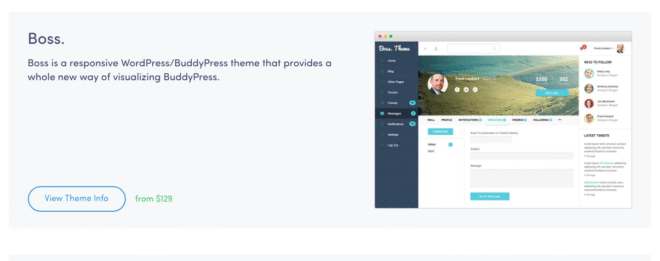
If you’re passionate about building a custom community and providing versatile features to serve your members, or perhaps even moving your followers from Facebook, then you’re probably aware that WordPress is by far the best platform to make that happen.
BuddyBoss has created some of the most popular eLearning and social networking themes and plugins available to help you with just that.
With our setup and development solutions, you can “own the land you build on,” with all your own branding and highly customizable, endlessly versatile features.
It’s not quite good enough to have your own custom community if members can only access its full functionality from a desktop computer.
Your members or students might be able to visit the forums and engage with each other and your content a couple times a day; in the morning or at night, and for the rest of the time they go away, work, study, live their lives and you’re out of sight, out of mind.
Failing to meet your members where they spend a huge chunk of their time learning and being entertained – their mobile devices – seriously hampers your ability to keep them interested, and to keep them, period.
That means lost revenue for you when they become inactive or close their accounts.
Push notifications for your forums, then, are a critical tool in your member retention kit.
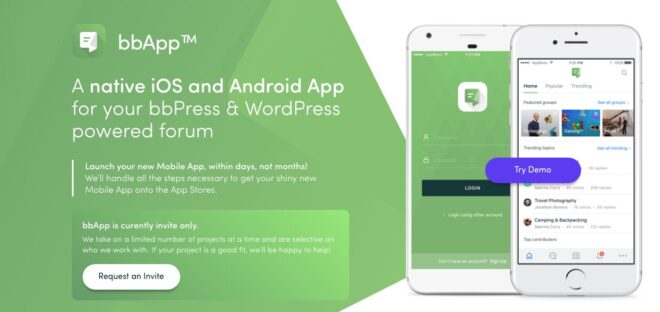
bbApp – a forum feature included with any native mobile app developed by AppBoss to integrate with your member site – fills this gap.
Your members can subscribe to different forums to see new content, comments and messages from their fellow members throughout the day via push notifications, and remain engaged in your community.
If you’re going to work hard to create amazing courses and content, you want to maximize the chances your members will see it, engage with it and enjoy it.
That’s good for your bottom line.
The biggest problem facing online course creators is member retention.
For independent coaches, corporate trainers, and educational institutions alike, course completion rates are all-important indicators of success.
If course completion is low, learners aren’t receiving the benefits of your eLearning content.
If they’re not seeing benefits, they aren’t going to stick with you.
For any learning business, that means lost revenue. Independent coaches need that revenue to survive and to grow; trainers see that lost revenue in thousands of dollars worth of inefficiency; and universities will endure poor course evaluations, lower grades, less satisfaction among students and so on.
If users are failing to complete courses, you know you need to address some aspect of your delivery.
BuddyBoss.com has plenty of tips for eLearning design and implementation.
But if your eLearning content is strong, you’ve done all your homework on branding, niche, content and web design, you need to look at improving enthusiasm and engagement.
The most powerful solution for striking directly at the heart of the engagement problem is mobile technology.
We go in-depth on the benefits of mobile on the AppBoss.com blog.
The purpose of this article is to give step-by-step instructions on creating a mobile app for your LearnDash eLearning program.
We have been doing responsive design and eLearning on the web as a company for many years, recently with a huge focus on mobile learning because we understand that this area is a huge driver of in the industry.
We’ve built dozens of apps, eLearning websites for clients, undertaken the publishing process many times, and we are highly familiar with the ins and outs.
Read through this guide if you’re a business owner or a corporate trainer who runs a LearnDash site. We’ll show you every step of creating a mobile app to optimize your education services.

This guide is for anyone who will be managing a mobile app development effort for their business.
Before we start building an app, and putting together a team or hiring an agency to build it for us, we need to first have an good understanding of the full process and what it entails.
This will tell us what we need in terms of tools, human resources or services.
Even if we hire an agency to do it, it is still very useful to know the full process, as we will be going through that process with the developer.

The needs of users differ depending on whether they’re accessing a website or a mobile app.
There’s no need for you to cram every feature of your website into your mobile app; for example, your website should have your brand assets for marketing and partnerships, but why would you need those taking up space on your students’ and members’ mobile app?
Do you need detailed reporting on the app, or can your admins access that from a desktop instead?
If the goal of your app is to provide mobile learning, then all you need are course features; if your objectives also involve engagement, then you need social features and forums – but not anything and everything, just what your users need on-the-go.

Wireframing is essentially rendering the various screens your app will display, and any functions. Think of it like a blueprint.
People approach wireframing differently.
You might do this by hand sketching, then creating something in a program; you might skip straight to a mockup on a program like Sketch.
You should choose the way that feels right for you. The point is mainly to ensure you don’t encounter extra costs and difficulties, because you’ll already know what your app looks like and how it works.
If you take the step of creating something visually appealing, you might also have an edge if you decide to present the project to a business investor early on.

There are not major differences between wireframing for Android and iOS.
A good wireframe will translate to both device formats.
At BuddyBoss and AppBoss, our wireframing tool of choice is Moqups.
Other choices include:
Because design requirements are pretty extensive, we’re going to give you some general tips on themes and principles. But not to worry – for a detailed, technical explanation, our blog has you covered.

Clarity:
Deference:
Depth:
Purpose: To maximize reach
Aesthetic integrity: How does appearance and behaviour integrate with function, i.e. captivate with fun and engaging design or focus with subtle purpose-driven design.
Consistency:
Direct manipulation rules:
Use “Metaphors:”
Theming:
Good news – if you’re using Sketch for your designing, wireframing and sketching, there’s a plugin that helps you customize your existing brand asset library to fit better with Material Design, called Material Plugin.
Nevertheless, you’ll want a grasp of the basics to begin with. We go in-depth on our blog.
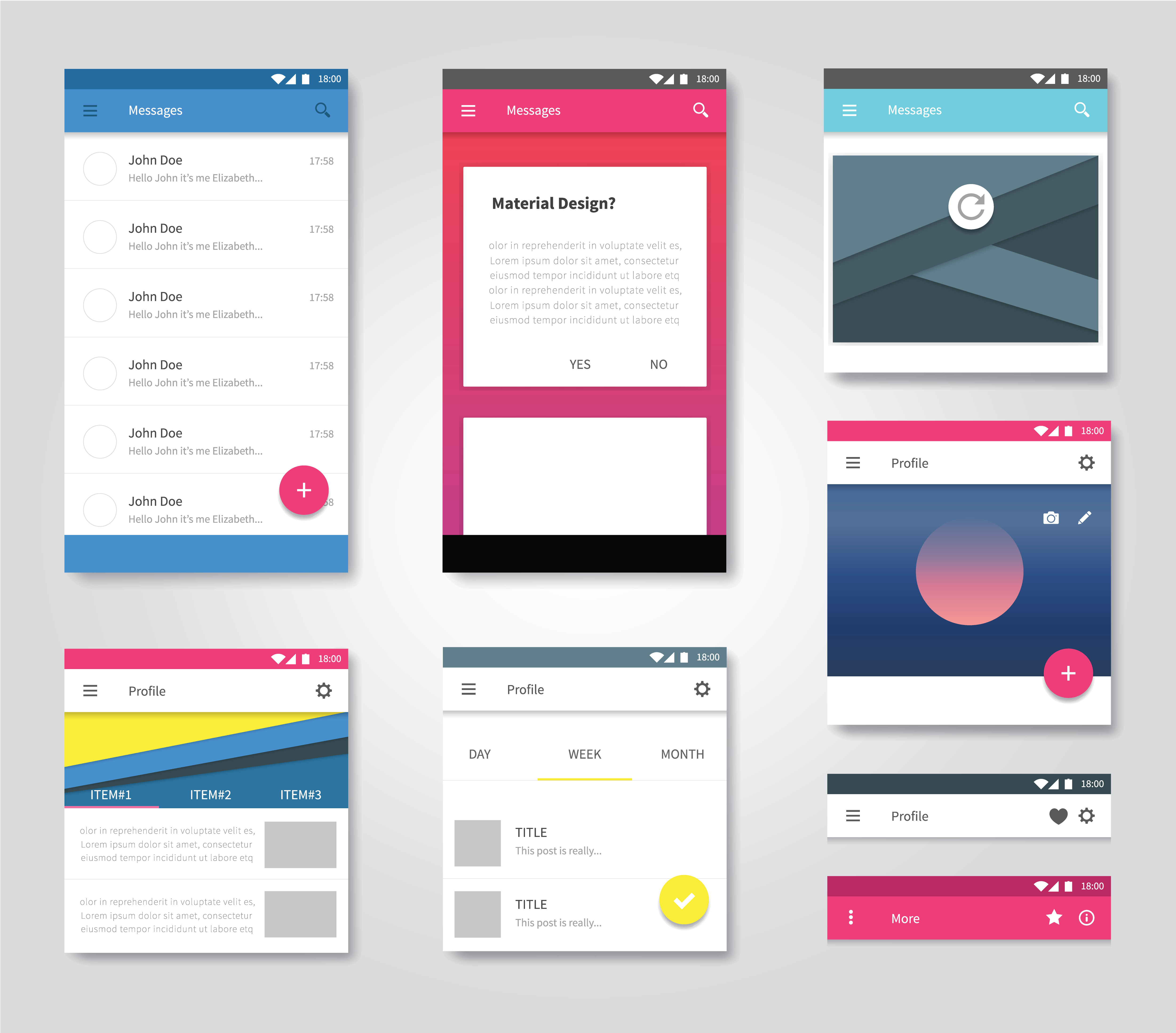
Material Design actually comes with custom theming that you can customize if you wish, or just use straight out of the box. Button shapes, element colour, typography and so on can all be adjusted to suit your brand theming.
Components:
Buttons, bars, navigation elements, shapes, progress indicators, and more; there’s a pretty long list of components that will make up your Material Design UI.
Finding Inspiration:
While you’re thinking about design standards, you can check out websites like Dribble and Behance for ideas. Tons of designers feature their apps on sites like these.
Since you’re going to need to know about apps that are competing with yours in the eLearning space, you should also look at some of them. What do they look like? What are their key features?
The industry standards for creating app design mockups for UI and UX development are Sketch and Photoshop.
Each has advantages and disadvantages, and if you’re undertaking design yourself, you may find one or the other is just a better fit.
Remember, both are workflow tools – they won’t teach you design. If you’re hopeless as a designer, you might want to outsource the work.

First and foremost, Sketch is a leaner tool. Photoshop is far more versatile – but Sketch is purpose-built for quickly mocking up wireframes and complex designs.
Sketch is only for Mac. If you’re coordinating with PC users, you may hit a snag when they can’t use your files.
Sketch is easy to learn in a few hours with tutorials, especially if you are familiar with Photoshop – the interfaces are similar.
Sketch is a vector-based tool. Files will be smaller and look good on all devices.
Sketch has specific plugins for UI/UX design. Photoshop has plugins, but many are for photo editing.

Photoshop files are compatible with MacOS and Windows.
Photoshop allows finer modification of objects. It’s easier to make small tweaks.
Photoshop and Illustrator are potentially more stable, as Sketch is newer
For an exhaustive look into the details of each program, check out our blog.
At BuddyBoss and AppBoss, Sketch is the tool of choice.

Prototyping is an important step in your plan. You want to get customer feedback on their needs and test the viability of your product, don’t you?
Not only that, taking this step can save you time and money. By the time you’re ready to code the app, your developer won’t be starting from scratch (although a good development agency can help you with this too).
You can save even more by sending solid wireframes or mockups to your designer and save money there, too, outsourcing only the fine-tuning for which an experienced designer is best relied upon.

InDesign is a good tool for interactivity prototyping.
You can design the interactive flow of the prototype, and even animate transitions between states of the application.
There’s no single program that we would call “industry standard” at this time.
However, there are a number of programs you might like to look into including:
Pro tip: many of these tools have a free trial period. Try a few out, or even prototype your project for free before moving on to the next stage of development.

Native? Web app? Hybrid? Which development technology is best?
If you aren’t even sure of the differences between these options, here’s a breakdown.
Native apps are built in a specific language for a specific platform, as opposed to web technologies like HTML, CSS or JavaScript. When you code for Android using Java, or for iOS using Objective C, the resulting app is called “native,” as it uses the platform’s native language.
A web app is really just a website, displayed in a way that displays on mobile to provide a more rich user experience and respond fluidly. Web apps require an internet connection to run, whereas native apps will work without one (although many features of a native app may require an internet connection to work properly).
A hybrid app combines elements of native and web apps.
They can be found in app stores, unlike web apps, can incorporate features of the operating system, and can store data on the device.
But, they will likely never run as fast as native apps.
We go into detail comparing the pros and cons of app technologies here on our blog.

The AppBoss team uses React Native to develop fully native apps.
React Native is one of the most popular cross-platform development frameworks that allows you to create native apps for Android and iOS with just one codebase.
React Native apps are really native apps, not web or hybrid apps. They benefit from the above-mentioned benefits of native apps.
React Native, which was created by Facebook, allows app developers to create these native mobile apps with the popular Javascript programming language.
Thus, you can hire a single developer or development team to create native apps that run on both Android and iOS.
React Native also cuts down development time significantly.
With a number of big companies such as Facebook and Tesla making use of React Native for mobile app development, it certainly is one of the better solutions for creating high-quality native apps that provide users with a great experience.
A quality assurance process is a must.
Even if the developer tests have been performed, users might interact with the app differently than expected.
Sometimes, another pair of eyes can spot bugs that fall outside of developer logic.
And quality assurance will save money down the road in maintenance, post-launch bug fixes, and all-important trust in your brand.
In fact, crashes and errors after installation can cause many users to delete your app. That’s something you’ll want to avoid. Trust us, the effort and cost now are worth the time and revenue saved in the future.
You should really be spending more time in testing than you do in development!
You can outsource this to a team who specializes in mobile app QA, or if you're hiring an app development agency, you'll want to make sure they have that process in hand. Or, you can give it a shot.
Check this space and our blog for full details on how to undertake QA by yourself if you aren't outsourcing.

You’ll need a Mac computer running the latest version of MacOS, and – for you or your developers – the current release of XCode for turning your app code into an IPA file for the App Store. (At AppBoss, we code in Javascript, then compile to Java and Swift and Objective-C for Android and iOS, respectively. If that makes your head hurt, see our blog for a breakdown of coding lingo.)
It’s a very good idea to familiarize yourself with Apple’s App Store review guidelines. We go deep on our blog.
Once your certificates are ready, you can upload your app to your iTunes Connect account.

You can upload your app from XCode to iTunes Connect.
Then the app will be staged at iTunes Connect in the Activity tab. You'll see the version uploaded there.
Once the build is uploaded, it’s available for testing.
Apple uses Test Flight for app testing, so you and your testers must download the Test Flight app.
You can see your users in AppStore Connect Users under Testers and Groups. To add users to your iTunes Connect account and to specific Test Flight app builds, follow these instructions:

Go to App Store App Information and enter all the info, name of app, privacy policy URL and other information required by the text fields.
Then, fill out the pricing and availability.
In iOS App – Waiting for Review, upload screenshots and promotional text that will show up on the app store.
Upload the build there that you want to submit for review to the App Store.
Then add your personal information to the required fields.
There's a spot where you can give notes to your testers in App Review Information, and upload pictures if needed too.
Fill out a brief questionnaire on your app's content, so Apple can assign a content rating.
Then finally, you can select whether you want your app to be automatically or released after passing Apple's review process in the Version Release section.
If it doesn't pass, Apple will tell you what needs your attention. Otherwise, your app is now live!
There are a number of options for testing and preparing to publish your app wth Android.
At AppBoss, we use HockeyApp once we have a build and need to begin the QA process.
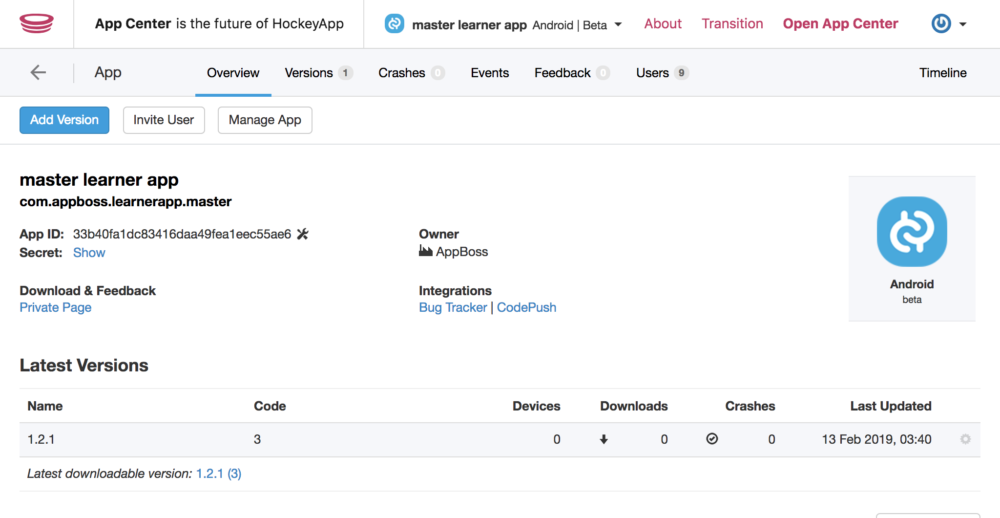
Some other options include:
In HockeyApp, you can upload your APK file (Android's equivalent to IPA) and invite people to the account to download your test build, and set their role.
Once the build is cleared by testers, then you can start on the Google Play store.
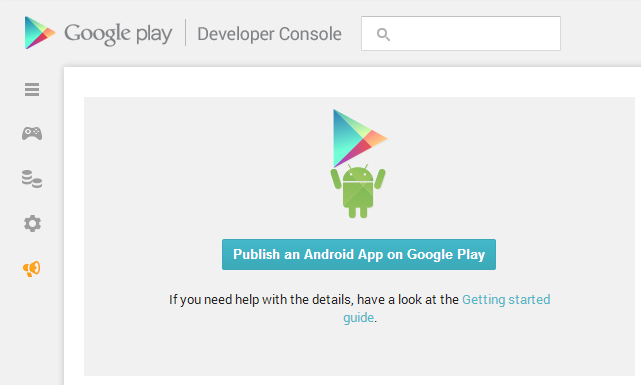
First, set up your developer account.
Then, you can sign in to see your Google Play Console homepage.
In “All Applications,” find the “CREATE APPLICATiON” button and click.
Name your app.
Go to Store Listing and fill out product details.
Add Contact Details.
Fill out Categories and your content rating questionnaire.
Include your screenshots, icon and banner in this section.
You can add your Privacy Policy…but at this stage, it's not required. Android lets you upload pretty much anything without any review…but for very obvious reasons, lack of a privacy policy is not good for your business.
Add Pricing and Distribution information.
Choose your audience.
Indicate whether your app features ads.
Indicate whether you followed Android's Content Guidelines (but Google won’t reject your app if you didn’t – it would just get pulled down in future if found to be violating them).
Once that is all set, go to App Releases – Production Track – Manage, create a release, and choose to Opt In or Opt Out of App Signing. (App signatures are just like the certificates you created for your iOS version that ensure you are the owner of your app.)
Then you can upload the APK file.
Note that you need to indicate the SDK target for your app, i.e. that is the minimum version of the Android Operating System on which your app must function.
Instead of having a living person review your app, Google has a system that automatically analyzes your code for minimum configuration settings.
Your app could fail submission if, for example, app permissions are wrong or nonexistent for things like requesting access to your user's camera, location services etc.
You'll be alerted to any issues like this in Review.
Then if it’s all good, you can select Rollout to Production. The app will appear on the Google Play Store in a few minutes to an hour.

Understand your needs.
What services do you need? What parts of this process are you confident with tackling by yourself?
It may be tempting to save money on doing, for example, your wireframing and design. Or maybe all you need is design help. If you’re confident, go for it!
If you want full end-to-end service from an agency, make sure you’re clear on the full offerings of the agencies you’re considering.
If you’re looking at an agency that doesn’t have a strong design team in-house, or at least, doesn’t outsource from a reliable designer, you’ll run into headaches.
It’s critical to understand whether agencies have dedicated specialists for each stage of the process.
Since we’re building a LearnDash website, the developer will need a strong background with WordPress too. And if they know LearnDash, so much the better.
Have a look at the previous clients of agencies you’re considering. Even better, check out the product if you can. A good company should be willing to show off their work with testimonials and case studies.
This one’s easy. Can they do the work for a price you find reasonable?
Some companies are in high demand, and if they really want to work with you, it might be an indication they believe in your project and are willing to meet your budget requirements in order to keep doing business with you in the future (on things like maintenance and support).
Consider your speed-to-market an asset of value. If a development agency seems like a decent fit, but can’t even start your project for months, that’s lost value for you.
Strike a reasonable balance between your enthusiasm to get cracking with an agency that ticks your other boxes while offering a decent bid on your budget.
You’re going to want to filter out BS. Some of these questions can help with that:
If you don’t want to hire an agency, there are a few options.
You can hire contractors.
You can hire freelancers on site like UpWork.
But, it's tough to guarantee success with these methods. You'll want to make sure contractors and freelancers have a very reliable work history and know the ins and outs, as well as any customization you require.
You can also consider using an app builder.
App builder technology comes in a number of forms, but usually as an online, DIY development tool for business people who can’t afford development services from an expert or agency.
Popular app builders include:
Building an app via an app builder tool usually involves filling out forms and choosing certain key elements from presets, such as app type, user access format, features and so on.
Pros:
Cons:
If you’re after a high-quality, original app where the features are up to you, it’s not a good idea to choose an app builder.
It’s unlikely these cookie-cutter solutions will be the foundation of a solid mobile-conscious business.
You will not have control over details that make all the difference, like custom pictures, text, appearance and performance.
App builders may be an affordable solution for small businesses who need a specific app with limited functionality.
However, it’s not recommended for anyone planning to push marketing resources into their mobile experience.
Template apps are mostly pre-built apps that can be customized to your needs.
If you're looking into this option, you must ensure the template app can synchronize content with your LearnDash site.
You'll also want to check that it is built with the technology that you want to use. When AppBoss builds LearnDash-powered WordPress apps, as mentioned previously, we use React Native.
If you are going to have your own team work on a template app instead of with a development agency, make sure the template product you're looking at has lots of documentation so your team can learn to work with it.
If it's just you, you'll have to look through all the documentation and learn it.
Or, you can hire a team to customize the app to work for your website.
Each options has its pros and cons.
If you're using an online app builder, then most likely, this option can’t sync with your website content.
The end result is low-quality. An online app builder does not allow enough flexibility to customize your app in a professional way.
If you buy a template and hire a team, that option can work out well, as long as the team knows how to work with that template app and they have all their documentation needed.
If you're by yourself, you'll need to have all the knowledge about building and customizing the app. It could take weeks to learn to do properly, but you may still spend all that time trying to learn the documentation and end up with nothing good.
AppBoss and BuddyBoss offer a prebuilt mobile app solution with templates, APIs, and functionality that allows us to speed up your launch significantly beyond the above alternatives.

If you have a good reason for your app to be fully custom, then you should build your own tea or hire a professional development agency.
Reasons could include:
If your app doesn't have these needs, but you desire a high degree of professionalism and in the appearance and user experience, then going with a customizable template app solution is the right choice for you.
Reasons to go template:
If your needs can be met by a template app, we can help.