














If you’re building a WordPress community in 2026, BuddyPress gives you a free starting point and BuddyBoss gives you a platform you can actually launch with.
I’ve spent a lot of time inside both and to be honest BuddyPress is the project that proved WordPress could do social networking. It deserves respect for that.
But after working with it and then working with BuddyBoss, the gap between the two isn’t subtle anymore.
BuddyBoss started from the BuddyPress codebase. The team saw what was broken, what was missing, and what community builders were duct-taping together with 20+ plugins and they built the platform that should have existed all along.
Today, it includes unified community tools, native LMS integrations, a white-label mobile app, real support from real people, and a development team that actually ships features.
BuddyPress? Still free. Still open-source. Still maintained by volunteers in their spare time. And still missing things you’ll need the moment you try to run a serious community.
If you’re a developer who wants a blank canvas, BuddyPress works. For everyone else such as course creators, membership site owners, coaches, community builders who need things to just work, BuddyBoss is the move.
→ Download BuddyBoss Platform for Free
Side-by-Side Comparison
Before I get into the details, here’s the snapshot of features, prices and everything else you need to know about these two platforms.
| Feature | BuddyPress | BuddyBoss (Free Platform) | BuddyBoss Pro / Plus |
| Price | Free (open source) | Free | $299/yr (Pro) / $349 first yr (Plus) |
| Activity Feeds | Basic | Enhanced | Advanced with reactions, GIFs |
| Groups | Public, private, hidden | Same + group types | + group hierarchy, advanced controls |
| Forums | ❌ Requires bbPress plugin | Built-in | Full forum suite |
| Private Messaging | Basic | Enhanced | Group messaging + media sharing |
| Member Profiles | Extended profiles | Rich profiles + profile types | + cover photos, social links, custom fields |
| Mobile App | ❌ Not available | ❌ | White-label iOS + Android ($79–$219/mo) |
| LMS Integration | ❌ Requires third-party setup | Basic LearnDash, Tutor LMS, LifterLMS | Deep native integration |
| Gamification | ❌ Requires third-party plugins | ❌ | Native (Plus plan) |
| Monetization | Requires plugin assembly | Basic integrations | MemberPress, Paid Memberships Pro, WooCommerce |
| Theme | Relies on third-party themes | ReadyLaunch (works with any theme) | BuddyBoss Theme (purpose-built) |
| Professional Support | Volunteer forums only | Knowledge base + tutorials | Dedicated support team (24/7) |
| Development Speed | Slow (volunteers) | — | Fast (large dedicated dev team) |
| Moderation Tools | Basic | Report, block, keyword filtering | + content approval, auto-suspend |
| GDPR Tools | ❌ | Built-in | Built-in |
What Do You Actually Get? A Feature-by-Feature Comparison
Let me walk you through the areas that matter most, and tell you exactly where each platform stands.
Community Features
BuddyPress gives you the basics: activity streams, friend connections, user groups, extended profiles. These features work and they also feel like they were built a decade ago, because they were.
Want your members to share photos, videos, or GIFs in the activity feed? You need a plugin.
Want reactions beyond basic comments? Plugin.
Want profile types so you can differentiate between students, coaches, and admins? Plugin.
Want rich media in private messages? Plugin. Every “of course it should do that” feature requires hunting down, installing, configuring, and maintaining a third-party add-on.
BuddyBoss rolls all of this into one platform. Activity feeds support @mentions, media sharing (photos, videos, GIFs, documents), reactions, and rich embeds, no plugins needed.
Profiles include profile types, custom fields, cover photos, and social links. Groups support types, hierarchies, separate activity feeds, and advanced controls.
Out of the box, it feels like a modern social network and that’s what it was designed to be.
Moreover, with BuddyBoss Plus, you get native gamification including points, ranks, badges, leaderboards with over 90 configurable triggers. Trying to do this on BuddyPress means installing GamiPress or myCred, spending hours configuring them, and crossing your fingers they don’t break on the next update.
My take: BuddyPress gives you the skeleton. BuddyBoss gives you the whole body. If you’re building something your members will actually enjoy using, the difference is night and day.
Forums
BuddyPress, a community platform, doesn’t include forums. You need to install bbPress as a separate plugin, maintained by a separate volunteer team. Styling bbPress to match your community? That’s on you. Updates between BuddyPress and bbPress staying in sync? Not guaranteed. They’re independent projects with independent timelines.
BuddyBoss forked bbPress directly into its platform. Forums are built in, styled consistently with everything else, and update together. You can attach forums to groups, create standalone discussions, moderate everything from one admin panel. No second plugin. No compatibility prayers.
I know this sounds like a small thing. It’s not. Forums are how communities have real conversations. Making them a separate, uncoordinated add-on is like selling a car without a steering wheel and pointing you to a third-party supplier.
Mobile App
There is no BuddyPress mobile app. Your members access the community through a mobile browser, which, let’s be honest, delivers a mediocre experience. Which basically means:- No push notifications, no native performance and no presence in the App Store.
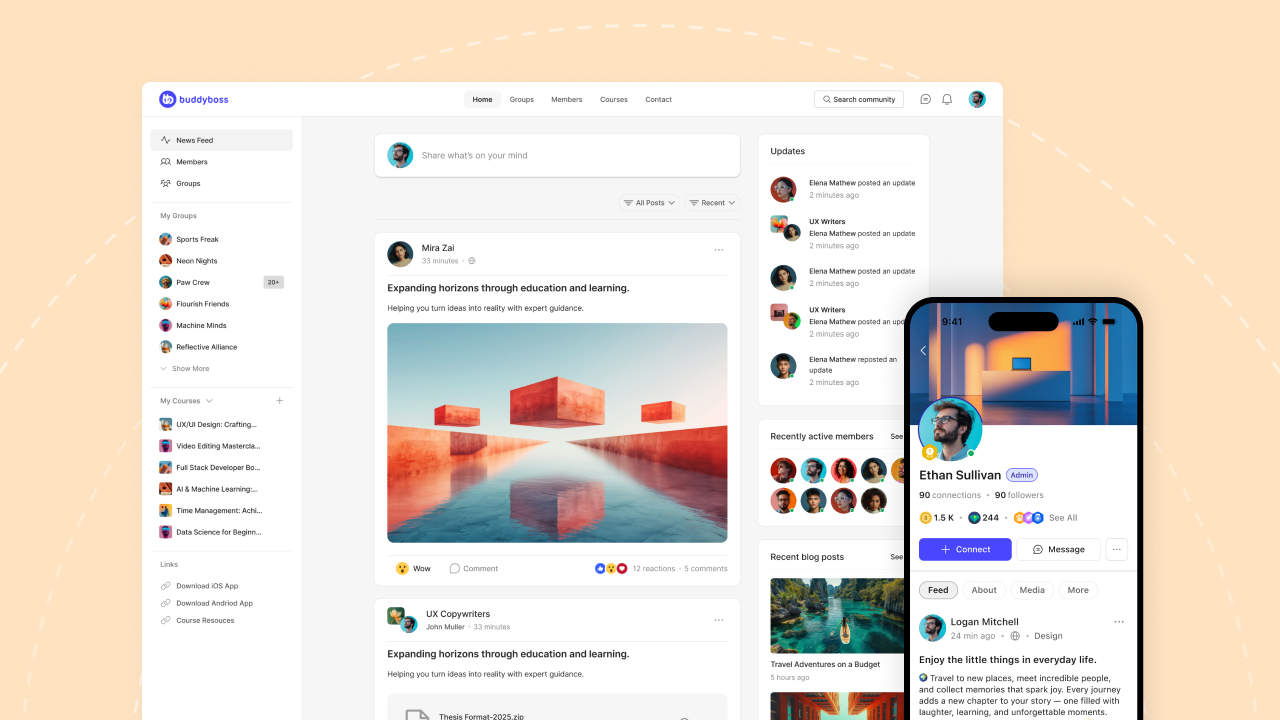
BuddyBoss offers white-label mobile apps App Lite and full App. It gets published under your brand in both the Apple App Store and Google Play.
Built with React Native, the same framework behind Facebook and Instagram and it syncs your community data in real time. You get push notifications, in-app messaging, activity feeds, course access, all native.
This isn’t a nice-to-have anymore. It’s often the difference between a community people visit occasionally and one they engage with daily.
Courses & LMS
If you’re here because you’re building a course-based community, then this is it for you.
BuddyPress has no built-in path for delivering online courses. Zero. You can install a WordPress LMS plugin separately and hope the pieces fit together, but there’s no native integration.
Styling consistency? It’s all on you. Data flow between courses and community? Your problem.
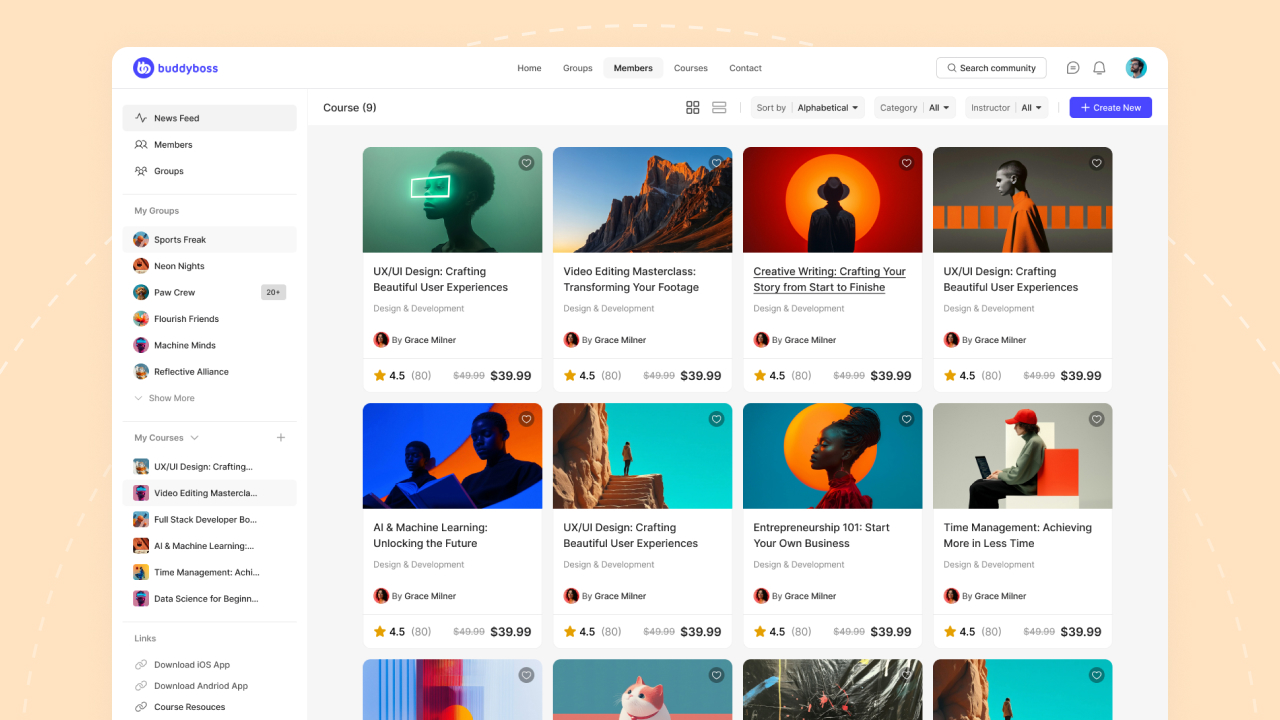
BuddyBoss was built with course delivery as a core use case. It integrates natively with LearnDash (the most popular pairing), Tutor LMS, and LifterLMS. With LearnDash, you get quizzes with multiple question types, certificates, drip content, progress tracking, completion badges, learning paths, and student dashboards, all styled consistently within your BuddyBoss community.
Here’s what that actually means for your students: they can finish a lesson, jump into a group discussion about that lesson, message their instructor, check their progress dashboard, and earn a badge, all without ever feeling like they’ve left one system and entered another.
That seamless experience is incredibly hard to build on BuddyPress. On BuddyBoss, it’s just how things work.
My take: For course creators and educational institutions, this is the single biggest reason to choose BuddyBoss. Nothing else in the WordPress ecosystem gives you this level of LMS-community integration without custom development.
Design & Theme
BuddyPress uses WordPress’s theme compatibility API, which “does its best” to make community pages look reasonable within your theme.
In practice, the results range from decent to ugly, depending on your theme. Creating something that looks like a real social network usually requires a BuddyPress-specific theme or a fair amount of custom CSS.
On the other hand, BuddyBoss gives you two options, and both are better:
ReadyLaunch (free): Built into the free BuddyBoss Platform. It adds pre-styled community pages — profiles, feeds, groups, messaging, that work with any WordPress theme without conflicting with your existing design. You can go from zero to a professional-looking community in minutes. This is genuinely impressive for a free product.
BuddyBoss Theme: A purpose-built theme designed specifically for the platform. Full layout control, customisable everything, pre-built page templates and it updates in sync with the platform. When BuddyBoss ships a new feature, the theme gets styled for it the same day.
Support
BuddyPress support: You post in a volunteer forum on buddypress.org. You have to wait. Days, sometimes weeks. There’s no ticketing system, no SLA and no guarantee to get a response.
BuddyBoss support: Professional, ticket-based, available 24/7. Dedicated support agents. Hundreds of tutorials and video walkthroughs. If there’s a bug, the team can access your site, patch it, and fix it in the product.
If your community generates revenue and at some point, isn’t that the goal? Relying on volunteer forum support is a risk I wouldn’t take.
Pricing Breakdown: What You Pay vs. What You Get
“BuddyPress is free” is technically true. But once you start adding the plugins you actually need a compatible theme, media uploads, gamification, membership tools, an LMS, moderation and much moe. A realistic BuddyPress stack runs $648–$1,846/yr plus the time you spend managing it all.
BuddyBoss pricing is more predictable:
| Plan | Cost | What You Get |
| Platform (Free) | $0 | Core community + ReadyLaunch. Genuinely usable. |
| Pro | $299/yr (renews ~$150/yr) | Theme + Platform Pro + advanced features + 24/7 support |
| Plus | $349/yr first year ($599/yr after) | Everything in Pro + gamification + media offloading and much more |
| Mobile App | $79/mo (Lite) or $219/mo (Full) | White-label app under your brand |
| Done For You | One-time fee (contact sales) | BB team builds your entire platform |
Most course creators need three things: a community platform, an LMS, and professional design. Here’s how the options stack up:-
| BuddyPress Stack | BuddyBoss Pro + LearnDash | |
| Community + forums + theme | $50–$299/yr (BP + plugins + bbPress) | $299/yr (all included) |
| LMS | $199–$399/yr | $199/yr (LearnDash, separate) |
| Support | ❌ Volunteer forums | ✅ 24/7 dedicated team |
| Hosting | $300–$600/yr | $300–$600/yr |
| Plugin maintenance time | High | Low |
| Year 1 Cost | $549–$1,298 + a lot of your time | $498–$899 + minimal setup |
Pricing is in the same ballpark, sometimes even lower. But the real value isn’t the dollar savings, it’s not having to fight with plugins every time something breaks.
→ See BuddyBoss Pricing | → Download Free Platform
Who Should Stay on BuddyPress
I’m not going to pretend BuddyBoss is the right answer for literally everyone. Here’s who should stick with BuddyPress:
You’re a developer who enjoys building from scratch. If you genuinely like assembling a stack of open-source tools and customising every piece yourself, BuddyPress gives you that blank canvas. No commercial layer, no opinionated design. Just code and possibility.
You’re running a small passion project with zero budget. If this is a hobby community for a local club, a personal side project, or something you’re experimenting with before committing money — BuddyPress plus some free plugins is a perfectly fine starting point. You’ll trade time for money, but if you’ve got more time than budget, that math works.
You’ve already invested heavily in a custom BuddyPress setup. If you’ve spent years building a specific BuddyPress configuration with custom code and a workflow your team knows inside out, migrating is a real undertaking. The good news is that BuddyBoss is compatible with most BuddyPress plugins, so it’s doable. But if your current setup genuinely meets all your needs, don’t fix what isn’t broken.
You care about contributing to open-source. BuddyPress is a community-maintained project that needs contributors. If that mission matters to you, supporting BuddyPress is a meaningful choice.
But if you’re reading this list and none of these describe you? Keep reading.
Who Should Choose BuddyBoss
You’re a course creator and your students deserve better than a Frankenstein stack. The native LearnDash integration alone makes BuddyBoss worth it. Quizzes, certificates, progress tracking, student dashboards, social learning, all in one cohesive experience. Trying to build this on BuddyPress is possible, but it’s going to cost you more in time, plugins, and frustration than BuddyBoss Pro costs in money.
You’re building a membership site that needs to make money. When your community is your business, “volunteer forum support” and “maybe someone will respond” aren’t acceptable. You need a platform with professional support, predictable updates, and monetisation tools that work out of the box.
You want a mobile app. BuddyPress can’t give you one. BuddyBoss can, and it’s white-labelled under your brand. If mobile engagement matters to your community (spoiler: it does), this is a dealbreaker.
You’re not a developer and you want something that looks professional without hiring one. ReadyLaunch gets you to a polished community in minutes. The BuddyBoss Theme gives you full design control without writing CSS. And the Done For You service builds everything for you if you’d rather skip setup entirely.
You’re done babysitting plugins. If you’ve lived through the plugin nightmare where one update breaks something, Developer A blames Developer B, you spend your Saturday debugging instead of serving your community, BuddyBoss’s unified stack is the antidote. One platform, one update cycle, one support team. That simplicity is worth more than people realise until they experience it.
You’re an agency building for clients. BuddyBoss’s multi-site licensing, professional theme, consistent codebase, and responsive support make it a reliable foundation for client projects. You deliver faster, support more easily, and sleep better.
How to Switch from BuddyPress to BuddyBoss
If you’re currently on BuddyPress, the migration is surprisingly smooth because BuddyBoss was built on the same codebase.
What You Need to Know
Most BuddyPress plugins will continue to work with BuddyBoss Platform since the underlying architecture is shared. You don’t need to install BuddyPress and BuddyBoss side by side — BuddyBoss Platform replaces both BuddyPress and bbPress.
Step-by-Step Migration
- Back up everything. Full database + files backup. Non-negotiable.
- Download BuddyBoss Platform (free) from buddyboss.com/platform.
- Deactivate BuddyPress and bbPress. Don’t delete yet — just deactivate.
- Activate BuddyBoss Platform. Your existing data (members, groups, activity, messages) carries over.
- Test thoroughly. Check community features, test any third-party BP plugins you use, verify member data.
- Upgrade if you want more. Pro for the theme and advanced features. Plus for gamification. App for mobile.
- Clean up. Once everything checks out, remove BuddyPress and bbPress.
The whole process can take as little as an hour for a straightforward site. If you’re running something more complex like heavy customisation, lots of third-party plugins, custom code then BuddyBoss’s Done For You team can handle the migration for you.
→ Explore Done For You Service | → Download Free BuddyBoss Platform
Frequently Asked Questions
Is BuddyBoss actually free?
Yes, the BuddyBoss Platform plugin is free and includes real community features plus ReadyLaunch.
Will I lose data migrating from BuddyPress?
No. BuddyBoss Platform reads existing BuddyPress data — member profiles, groups, activity streams, messages, forums. Deactivate BP, activate BB, your data is there. I’d still recommend a full backup beforehand (always do), but the migration is designed to be seamless.
Do my BuddyPress plugins still work?
Most will, since BuddyBoss Platform is architecturally compatible with BuddyPress. But here’s the thing, many of those plugins become unnecessary because BuddyBoss already includes the features you were adding through third-party add-ons. You might end up removing plugins instead of worrying about compatibility.
What’s the difference between Platform, Pro, and Plus?
Platform (Free): Core community features + ReadyLaunch design. Solid for getting started or testing the waters. Pro ($299/yr): Adds the BuddyBoss Theme, Platform Pro features (Zoom integration, access controls, premium layouts), and full 24/7 support. This is where most people land. Plus ($349/yr first year, $599/yr after): Everything in Pro plus native gamification (points, ranks, badges, leaderboards) and media offloading to Cloudflare. For communities that are scaling and need engagement tools built in.
Do I need hosting?
Yes, same as BuddyPress. Both run on WordPress and need web hosting. Managed WordPress hosting (Cloudways, Vultr, DigitalOcean) starts around $25–50/month for smaller communities. Costs increase as your community and media library grows, BuddyBoss recommends cloud hosting rather than shared hosting for performance reasons.
Is BuddyBoss better than BuddyPress for LearnDash?
Significantly, and it’s not close. BuddyBoss has deep native integration with LearnDash: styled course pages, student dashboards, social learning within courses, group-based courses, and design consistency between community and course content. On BuddyPress, you’re on your own making LearnDash look and feel like part of your community.
What happened to bbPress?
bbPress still exists as a standalone forum plugin. But BuddyBoss includes forum functionality built in (forked from bbPress), so you don’t need it as a separate install. Everything is styled consistently, integrated with groups, and updated together. One less plugin to manage.
Final Verdict
If you’re currently on BuddyPress and it’s genuinely working for you, there’s no emergency. But if you’re starting something new in 2026 or if you’ve been hitting the ceiling with BP and you know it.
I’d strongly recommend starting with the free BuddyBoss Platform. Install it, run it alongside your current setup in a staging environment, and see the difference for yourself. You’ll know within an hour.
→ Download BuddyBoss Platform — It’s Free
→ Need Help? Explore Done For You Service
BuddyBoss is the #1 course and community platform for WordPress, trusted by over 50,000 customers worldwide. See how others are using it →
