Managing a growing community with spreadsheets, email threads, and five different tools is exhausting.
You need one place to see member activity, moderate discussions, track engagement metrics, and manage content without toggling between tabs.
And that's exactly what a community management software does. But with dozens of options ranging from free WordPress plugins to $500/month SaaS platforms, choosing the right one is its own challenge.
I cover what community management software actually does, the seven features that separate good platforms from frustrating ones, and a head-to-head comparison of five leading tools with honest assessments of where each one wins and where it falls short.
If you want to see how one of those tools handles the day-to-day, the BuddyBoss management features are worth bookmarking before you dive into the full comparison.
What Is Community Management Software?
Community management software is the category of tools designed to help you build, moderate, and grow an online community in one place.
Rather than stitching together a Slack workspace, a Mailchimp list, a Facebook group, and a Google Sheet of member data, a community platform consolidates those functions into a unified system.
At the core, these community management platforms handle five things:
- Member management — user profiles, roles, permissions, onboarding flows
- Moderation — content review queues, reporting, banning, spam filtering
- Engagement — activity feeds, discussions, events, reactions, notifications
- Analytics — member growth, retention, post engagement, churn signals
- Communication — direct messaging, announcements, email digests
The “stack” picture matters here. Most communities don't run on a single tool — they run on a platform (where members actually live), plus integrations (payments, email, CRM, courses), plus supporting tools (Zapier, analytics, helpdesk). The platform you choose determines how much of that stack you control and how much gets locked inside someone else's system.
Who needs dedicated community management software? If you're managing fewer than 50 members in a casual setting, a Facebook Group or Discord server might be enough.
Once you cross 100+ members, you'll feel the pain of no moderation queues, no member data, no engagement reporting, and no way to monetize without adding yet another tool. That's the threshold where purpose-built software pays for itself.
Essential Features in Community Management Software
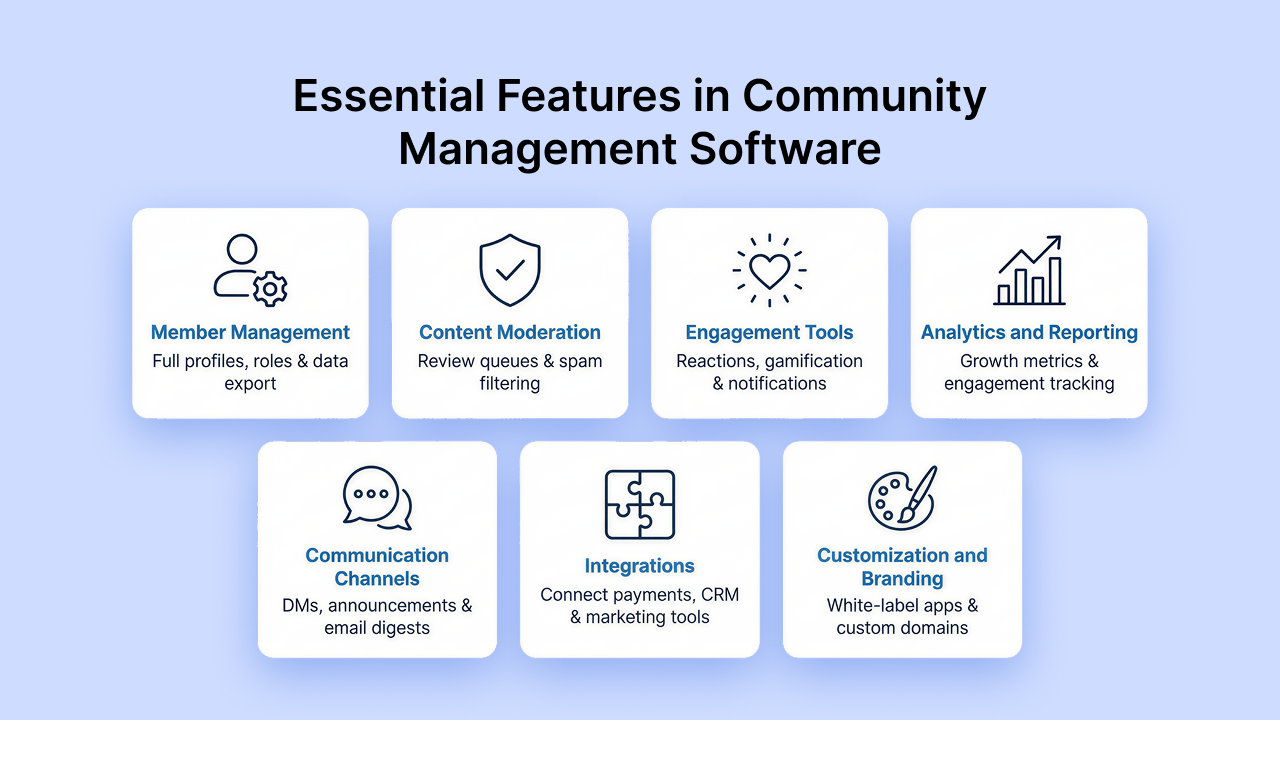
Not all platforms are built equal. Before you evaluate any specific tool, build a checklist around these seven capability areas. A platform that's weak in two or three of these will cost you in workarounds, missing data, or a painful migration later.
1. Member Management
Can you see a full profile for each member — join date, activity history, groups, purchases? Can you assign roles (admin, moderator, member, guest)? Can you bulk-import and export your member list as a CSV you actually own? Member data portability is non-negotiable.
2. Content Moderation
Forums and activity feeds generate noise. Look for: reporting tools members can use, admin review queues, the ability to flag and hold posts before they go live, and automated spam filtering. If you're running a brand community, a toxic post that stays up for 12 hours is a real problem.
3. Engagement Tools
Engagement features drive the behaviors that keep members coming back: activity feeds, reactions, @mentions, gamification (points, badges, leaderboards), events, polls, and push notifications. The more of these a platform supports natively, the less you're gluing together external tools.
4. Analytics and Reporting
You can't manage what you can't measure. At minimum: member growth over time, active vs. dormant member ratios, top content by engagement, and churn signals. Advanced platforms add cohort retention, engagement funnels, and revenue attribution.
5. Communication Channels
Direct messaging between members, group announcements, moderated chat, and email digests. Pay attention to whether those channels are siloed inside the platform or integrated with your existing email provider.
6. Integrations
No community platform is an island. Evaluate native integrations for: payment/membership (MemberPress, Stripe), LMS/courses (LearnDash), email marketing (Mailchimp, ConvertKit), CRM (HubSpot), and automation (Zapier). The broader the integration library, the more flexibility you have as you grow.
7. Customization and Branding
White-label mobile apps, custom domains, branded color schemes, and the ability to modify the UX without touching code. SaaS platforms typically offer surface-level customization. Self-hosted platforms give you full control but require more setup.
Use these seven categories as your evaluation rubric when you run demos or free trials. A platform that checks all seven is rare. The question is which gaps you can live with.
Top Community Management Software Compared
Here's an honest look at five platforms that represent the main tiers of the market from free open-source to enterprise.
BuddyBoss Platform (WordPress)
BuddyBoss is a WordPress plugin (and theme ecosystem) that turns any WordPress site into a full-featured social community. Because it runs on WordPress, you're self-hosting on your own server, which means you own everything.

Core features: Activity feeds, groups, forums, member profiles, direct messaging, content moderation, and member onboarding. The Plus plan adds gamification (points, badges, ranks) and advanced analytics. Integration with LearnDash enables a full LMS inside your community. MemberPress handles gated access and paid memberships.
Pricing: Free (core plugin) / Pro $299/year / Plus $349/year. No per-member fees at any tier.
Best for: WordPress site owners, course creators, membership site builders, and anyone for whom data ownership is a hard requirement.
Key differentiator: BuddyBoss sits on top of 60,000+ WordPress plugins, meaning nearly any integration you need either already exists or can be built. You're not limited to what one SaaS company decides to support. The white-label mobile app option lets you ship a branded app in the App Store and Google Play under your own name.
Honest consideration: You'll need WordPress hosting (typically $20–50/month), and the initial setup takes more time than signing up for a SaaS tool. If you want to go from zero to live community in a weekend without touching any settings, BuddyBoss isn't the fastest path. If you want to build something you fully control, it's hard to beat.
Circle.so
Circle is a SaaS community platform built for creators and businesses who want a clean, modern community space without the complexity of self-hosting.
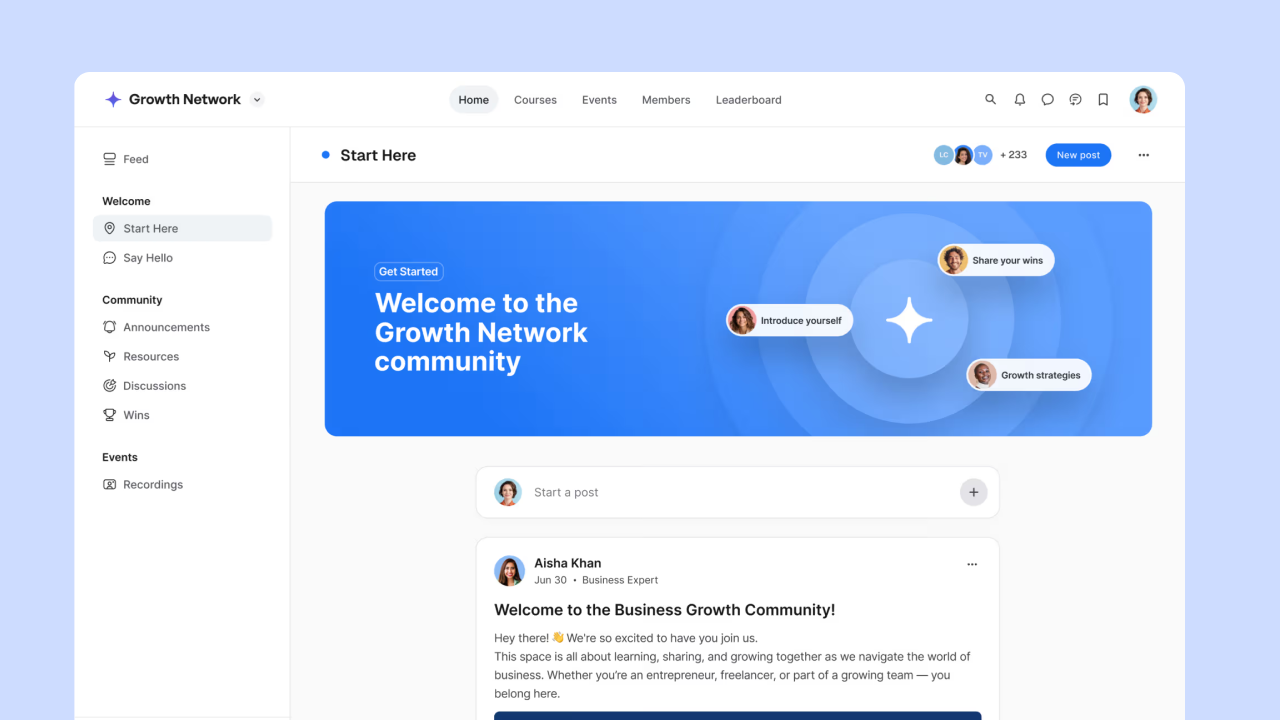
Core features: Spaces (organized discussion areas), threaded discussions, live events, native courses, member directory, and built-in analytics. The UI is polished and the onboarding is fast.
Pricing: Starts at $89/month. Annual plans bring the cost down.
Best for: Creators, coaches, and SaaS companies who want a community product they can launch quickly without touching code.
Honest consideration: Circle's customization ceiling is relatively low, you get color and logo adjustments, but not structural changes to the UX. Your data lives on Circle's servers. If Circle changes its pricing model (which SaaS platforms do), your options are limited. There's no white-label mobile app on standard plans.
Mighty Networks
Mighty Networks combines community, courses, and live events in a single SaaS platform. It's been a popular choice for course creators who want their audience in the same place as their content.

Pricing: $79–$354/month depending on the plan. Higher tiers unlock the native mobile app feature.
Best for: Course creators who want community + courses in one place without self-hosting anything.
Honest consideration: The mobile app Mighty Networks provides is their branded app, not yours. Your community lives inside the “Mighty Networks” app in the App Store, your members see their branding, not yours. Customization is also limited, and at the higher pricing tiers, you may find that BuddyBoss + LearnDash on WordPress delivers more for less.
Discourse
Discourse is an open-source forum platform. It's the gold standard for technical communities, developer forums, and support communities where long-form threaded discussion is the primary activity.
Pricing: Free if you self-host. Hosted plans from Discourse range from roughly $20 to $300/month.
Best for: Developer communities, open-source project forums, technical support communities.
Honest consideration: Discourse is a forum, a very good one but it's not a community platform in the full sense. It doesn't have activity feeds, social profiles, groups with membership gating, native courses, or revenue tools out of the box. You can extend it with plugins, but you're assembling a stack piece by piece. For general-purpose communities, it's underpowered outside the forum use case.
Higher Logic / Vanilla Forums (Enterprise)
Higher Logic (which acquired Vanilla Forums) represents the enterprise tier: platforms built for large associations, B2B companies, and organizations managing 10,000+ members with CRM integration requirements.
Pricing: Custom contracts, typically $500–$2,000+/month depending on member count, features, and support level.
Best for: Large professional associations, enterprise B2B communities, organizations that need deep Salesforce or HubSpot CRM integration.
Honest consideration: This tier is overkill for most communities. The onboarding is slow, the contracts are long, and you're paying for complexity you probably don't need unless you're running a community at serious enterprise scale.
At a Glance: How the Five Platforms Compare
What this table shows is where each one leads and where it compromises. Use it alongside your own checklist.
| Feature | BuddyBoss | Circle | Mighty Networks | Discourse | Higher Logic |
|---|---|---|---|---|---|
| Activity feeds | Yes | Yes | Yes | No | Yes |
| Forums | Yes | Yes | Limited | Yes | Yes |
| Groups | Yes | Spaces | Subgroups | Categories | Yes |
| Messaging | Yes | DMs | DMs | No | Yes |
| Courses | LearnDash | Native | Native | No | No |
| Gamification | Plus plan | No | No | Trust levels | Yes |
| Analytics | Plus plan | Yes | Yes | Plugins | Yes |
| Mobile app | White label | Their brand | Their brand | No | Limited |
| Pricing (annual) | $0–449 | $1,068–4,788 | $396–2,628 | Free–$3,600 | $6,000+ |
| Per-member fees | No | Plan limits | Higher tiers | No | Custom |
| Data ownership | You own | Platform | Platform | You own | Platform |
Pricing as of April 2026. Visit each platform's pricing page for current rates.
WordPress vs. SaaS: The Ownership Question
The single most important decision in choosing community management software isn't which features a platform has, it's where your community lives and who controls it. The WordPress vs. SaaS divide shapes every other decision.
Data Ownership
When you run BuddyBoss on WordPress, your member data like profiles, activity, messages, forum posts, lives in a database on your server. You export it, migrate it, back it up, and hand it to your lawyer if needed. When you run on Circle, Mighty Networks, or Higher Logic, that data lives in their infrastructure. You get access to it through their interface, on their terms.
For most communities, this is an abstract concern until it suddenly isn't, it can be a pricing change, an acquisition, a policy update, or a platform shutdown. The history of SaaS community platforms is littered with examples of communities scrambling to migrate when a platform pivoted or shut down.
Cost at Scale
SaaS platforms look cheap at low member counts and get expensive fast. A Circle community at the Business tier runs $199/month which means $2,388/year and that’s before you add any courses or integrations. BuddyBoss Plus at $349/year covers unlimited members. The math flips hard in BuddyBoss's favor somewhere around 300–500 active members, and only gets more favorable as your community grows.
Customization Depth
WordPress's plugin ecosystem with more than 60,000+ plugins means you can integrate almost anything: helpdesks, affiliate programs, advanced analytics, payment processors, custom gamification logic, e-commerce, and more. SaaS platforms give you the integrations they've chosen to build. If you need something they haven't built, you're waiting on their roadmap.
The Real Switching Cost
Switching community platforms is painful. You can export member emails. You cannot easily export forum threads, activity history, group structures, private messages, and points balances in a format another platform will import cleanly. Every platform you consider, evaluate it as if you might be there for five years because the switching cost makes that a realistic scenario.
When SaaS Makes Sense
Hey! SaaS isn't always the wrong call. If you're launching a community with under 100 members and you need to be live in 48 hours with zero technical setup, Circle or Mighty Networks gets you there faster than a WordPress build. The question is whether that speed advantage is worth the long-term trade-offs in cost, customization, and ownership.
For a step-by-step look at building and launching your own community, see our guide on how to create an online community that thrives.
How to Choose the Right Community Management Software
Use this decision framework to shortcut the evaluation process:
If you're building on WordPress (or want to): BuddyBoss is the clear choice. Nothing else in the WordPress ecosystem matches its feature depth for community, and the plugin integrations mean you can add anything else you need.
If you need community + courses in one place: BuddyBoss with LearnDash, or Mighty Networks. BuddyBoss wins on customization and long-term cost; Mighty Networks wins on zero-setup speed.
If data ownership is a hard requirement: BuddyBoss or Discourse. Both give you full database access on self-hosted infrastructure. Discourse is the better choice if your community is primarily forum-based; BuddyBoss wins for full-featured social communities.
If you want a white-label mobile app: BuddyBoss. It's one of the very few platforms in this price range that supports a fully branded native app under your name in the App Store and Google Play.
If you want zero technical setup: Circle or Mighty Networks. Accept the trade-offs on customization, data ownership, and long-term cost and build in a migration plan for when you outgrow them.
If you're managing 10,000+ members in an enterprise or association context: Higher Logic or Vanilla Forums. The price is real, but so is the enterprise-grade support, CRM integration depth, and compliance infrastructure.
The most common mistake in this decision is optimizing for setup speed and underweighting long-term control.
The platform you choose will touch every aspect of your community including member experience, revenue, content, support and that for years. So, get the foundation right.
FAQ: Community Management Software
What software is used for community management?
The most widely used community management platforms include BuddyBoss (WordPress-based), Circle, Mighty Networks, Discourse, and enterprise solutions like Higher Logic. The right choice depends on your community size, technical comfort, budget, and whether data ownership matters to you. WordPress-based solutions like BuddyBoss are popular with creators and membership site owners because they combine flexibility with full data control.
How much does community management software cost?
Costs range widely. BuddyBoss Pro runs $299/year with no per-member fees. Circle starts around $89/month. Mighty Networks ranges from $33–$219/month. Discourse is free if self-hosted, or $50–$300/month for hosted plans. Enterprise platforms like Higher Logic start at $500–$2,000+/month. For communities over a few hundred members, self-hosted options typically cost significantly less over time than SaaS platforms with per-member pricing or tiered seat limits.
What features should community management software have?
At minimum, look for: member management with data export, content moderation tools, engagement features (feeds, groups, discussions), analytics, direct messaging, and third-party integrations. More advanced needs may include gamification, a white-label mobile app, native course delivery, and revenue/membership management. Build a checklist from the seven categories covered above and use it to evaluate every platform you demo.
What is the best community management platform?
There's no single best platform, it depends on your situation. BuddyBoss is the strongest choice for WordPress users, creators who need full customization, and communities where data ownership matters. Circle is a strong option for quick SaaS launches. Discourse leads for technical/forum-focused communities. The comparison table above covers the key trade-offs across five leading platforms.
What is the difference between community management software and a social network?
A social network (Facebook, LinkedIn, X) is a public platform owned by a third party, where your community competes for attention alongside millions of other groups and pages. You have no data ownership, limited moderation control, and zero ability to monetize directly. Community management software gives you a private, branded space you control with your own member data, moderation tools, analytics, and monetization options. Running a community on Facebook Groups is the SaaS equivalent, taken to an extreme: you're building on rented land with no lease.
Choosing the Right Foundation
The community management software market covers a wide range of tools from free WordPress plugins to $2,000/month enterprise contracts.
The right fit comes down to three questions: How much control do you want over your data?
How much are you willing to pay as your community grows?
And how much setup complexity can your team handle?
For most community builders such as creators, membership site owners, coaches, and brands building owned audiences, BuddyBoss delivers the best combination of features, pricing, and long-term flexibility. The self-hosted model means no per-member fees, no platform lock-in, and access to the full WordPress ecosystem.
Ready to see how the plans stack up?
Compare BuddyBoss Free, Pro, and Plus plans → /pricing/