
Introduction
Images that uploaded through the BuddyBoss Platform are automatically compressed to optimize performance and storage. If you prefer to retain the original quality and file size of uploaded images, BuddyBoss does not currently offer an out-of-the-box setting for this. You can apply a custom workaround to retain the original quality of uploaded images in BuddyBoss.
Custom Workaround
- Go to Appearance > Theme Editor in your WordPress admin dashboard.
- Under Select theme to edit, choose your active theme (preferably a BuddyBoss Child Theme), then click Select.
- From the Theme Files list, click Theme Functions (functions.php).
- Paste the following code just before the closing PHP tag (?>):
// Retain original image quality by disabling additional image sizes
add_filter( 'bp_media_add_image_sizes', function ( $sizes ) {
    return array();
});
- Click Update File to save your changes.
After applying this code, BuddyBoss will no longer generate additional compressed image sizes, helping retain the original image quality and size.
Screenshots
Before:
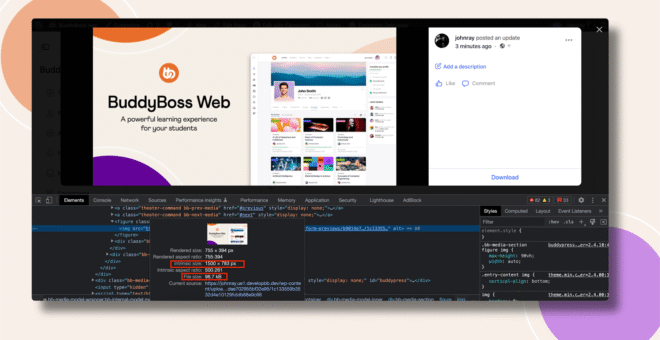
After:
Troubleshooting and FAQs
Q: Existing uploaded images are still compressed.
A: This code only affects images uploaded after the change. Previously uploaded images will remain unchanged.
Q: Will this affect site performance or storage usage?
A: Yes. Retaining original image sizes may increase storage usage and affect page load times, especially on image-heavy sites.
Q: Does this disable WordPress image compression globally?
A: No. This only affects BuddyBoss media uploads. WordPress core image handling remains unchanged.
Q: Can I revert this behavior?
A: Yes. Simply remove the code from functions.php and save the file.
Q: Who can I contact for further assistance?
A: Please review the BuddyBoss Support Policy or consult a developer if you need help optimizing image handling for your site.