
Introduction
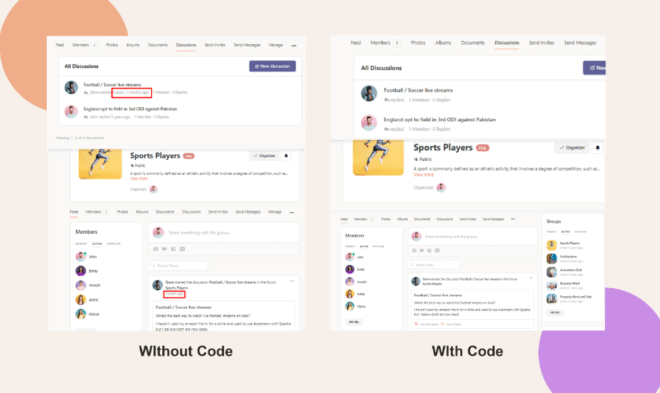
BuddyBoss doesn’t offer a built-in setting to hide the timestamps next to group feed posts or forum replies. If you prefer a cleaner look without dates, you can apply a simple CSS snippet via Theme Options.
Custom Workaround
- In your WordPress admin, go to BuddyBoss > Theme Options.
- Under Custom Codes, toggle Enable CSS to On.
Paste the following CSS:
.bs-forums-items .bs-replied a,

.bp-activity-head .activity-date {

  display: none;

}- Click Save Changes.
Troubleshooting and FAQs
Q: The dates are still visible—what should I check?
A:
- Clear any caching plugin or CDN cache.
- Ensure you pasted the CSS exactly, without extra characters or missing semicolons.
- Verify you enabled Enable CSS before saving.
Q: I only want to hide dates in forums, not activity feeds—can I target just one?
A: Yes. Remove one selector. For forums only, use:
bs-forums-items .bs-replied a {
  display: none;
}
Q: Can I hide other elements similarly?
A: Absolutely. Identify the element’s CSS selector (e.g., via browser inspector) and apply display: none; within the same CSS area.
Q: Will this affect other pages or desktop views?
A: No. This rule only targets forum replies (.bs-replied a) and activity date (.activity-date) elements wherever they appear.
Q: Who can I contact for further assistance?
A: Submit a support ticket via your BuddyBoss account dashboard for personalized help.