
REQUIRES: PRO PLAN OR HIGHER • Last updated: Mar 12, 2026 • ~4 min read
The LearnDash Groups to Social Groups integration allows LearnDash Groups to automatically create and synchronize with BuddyBoss Social Groups. You can control automatic group creation and deletion, default privacy, invite permissions, and how LearnDash leaders and users map to BuddyBoss group roles. This manual walks you through each setting.
Tutorial Video
Accessing the Integration Settings
Navigate to your WordPress Dashboard, go to BuddyBoss > Settings > LearnDash > LearnDash Settings, then locate the LearnDash Groups to Social Groups section.
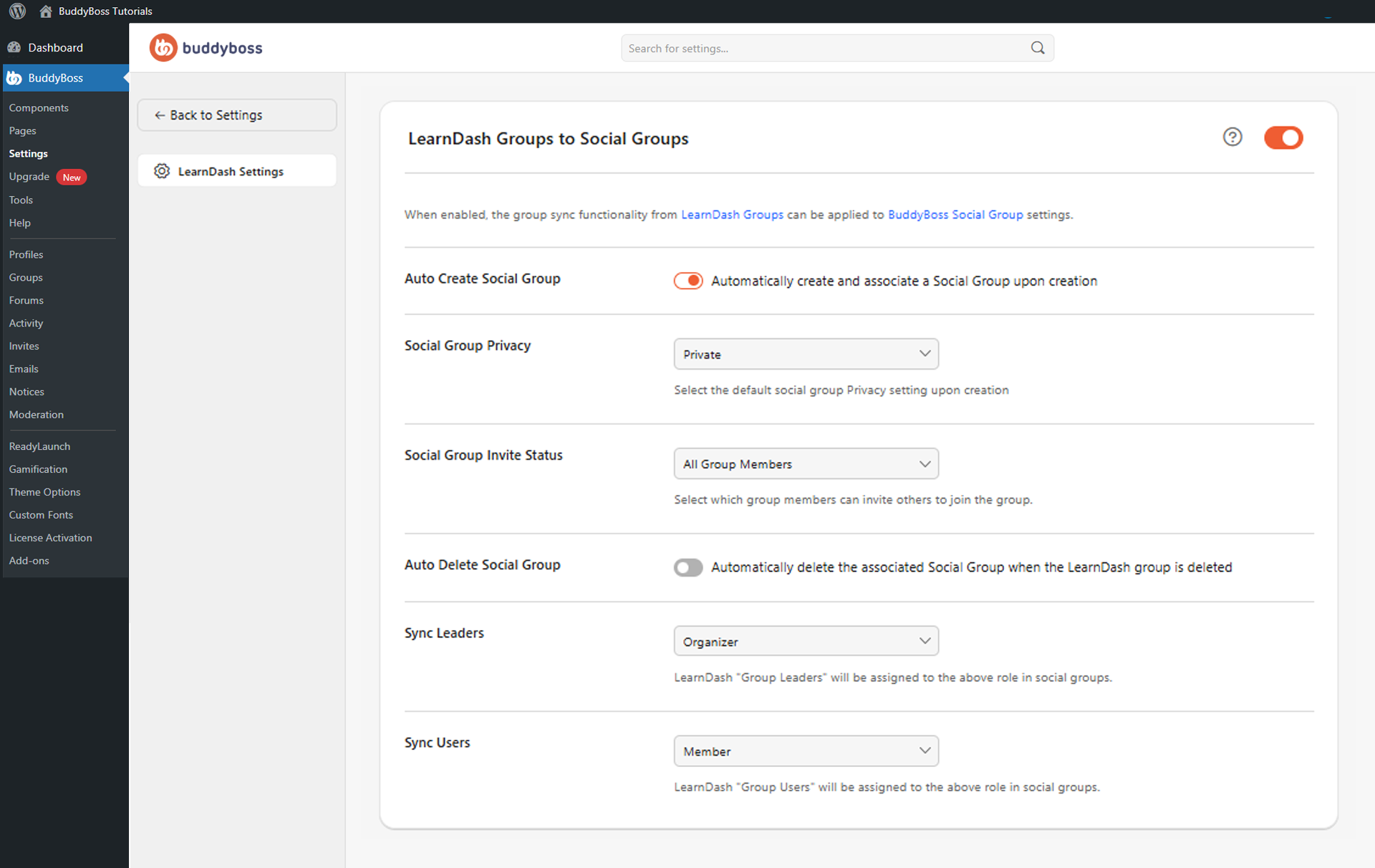
Enable the main toggle to activate the integration.
Integration Settings
Once the integration is enabled, the following options are available:
- Auto Create Social Group: When enabled, a BuddyBoss Social Group is automatically created and linked whenever a new LearnDash Group is created, removing the need to create groups manually.
- Social Group Privacy: Sets the default privacy for auto-created groups – Public, Private, or Hidden. Private or Hidden is recommended for courses and premium communities.
- Social Group Invite Status: Controls who can invite members into synchronized groups – All Group Members, Group organizers and moderators only, or Group organizers only.
- Auto Delete Social Group: When enabled, the linked BuddyBoss Social Group is automatically deleted when its LearnDash Group is deleted. Use carefully — deleted social groups cannot be restored automatically.
- Sync Leaders: Maps LearnDash Group Leaders to a BuddyBoss Social Group role – Organizer, Moderator, Member, or None.
- Sync Users: Maps LearnDash Group Users to a BuddyBoss Social Group role – Organizer, Moderator, Member, or None.
© 2026 BuddyBoss LLC. All Rights Reserved. | buddyboss.com