














Adding BuddyBoss to your Google Play Developer account allows our team to access your app’s settings and assist with essential configurations in Google Play Console. You can add BuddyBoss as a user to your Google Play Developer account by sending an invitation and granting Admin permissions for the selected app.
This access allows our team to assist with configuring in-app purchases, subscriptions, and other supported services for your BuddyBoss App.
Invite BuddyBoss with Admin Access
- Log in to Google Play Console using your Google Play Developer account.
- From the sidebar, navigate to Users and permissions.
- Click Invite new users.
- In the Email address field, enter [email protected].
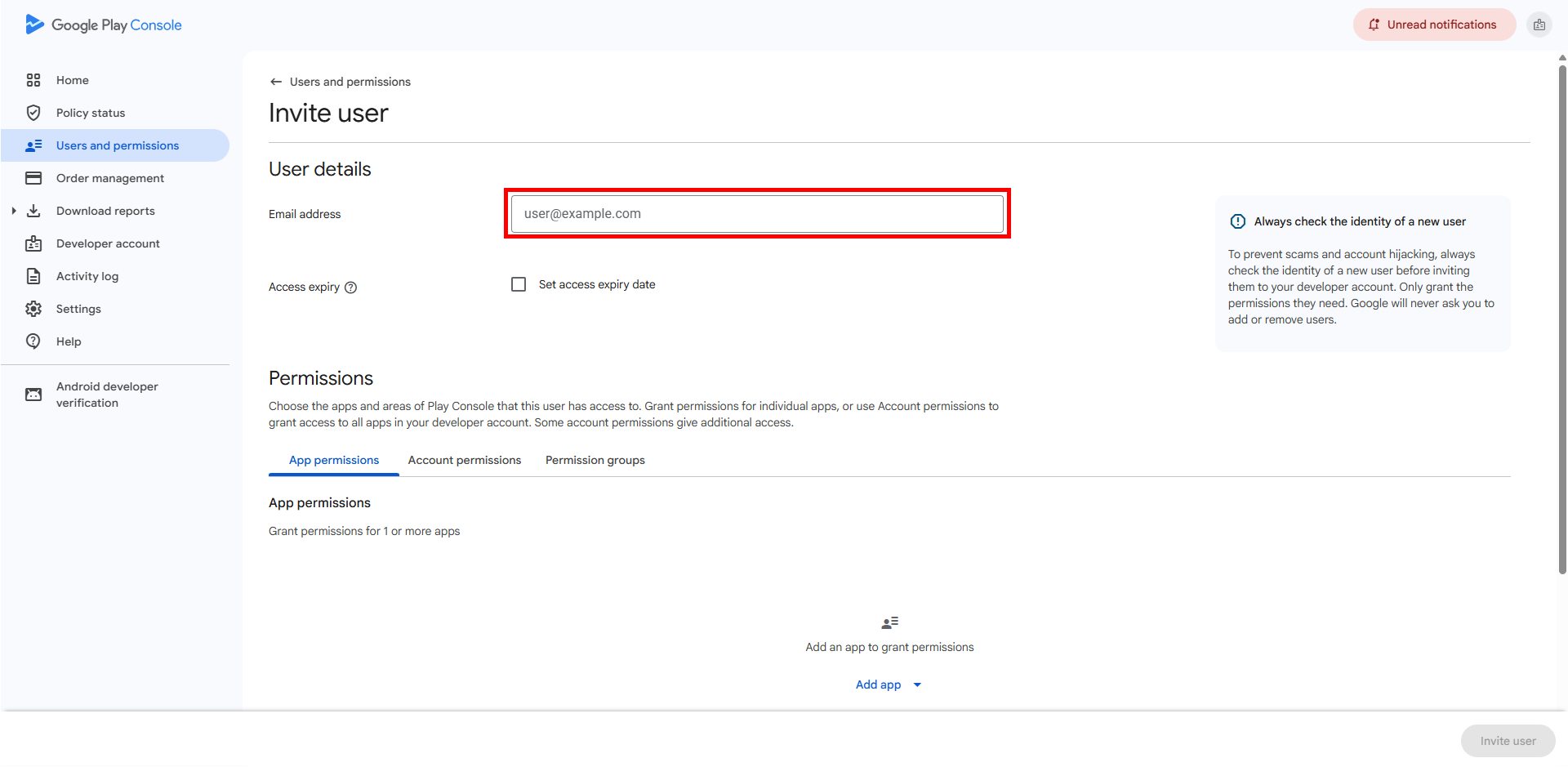
- Make sure Set access expiry date is unchecked.
- Under App permissions, select the app you want BuddyBoss to manage.
- Click Apply.
- In the permissions section, select Admin (all permissions).
- Click Apply to confirm the permissions.
- Click Invite user to send the invitation.
Note: If you have multiple apps that require BuddyBoss assistance, select each applicable app when configuring the permissions.
Once the invitation is sent, BuddyBoss will appear in your Users and permissions list. Our team can accept the invitation to access the selected apps and assist with their configuration.