














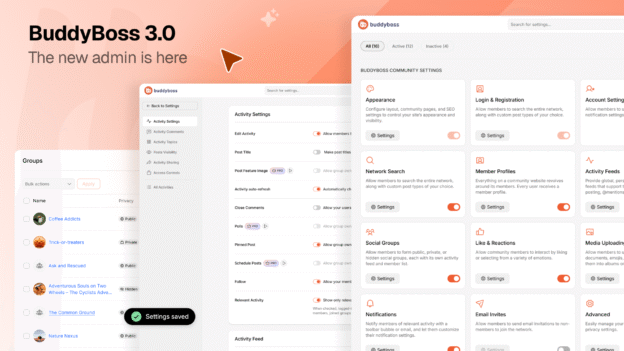
The admin experience, rebuilt. Release 1 of 3: an admin that loads only what you need, finds any setting in seconds, and lays the foundation for everything coming next.
If you have spent any time in the BuddyBoss admin, you have probably wished it were easier. Settings tucked behind sub-menus that grew over five years of features. Toggles your muscle memory eventually learned, but a new team member would still hunt for. Gaps the design never quite closed that you filled in yourself.
Today, the admin you wished for arrives.
BuddyBoss 3.0 is the most significant update to the platform in years, starting with a complete rebuild of the admin experience. The new backend is faster, more organised, and shows you everything BuddyBoss can do in one place. It is Release 1 of 3 in the BuddyBoss 3.0 era: the admin now, the Next Generation BuddyBoss App in late May, and ReadyLaunch in June.
We resolved over 300 issues across the BuddyBoss stack in the past three months. Performance. Stability. Infrastructure. That was the groundwork. This is the first visible result: an admin redesigned around what you actually do, not around what made sense when we first built it in 2019.
Three things define this rebuild. Each one changes how the admin works for you every day.
How to Update
The new admin arrives through a standard plugin update. Here is how to get it:
- Log in to your WordPress dashboard
- Go to Plugins > Updates (or Dashboard > Updates)
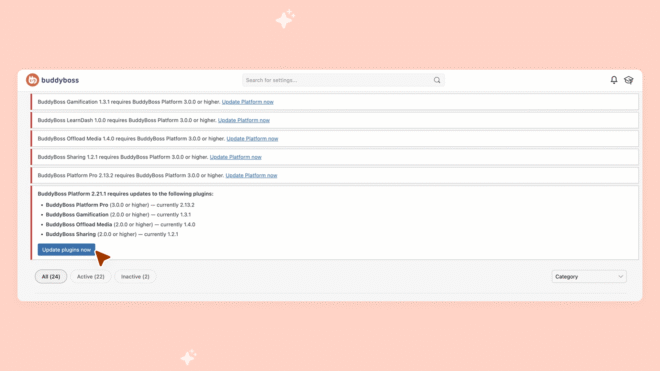
- Update BuddyBoss Platform to version 3.0
- Update the BuddyBoss Theme (recommended for full styling support)
- Update the BuddyBoss LearnDash add-on (required if you use LearnDash)
- Update any other BuddyBoss add-ons (recommended)
Once updated, the new admin loads immediately. No migration. No reconfiguration. Your existing settings carry over exactly as they are.
Using LearnDash? The LearnDash integration has moved from the core platform into a dedicated add-on. After updating to Platform 3.0, go to your BuddyBoss add-ons page and enable the BuddyBoss LearnDash add-on to keep your courses running smoothly. Your existing settings are preserved. Not using LearnDash? No action needed.
Modules That Stay Out of Your Way
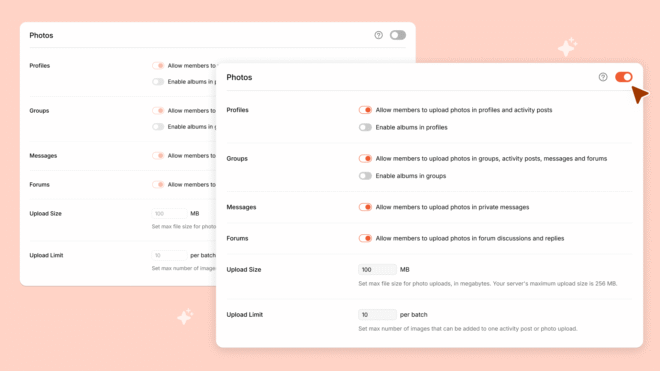
The old admin loaded everything, every time. Every settings page pulled in code for every feature, whether you used it or not. Forums, messaging, courses, notifications, media, groups: all of it loading in the background on every page.
The new admin only loads what you actually use.
If you have forums turned off, the admin no longer loads forum code. If you are not using the media component, it is not running in the background while you configure your courses. Every inactive module stays completely out of the way.
The result: a lighter admin. Pages render faster. Navigation feels snappier. Less server work on every page load. If you are on shared hosting where resources matter most, you will notice the difference immediately.
This is not a visual refresh. It is a structural change. The admin was rebuilt so that turning features off actually turns them off, all the way down to the code that executes when you open a settings page.
The whole admin section is way clearer and a much less daunting user experience. Even if you knew your way around the old menus and sub-menus, training a new team member on where things were was a convoluted experience.
Jody, The Happy Pear

Four Changes You Will Feel Every Day
Beyond the structural improvements under the hood, four everyday changes define what the new admin feels like to use. Three of them solve frictions a customer who has used BuddyBoss for years would name without prompting (we will show you a quote in a moment). The fourth is the smallest change with the largest daily payoff.
Tile-based settings. The old settings pages were long scrolling lists. The new admin organises configuration options as tiles. Each tile represents a feature area, and clicking into one shows you only the settings that belong there. You see your options at a glance. You scan instead of read. You find what you need without committing to a path through three nested menus first.
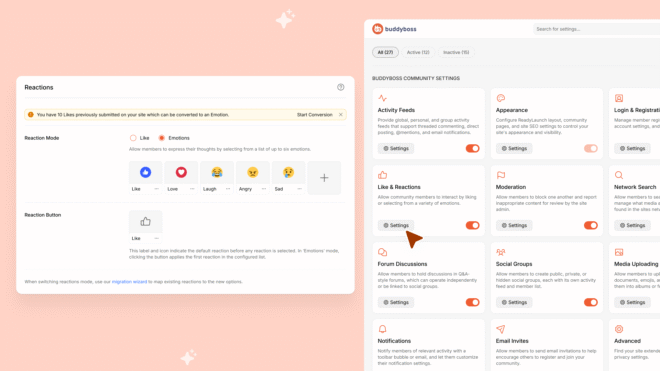
Help in a side panel. When you see a help icon next to a setting, click it. The article opens in a panel on the right side of the screen, on the same page you are configuring. No new tab. No losing your place. No forgetting which setting you were trying to change by the time you find the answer. The help is right there, beside the thing it explains.
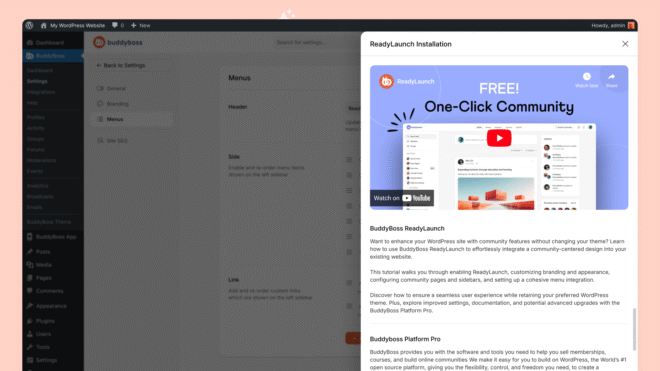
Auto-save. The admin now saves your changes as you make them. No more scrolling to the bottom of a long page to find the Save button. No more losing ten minutes of configuration because you accidentally closed a tab or your browser refreshed. The admin protects your work.
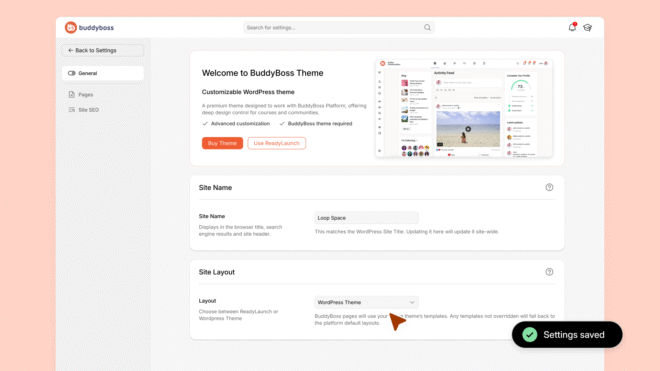
The new tile-focused layout is far more intuitive and eliminates the need for endless scrolling. Help articles that open in a side panel removes the need to constantly toggle browser tabs. Auto-save is a huge quality-of-life improvement that makes updating settings more failsafe.
Desmond, Money$ense

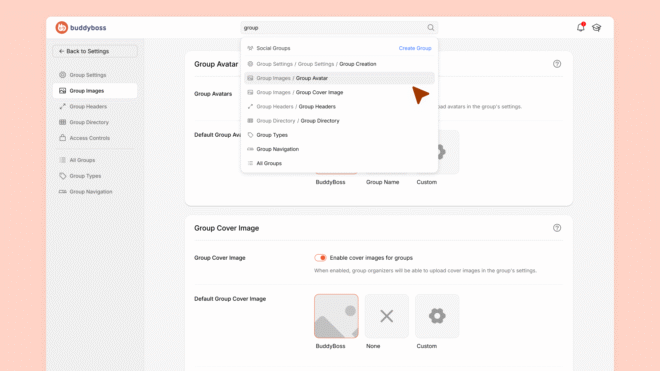
Search that lands you on any BuddyBoss setting. Press the search icon at the top of the admin, type the name of a setting: notifications, registration, group access, course completion. The new global search picks up every BuddyBoss setting page across your site and lands you straight on the one you need.
The Foundation for Everything Coming Next
Here is the question we hear most from customers who already know about the redesign: “Why start with the backend?”
Because every improvement shipping this year arrives through the admin. Every new feature, every capability, every tool you configure for your community: the admin is where you set it up, manage it, and decide how it works. Making the admin faster, more organised, and more capable was the highest-leverage starting point. Not the flashiest. The most useful.
The module system that only loads what you use is not just today’s performance gain. It is the architecture that future features plug into. The tile-based settings layout is not just easier to scan today. It is structured so new capabilities can be added without breaking the visual logic. Every structural choice in this rebuild was made to carry weight beyond this release.
We are calling this the BuddyBoss 3.0 era because that is what it is. The admin is Release 1 of 3. Two more releases follow this month and next. Each one builds on the same foundation: less friction, more control over the platform you build your business on. See the communities built on BuddyBoss.
The admin is where that starts. The part of BuddyBoss you open every day. We rebuilt it first because you use it most.
I love how everything is so organized, no more fumbling through multiple pages. It works incredibly well on mobile as well, allowing you to make changes wherever you are.
Josh, tabifolk

Quick Wins to Try After You Update
After you update to BuddyBoss 3.0, here are five things worth trying in your first five minutes:
- Check the new tile layout. Open Settings. The configuration options are now organised as tiles instead of endless scrolling lists. Scan instead of hunt.
- Explore the options under each tile. Pick a tile that looks interesting. Click in. Notice how much shorter the path is to find what you need.
- Try the admin search. From any admin page, click the search icon at the top. Type any setting you remember from before. Our new global search now lands you on the exact BuddyBoss page that holds it.
- Click a help icon inside the admin. The article opens in a side panel without leaving the page you are configuring. No new tabs. No losing your place.
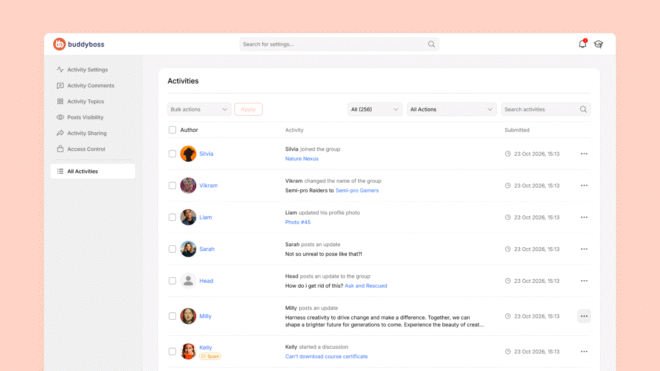
- Check the new activity panel on the left-hand navigation. It has been redesigned to surface what is happening across your community at a glance.
What Is Next in the BuddyBoss 3.0 Era
This is Release 1 of 3.
The BuddyBoss App, rebuilt from the ground up. Faster, cleaner, and designed with dark mode from day one. You will start seeing it as early as next week. Keep an eye on your inbox.
ReadyLaunch. The set-it-and-forget-it path for your community pages on the web. Same settings you already configured, rebuilt on technology that is faster and more performance-friendly than anything else we ship. More details in June.
Each release follows the same direction: less friction, more control.
If you want the full walkthrough, watch the tutorial video below.
Log in and see it for yourself. The new admin is live now.
Frequently Asked Questions
What is BuddyBoss 3.0?
BuddyBoss 3.0 is the platform’s most significant update in years, starting with a rebuilt admin experience. It is Release 1 of 3 in the BuddyBoss 3.0 era: the admin (May 2026), the Next Generation BuddyBoss App (late May), and ReadyLaunch (June).
What changed in the BuddyBoss admin?
Five things. The admin now loads only the modules you use, making pages faster and lighter. Settings are organised as tiles instead of endless lists. Help articles open in a side panel without leaving the page you are configuring. Changes auto-save as you make them, so you never lose work. And WordPress’s native admin search now lands you on any BuddyBoss setting page in seconds, because every setting has its own discoverable page in the new structure.
How do I get the new BuddyBoss admin?
Update the BuddyBoss Platform plugin to version 3.0 in your WordPress dashboard under Plugins, then Updates. The new admin loads immediately. No migration or reconfiguration needed. Updating the BuddyBoss Theme is recommended for full styling support. If you use LearnDash, also update the BuddyBoss LearnDash add-on: it is required for full compatibility with Platform 3.0.
What is coming next in BuddyBoss 3.0?
The Next Generation BuddyBoss App arrives later in May. Rebuilt from the ground up: faster, cleaner, with dark mode from day one. ReadyLaunch follows in June: the set-it-and-forget-it path for your community pages on the web, rebuilt on technology that is faster and more performance-friendly than anything else BuddyBoss ships. Each release builds on the same rebuilt foundation.
Where can I see the full BuddyBoss 3.0 changelog?
The complete technical changelog for each component is available in our release notes archive:
And if something feels right, or something feels off, share your feedback on our roadmap.
Need to compare what each plan unlocks? See what’s included in your plan.
