














Introduction
This article explains how to create an Android Release App build on the BuddyBoss Platform and download the resulting .AAB file. Since August 2021, Google requires new app submissions to include an AAB file. Previously published apps may still use APK files for release builds, but new builds must be in AAB format. Follow these instructions to generate a release build and securely save your .AAB file for distribution.
Create an Android Release Build
- Log into your Dashboard in your WordPress admin.
- Navigate to BuddyBoss App > Build.
- Click on Request Build.
- Select Android as the Platform and Release App as the Build Type.
- Click Next Step, then click Send Build Request.
Download the .AAB File
- Once the build completes, go to Build History.
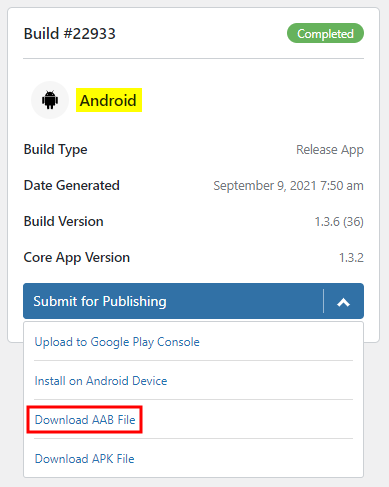
- Click the button on the completed release build to Download AAB File.
- Save this file in a secure location.
Troubleshooting and FAQs
Q: What if I do not see the option to download the .AAB file?
A: This may indicate that your BuddyBoss App plugin is outdated. Update the plugin to the latest version to ensure that the .AAB file download option is available.
Q: Can I still use APK files for release builds?
A: Previously published apps may continue to use APK files for release builds. However, for new app submissions, Google requires an .AAB file.