
Last updated: Mar 12, 2026 • ~3 min read
The Gamification Display Settings control where Points, Ranks, and Achievements appear across your community. You can enable or disable each element independently for member profile headers and the member directory. This manual walks you through each display area.
Accessing Gamification Display Settings
Navigate to your WordPress Dashboard, go to BuddyBoss > Settings > BuddyBoss Gamification.
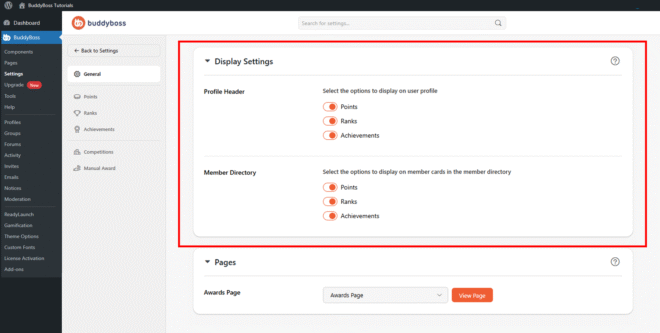
Click General from the left panel, then scroll to the Display Settings section.
Display Settings
Both display areas offer the same three toggles – Points, Ranks, and Achievements. Enable or disable each item independently. Click Save Changes when done.
- Profile Header: Controls which gamification elements appear on individual member profile pages. Displaying these helps members track their progress and increases motivation through visible recognition.
- Member Directory: Controls which gamification elements appear on member cards in the Members Directory, helping visitors quickly identify active or high-ranking members.
© 2026 BuddyBoss LLC. All Rights Reserved. | buddyboss.com