
REQUIRES: PRO PLAN OR HIGHER • Last updated: Mar 12, 2026 • ~4 min read
The Member Moderation settings help maintain a safe community by allowing members to block or report others, automatically suspending users who reach defined thresholds, and notifying administrators when suspensions occur. This manual walks you through each setting.
Tutorial Video
Member Moderation Settings
Navigate to your WordPress Dashboard, go to BuddyBoss > Settings > Moderation > Click Member Moderation.
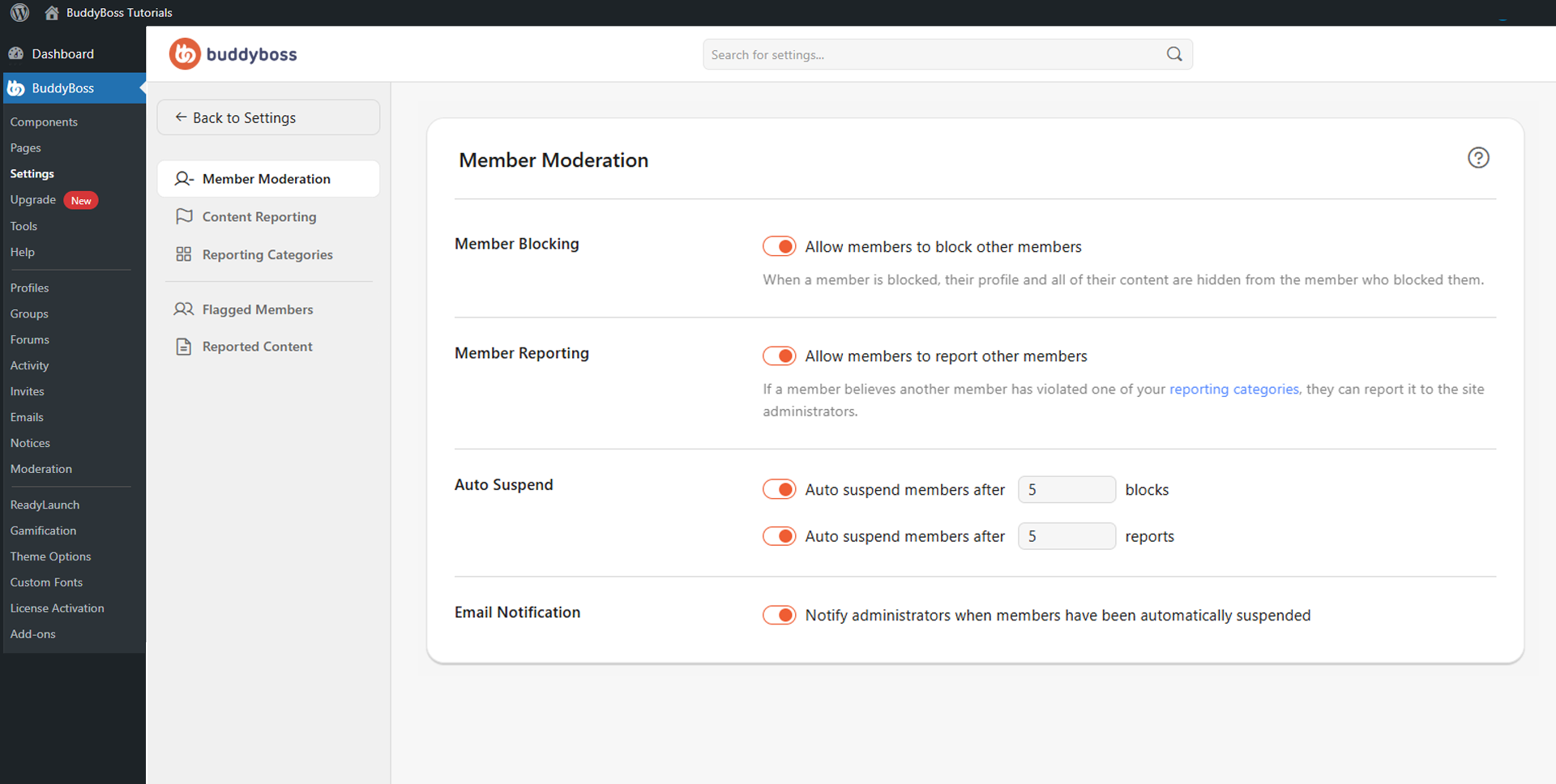
The following settings are available. Click Save Changes when done.
- Member Blocking: Allows members to block other members, hiding their profiles and content from the blocking member.
- Member Reporting: Allows members to report others for violating community rules using your predefined reporting categories.
- Auto Suspend after [X] blocks: Automatically suspends a member once they have been blocked by the number of members you specify.
- Auto Suspend after [X] reports: Automatically suspends a member once they have received the number of reports you specify.
- Email Notification: Notifies administrators by email whenever a member has been automatically suspended, allowing the moderation team to review and take further action.
© 2026 BuddyBoss LLC. All Rights Reserved. | buddyboss.com