
REQUIRES: PRO PLAN OR HIGHER • Last updated: Mar 12, 2026 • ~3 min read
The Profile Search feature enables advanced search functionality within the member directory, allowing members to find others based on specific profile fields such as name, gender, or custom profile data. This manual walks you through enabling profile search and configuring which fields appear in the search form.
Tutorial Video
Accessing Profile Search Settings
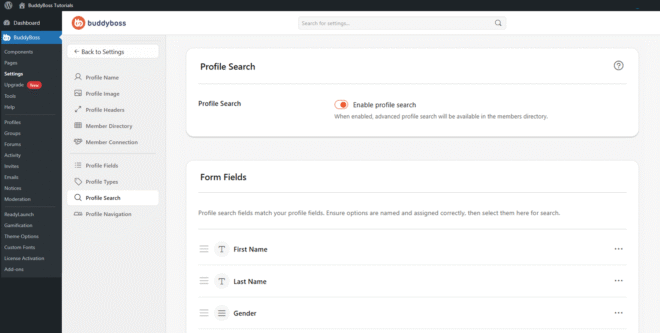
To access these settings, navigate to your WordPress Dashboard, go to BuddyBoss > Settings > Member Profiles, then click Profile Search from the left menu. Toggle Enable profile search on to activate the feature. Once enabled, advanced profile search becomes available in the member directory.
Configuring Search Fields
The Form Fields section lists the profile fields currently included in the search form – for example, First Name, Last Name, and Gender. You can drag and reorder fields to control the order in which they appear in the search form. To add a new field, click Add Field. A popup will open with the following options:
- Select Field: Choose which profile field to add to the search form from the dropdown.
- Label: The name displayed for this field in the search form.
- Description (Optional): Helper text shown to members below the search field.
Click Add Field to save the field to the search form. To edit or remove an existing field, click the three-dot menu next to it and select the appropriate option. Search fields are drawn from your existing Profile Fields, so ensure your profile fields are properly configured before adding them here.
© 2026 BuddyBoss LLC. All Rights Reserved. | buddyboss.com