
REQUIRES: PRO PLAN OR HIGHER • Last updated: Mar 12, 2026 • ~3 min read
The Group Access Controls settings allow you to define who can create and join groups within your community. By assigning permissions based on roles or membership conditions, you can control participation and maintain a structured environment. This manual walks you through each setting.
Tutorial Video
Accessing Group Access Controls
To access these settings, navigate to your WordPress Dashboard, go to BuddyBoss > Settings > Social Groups, then click Access Controls under the Groups section.
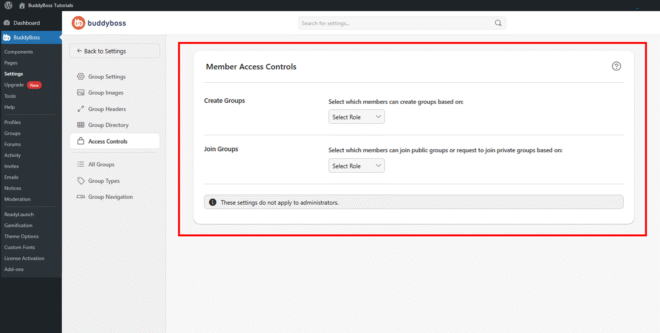
Create Groups and Join Groups
The Create Groups setting determines which members are allowed to create new groups.
The Join Groups setting controls which members can join public groups or request access to private ones. Both settings use the same Select Role dropdown with the following condition types:
- WordPress Role: Restrict access based on user roles such as Subscriber or Editor.
- Profile Type: Limit access based on the member’s assigned BuddyBoss profile type.
- GamiPress: Control access using gamification rules such as achievements or points.
- Membership: Restrict access based on the member’s membership level.
- Gender: Restrict access based on gender profile field values.
© 2026 BuddyBoss LLC. All Rights Reserved. | buddyboss.com