














Introduction
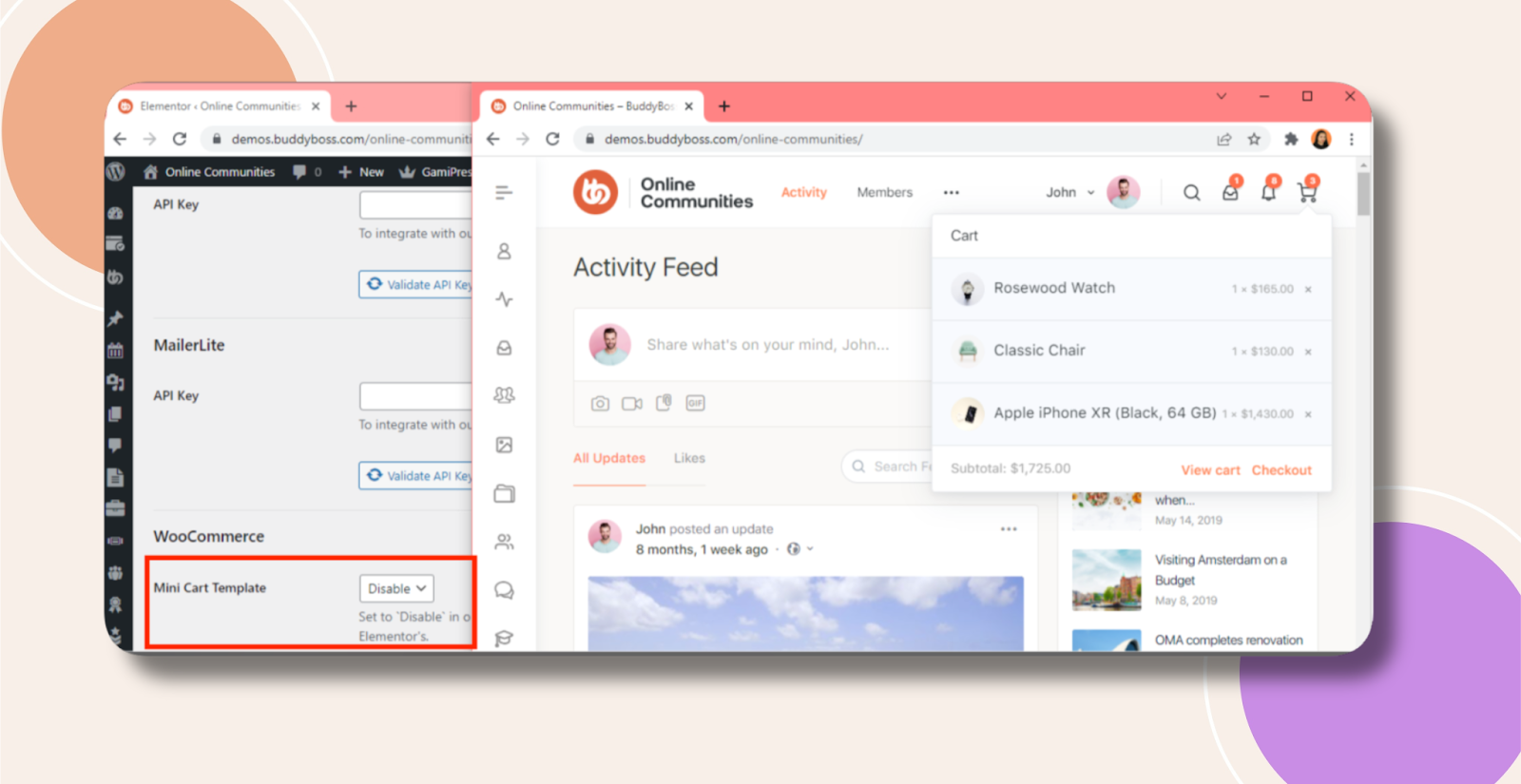
If your Header Mini Cart isn’t appearing or looks different from the demo, it’s usually due to an active Mini Cart template in Elementor’s WooCommerce integration. Disabling or clearing that template restores the default header cart behavior.
How to Resolve
- In your WordPress admin, go to Elementor > System > Integrations.
- Scroll to the WooCommerce section.
- Locate Mini Cart Template.
- Set the Mini Cart Template to Blank or Disable.
- Save your settings and refresh your site to confirm the header cart now matches the demo.
Troubleshooting and FAQs
Q: I still don’t see the mini cart—what now?
A: Clear any cache (Elementor, site, or CDN) and reload the page.
Q: The “Mini Cart Template” option is missing—why?
A: Ensure both Elementor Pro and the WooCommerce integration are installed and activated.
Q: My cart contents aren’t updating—what should I check?
A: Verify your WooCommerce cart widget is placed in the header template and that no caching plugin is serving stale markup.
Q: Can I safely re-enable a custom mini cart template later?
A: Yes—just reverse the above steps to select your template again once you’ve resolved display issues.