














Introduction
Monitoring device logins and app installations is essential for managing user activity on your BuddyBoss App account. You can track which devices have logged in by a specific account and check if users have installed your app. With direct database queries or the built-in Devices tab in user profiles, you’ll gain valuable insights that help you maintain security and optimize user engagement on your BuddyBoss Platform.
Querying the Database Directly
- Log in to your server backend or contact your hosting provider to access your site database.
- Find the table named _bbapp_user_devices. This stores records of all devices that have logged in by user account.
Using the User Profile Devices Tab
- Navigate to the Dashboard > Users > All Users.
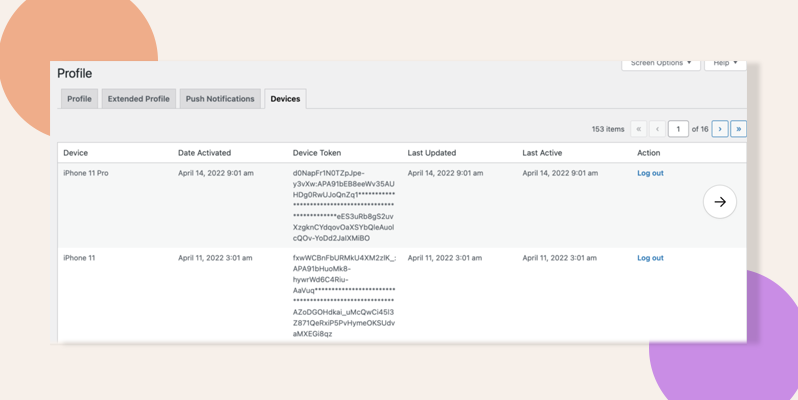
- Click on a user’s profile and select the Devices tab to see all devices that have been used to log in.
- Use the logout option available in the Devices tab to log the user out of all devices if needed.

Troubleshooting and FAQs
Q: What should I do if I cannot access the device records in the database?
A: Ensure that you have the necessary backend access or contact your hosting provider for assistance with accessing your site database.
Q: Can I log out a user from all devices using the BuddyBoss App?
A: Yes. When viewing a user’s profile, click the Devices tab and use the logout option to terminate all active sessions.