












Introduction
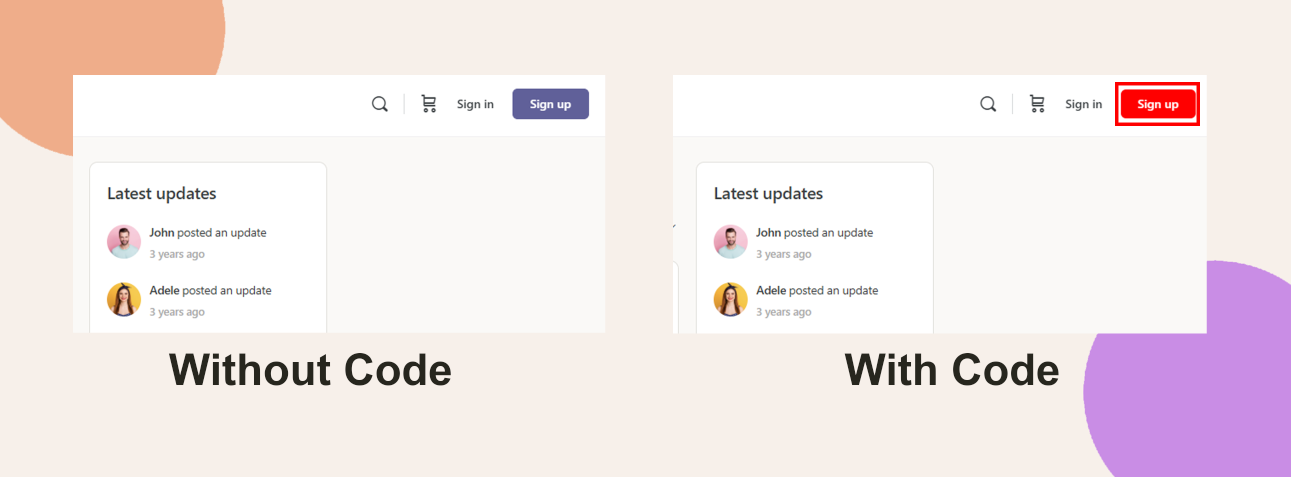
Customizing the Signup button color helps align your site’s call-to-action with your brand palette and improve visual consistency. While BuddyBoss doesn’t include a built-in setting for this, a brief CSS snippet lets you update the button’s background, border, and text color—including its hover state.
Custom Workaround
To change the background and text color of the Signup button:
- In your WordPress Dashboard, go to BuddyBoss > Theme Options.
- Scroll down to the Custom Codes section and toggle Enable CSS.
Append the following CSS code (adjust the color values as needed):
/* Hover state */

.site-header .button.signup:hover {

  background: red;

  border: red;

  color: white;

}- Click Save Changes.
Troubleshooting and FAQs
Q: The button color didn’t change—what should I do?
A: Make sure your CSS was saved properly, and clear any browser or site-level cache. Also, ensure no conflicting CSS is overriding your changes.
Q: Can I use hex codes or RGB values instead of color names?
A: Yes. You can use any valid CSS color format, such as #FF6600 or rgb(255, 102, 0).
Q: Will this affect other buttons on my site?
A: No. This CSS targets only the Signup button in the site header.