










BUDDYBOSS WEB

Your community, courses and memberships on your own website.

BUDDYBOSS APP

Your own branded app on iOS and Android.

DONE FOR YOU

We build, launch and run it for you.

BuddyBoss website and mobile app

Web + App Done For You

$4,999 flat

Web Scale + Done For You Web

App Launch + Done For You App

PRICING

Web Pricing

Launch, Scale and Done For You Web.

From

$199

first year

App Pricing

Solo, Launch and Done For You App.

From

$499

first year

SITE + APP

Web + App Done For You

Your site and your app, built and run for you.

$4,999

flat, never rises

How to Change the Background Color of the Mobile Menu Display

Updated

Introduction

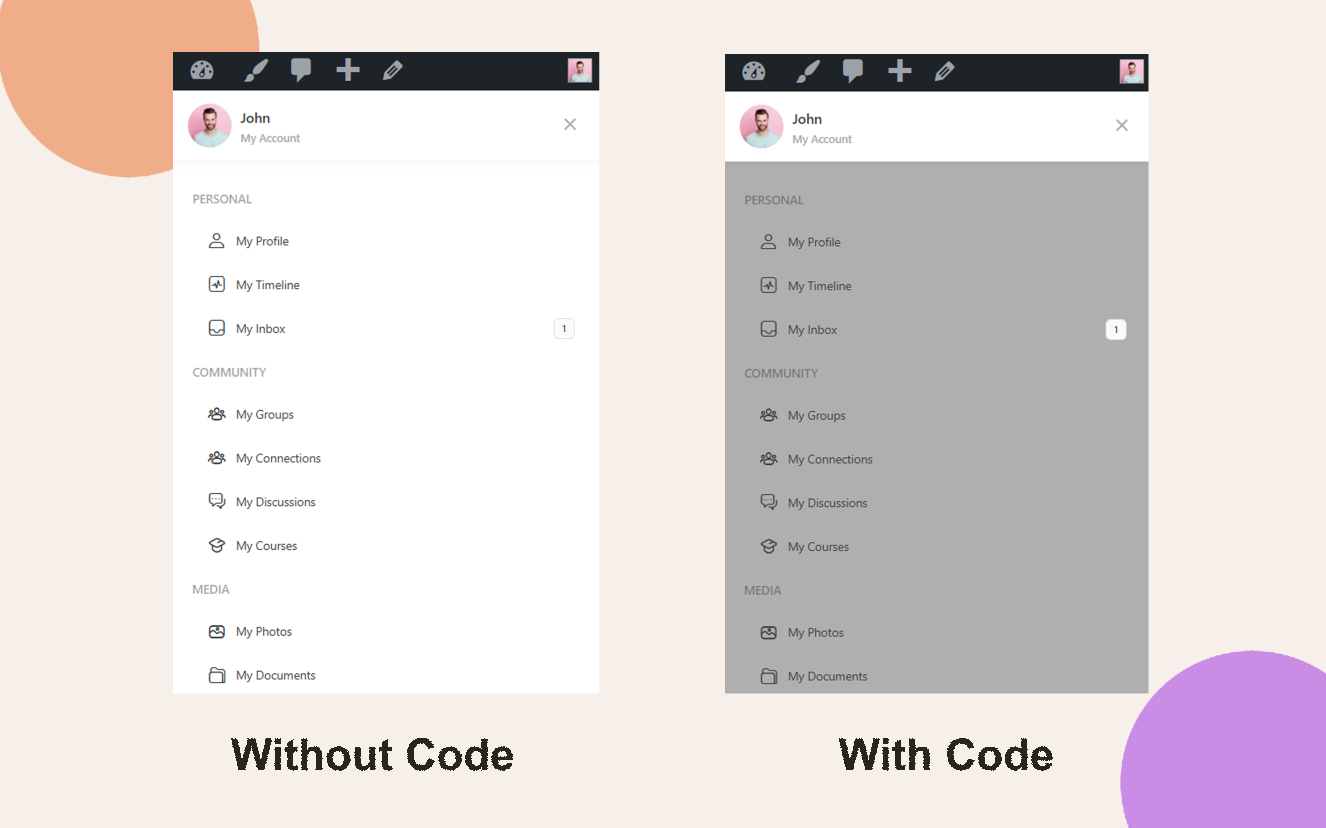
The BuddyBoss mobile menu panel uses the theme’s default background color. You can override this by adding a small CSS snippet in the Theme Options to match your brand or improve readability on mobile devices.

Custom Workaround

  1. Go to BuddyBoss > Theme Options.
  2. Under Custom Codes, Enable CSS.

Append the following CSS:

.bb-mobile-panel-wrapper .bb-mobile-panel-inner {

  background: #AFAFAF;

}
  1. Save Changes.

Note: Any modifications are considered “custom work.” You may review our Support Policy for details.

Troubleshooting and FAQs

Q: The mobile menu background didn’t update—what should I check?
A: Clear any site, CDN, or browser cache. Also verify your device is in a mobile viewport (under 768px width) when testing.

Q: Can I use a gradient or image instead of a solid color?
A: Yes—just replace the background property with a gradient (e.g., linear-gradient(…)) or background-image: url(…).

Q: How do I revert this change?
A: Remove or comment out the CSS snippet from Custom Codes and save the Theme Options.

Was this article helpful?

Subscribe to Our Newsletter

This field is for validation purposes and should be left unchanged.
This field is hidden when viewing the form

Can’t find the answer you’re looking for?

Our support team is here to help with anything the docs don’t cover.