














Introduction
Activating your BuddyBoss license key ensures your site receives product updates, security improvements, and access to premium features included in your BuddyBoss products. The activation process is quick and requires only your license key and the BuddyBoss account email associated with your subscription. This guide walks you through how to locate your license key and activate it inside your WordPress Dashboard.
Locate Your BuddyBoss License Key
- Log into https://buddyboss.com/.
- Go to Your Account.
- Open the Subscriptions tab.
- Select the Subscription that you want to retrieve the license key.
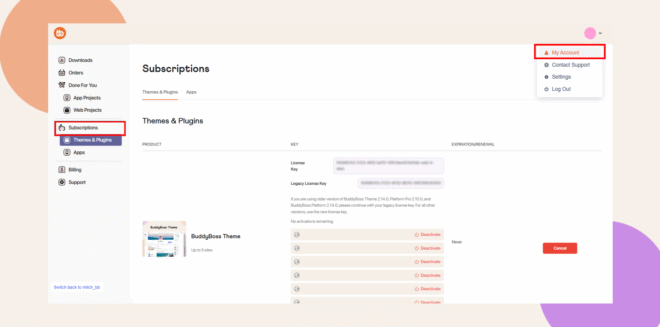
- Copy your License Key.
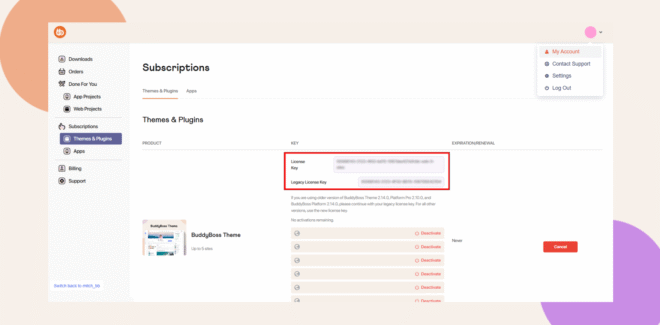
Activate Your License Key in WordPress
- In your WordPress Dashboard, go to BuddyBoss > License Activation.
- Paste your License Key.
- Enter your BuddyBoss account email.
- Click Update License.
A message confirmation about your license activation will show. Your site will receive updates automatically.
Troubleshooting and FAQs
Q: Why is my license key invalid?
A: Ensure the key and email match those in your BuddyBoss account. Also confirm whether you should use a legacy or new license key based on your product versions.
Q: My license shows expired. What should I do?
A: Re-enter the license key and email, then click Update License again.
Q: Can I use the license on multiple sites?
A: This depends on your subscription. Check your plan details under the Subscriptions tab.
Q: Updates are not showing after activation.
A: Clear your cache and reload the Plugins page.
Q: Where can I find my BuddyBoss account email?
A: It’s the email you use to log in at BuddyBoss.com.