














Introduction
The Groups tab in a BuddyBoss user profile is visible to all visitors, including logged-out users. If you want to limit profile navigation and prevent logged-out users from accessing the Groups tab, you can do so by adding a small custom function to your active theme. This tutorial walks you through how to disable the Group tab in the user profile for logged-out users.
Custom Workaround
Note: Any modifications are considered custom work. Please review the BuddyBoss Support Policy before proceeding.
Before proceeding, make sure you have a complete site backup.
- Go to Appearance > Theme Editor in your WordPress admin dashboard.
- Under Select theme to edit, choose your active theme (preferably BuddyBoss Child Theme), then click Select.
- From the Theme Files list, click Theme Functions (functions.php).
- Paste the following code just before the closing PHP tag (?>):
function bb_remove_groups_tab_for_visitors() {
    if ( is_user_logged_in() ) {
        return;
    }
    bp_core_remove_nav_item( 'groups' );
}
add_action( 'bp_ready', 'bb_remove_groups_tab_for_visitors' );
- Click Update File to save your changes.
Once applied, the Groups tab will no longer appear in user profiles when viewed by logged-out visitors.
Screenshots
Logged in:
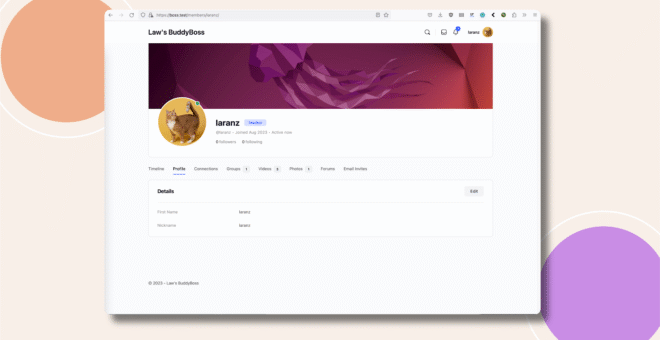
Logged out:
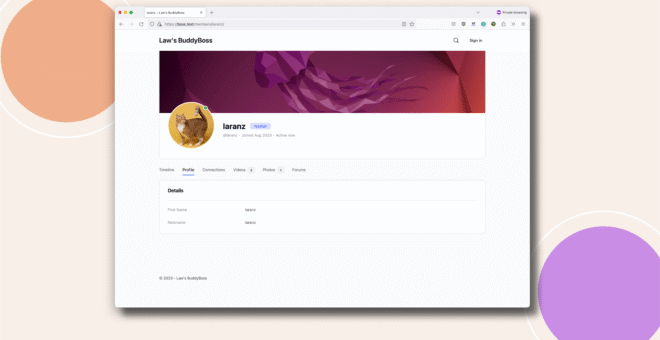
Troubleshooting and FAQs
Q: The Groups tab is still visible for logged-out users.
A: Make sure the code is added to the active theme’s functions.php file and clear any site or browser cache. Also confirm that no other custom code or plugin is re-adding the Groups tab.
Q: Will this hide the Groups tab for logged-in users as well?
A: No. Logged-in users will continue to see the Groups tab normally.
Q: Does this prevent logged-out users from accessing groups entirely?
A: No. This only removes the Groups tab from the user profile navigation. Group visibility still depends on your site’s privacy and access settings.
Q: How can I revert this change?
A: Simply remove the added code from functions.php and save the file.