














Introduction
Starting with iOS 16.0, Apple introduced Developer Mode as a security feature to ensure users explicitly consent before installing and running apps outside the App Store. Without enabling Developer Mode, side-loaded or locally built test apps (for example, via Xcode or enterprise distribution) will refuse to launch—even after successful installation.
This guide explains why Developer Mode is required, how to turn it on, and how to troubleshoot common issues so you can continue developing and testing your iOS applications.
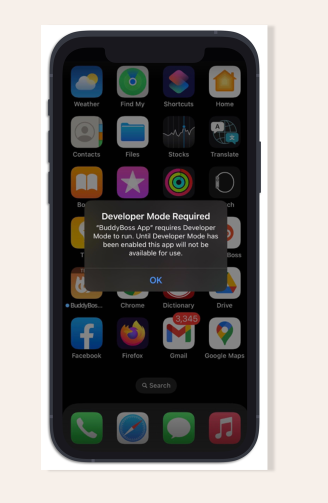
Explore BuddyBoss Platform | BuddyBoss App | BuddyBoss Pricing | Try BuddyBoss Demo
How to Turn On Developer Mode
- Open Settings on your iPhone.
- Scroll down and tap Privacy & Security.
- Tap Developer Mode, then toggle it On.
- When prompted, tap Restart to reboot your device and activate Developer Mode.

Troubleshooting and FAQs
Q: My device doesn’t show “Developer Mode” in Settings. What should I do?
A: Ensure your device is running iOS 16.0 or later.
Q: I enabled Developer Mode but the test app still won’t run.
A: After rebooting, verify that Developer Mode is still toggled on.
Q: Is Developer Mode required for TestFlight builds?
A: No. TestFlight-distributed apps are signed by Apple and installed through the App Store infrastructure; they do not require Developer Mode.
Explore BuddyBoss Platform | BuddyBoss App | BuddyBoss Pricing | Try BuddyBoss Demo