BUDDYBOSS WEB

Your community, courses and memberships on your own website.

BUDDYBOSS APP

Your own branded app on iOS and Android.

DONE FOR YOU

We build, launch and run it for you.

BuddyBoss website and mobile app

Web + App Done For You

$4,999 flat

Web Scale + Done For You Web

App Launch + Done For You App

PRICING

Web Pricing

Launch, Scale and Done For You Web.

From

$199

first year

App Pricing

Solo, Launch and Done For You App.

From

$499

first year

SITE + APP

Web + App Done For You

Your site and your app, built and run for you.

$4,999

flat, never rises

Why Do My LearnDash Videos Not Have the Play/Pause Button?

Updated

Introduction

If your LearnDash lesson videos are missing the play/pause button, it is likely because the video control setting is disabled. This setting must be turned on for each individual lesson.

How to Enable the Play/Pause Button

  1. Log in to your WordPress Admin Dashboard.
  2. Navigate to LearnDash LMS > Lessons.
  3. Click Edit next to the lesson where you want to enable video controls.
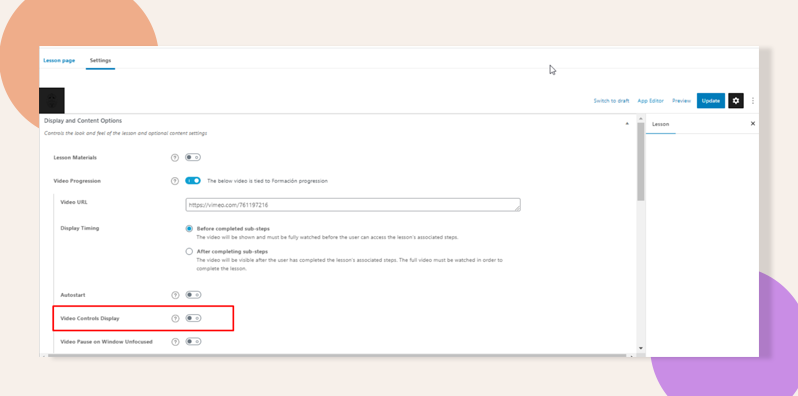
  4. Scroll to the Settings tab within the lesson editor.
  5. Find the Display and Content Options section.
  6. Enable the Video Control Display toggle.
  7. Click Update to save your changes.

Once enabled, the play/pause button should appear on the video for learners.

Troubleshooting & FAQs

Q: Do I need to enable this for each lesson individually?
A: Yes. LearnDash requires the setting to be manually toggled per lesson where video playback controls are needed.

Was this article helpful?

Subscribe to Our Newsletter

This field is for validation purposes and should be left unchanged.
This field is hidden when viewing the form

Can’t find the answer you’re looking for?

Our support team is here to help with anything the docs don’t cover.