














Introduction
Build Error Code E001 with the message “Unable to generate build with the provisioning profile provided” indicates that the provisioning profile used for signing your iOS app is invalid or out of sync. Follow these steps to delete the old profile settings in the BuddyBoss App plugin, regenerate fresh profiles, and then rebuild your app successfully.
Delete Existing Provisioning Profiles
- In WordPress, go to BuddyBoss App > Configure > iOS Settings.
- Scroll to the Provisioning Profiles section.
- Untick Automatically generate provisioning profiles and click Save Changes.
- Scroll back down and click the ✕ next to each listed provisioning profile to delete them.
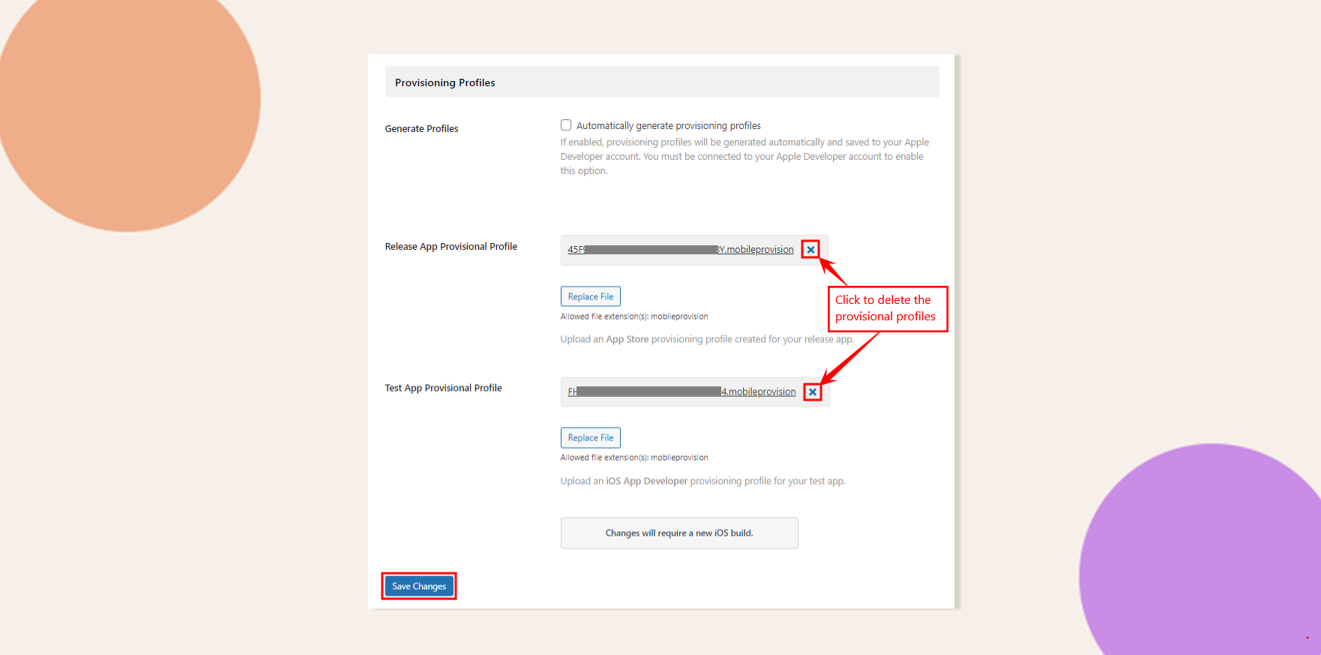
- Click Save Changes again to confirm removal.
Re-enable Automatic Provisioning Profiles
- On the same iOS Settings page under Provisioning Profiles, tick Automatically generate provisioning profiles.
- Click Save Changes to trigger generation of new, valid provisioning profiles.
Do I Need to Generate a New Build?
Yes. You must create a new iOS build so that the updated provisioning profile settings are embedded in your app.
Troubleshooting and FAQs
Q: I still see E001 after regenerating profiles.
A: Verify that your Apple Developer account credentials in BuddyBoss App > Configure > iOS Settings are correct and have the necessary team permissions. Clear any plugin or server caches before rebuilding.
Q: The “Automatically generate provisioning profiles” option is missing.
A: Ensure you’re using the latest BuddyBoss App plugin version and have access to iOS Settings under Configure. Update the plugin if needed.
Q: How can I confirm the new profiles are active?
A: After saving changes, refresh the iOS Settings page—the newly generated profiles should appear without errors.