














Last updated: Mar 12, 2026 • ~4 min read
The Activity Settings control how the Activity Feed functions across your community. You can manage posting behavior, editing permissions, and engagement features like polls, pinned posts, and follows. This manual walks you through each setting.
Accessing Activity Settings
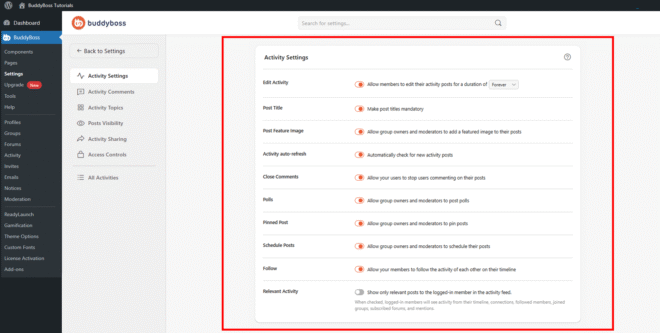
To access these settings, navigate to your WordPress Dashboard, go to BuddyBoss > Settings > Activity Feed, then click Activity Settings from the left menu.
Posting Options
These settings control how activity posts are created and managed across the feed:
- Edit Activity: Allow members to edit their activity posts after publishing. Select a duration to control how long edits are permitted (e.g., Forever or a limited time window).
- Post Title: Make post titles mandatory for all activity posts.
- Post Feature Image: Allow group owners and moderators to add a featured image to their activity posts.
- Close Comments: Allow members to stop others from commenting on their own posts.
- Pinned Post: Allow group owners and moderators to pin important posts to the top of the feed.
- Schedule Posts: Allow group owners and moderators to schedule posts to go live at a future date and time.
Engagement Features
These settings drive member interaction and personalize the activity experience:
- Activity Auto-Refresh: Automatically check for and load new activity posts without requiring a page refresh.
- Polls: Allow group owners and moderators to post polls in the activity feed.
- Follow: Allow members to follow each other and track their activity updates on their timeline.
- Relevant Activity: Show only content relevant to the logged-in member in the activity feed – including activity from their timeline, connections, followed members, joined groups, subscribed forums, and mentions.
© 2026 BuddyBoss LLC. All Rights Reserved. | buddyboss.com