
REQUIRES: PRO PLAN OR HIGHER • Last updated: Mar 12, 2026 • ~3 min read
The Activity Topics feature allows you to organize Activity Feed posts into categories, helping members quickly identify the purpose of a post – such as announcements, content, or discussions. You can enable the feature, require topic selection, and manage the available topics and their posting permissions. This manual walks you through each option.
Tutorial Video
Accessing Activity Topics Settings
To access these settings, navigate to your WordPress Dashboard, go to BuddyBoss > Settings > Activity Feed, then click Activity Topics from the left menu.
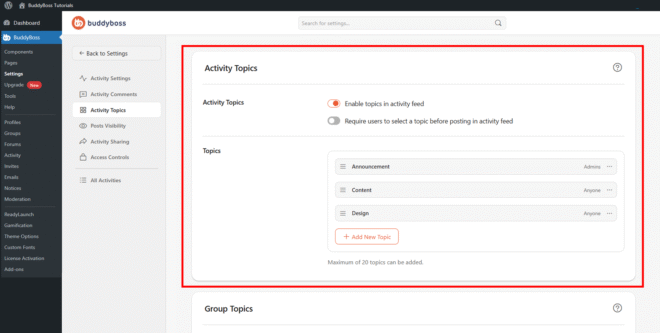
Enabling Activity Topics
Toggle Enable topics in activity feed on to activate the feature. When enabled, members will see a topic selector when creating posts in the Activity Feed. You can also enable Require users to select a topic before posting in activity feed to ensure all posts are categorized, making content easier to filter and manage across your community.
Managing Topics
The Topics section lists all existing topics and lets you create new ones. Click Add New Topic to open the creation form. Enter a name in the Topic Name field, then use the Posting Permissions setting to control who can assign this topic to their posts. Select Anyone to allow all members to use the topic, or Admins to restrict it to administrators only. Click Add Topic to save.
You can drag and reorder topics using the handle icon to control the order in which they appear in the Activity Feed topic selector. To edit or remove an existing topic, click the three-dot menu next to it and select Edit or Delete. A maximum of 20 topics can be created.
© 2026 BuddyBoss LLC. All Rights Reserved. | buddyboss.com