














REQUIRES: PRO PLAN OR HIGHER • Last updated: Mar 12, 2026 • ~2 min read
The Connection Access settings control which members are permitted to send connection requests within your community. By assigning permissions based on user roles, you can manage how connections are initiated and ensure interactions align with your platform’s structure and privacy requirements. This manual walks you through the configuration.
Accessing Connection Access Settings
To access these settings, navigate to your WordPress Dashboard, go to BuddyBoss > Settings > Member Profiles, click Member Connection from the left menu, then scroll to the Connection Access section.
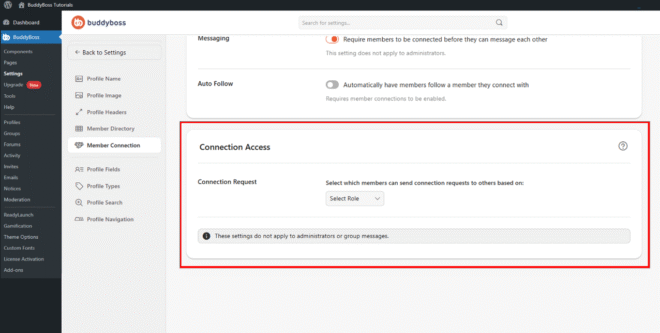
Connection Request
The Connection Request dropdown lets you select which user roles are permitted to send connection requests on your site. Use the Select Role dropdown to assign the appropriate roles. These settings do not apply to administrators or group messages.
© 2026 BuddyBoss LLC. All Rights Reserved. | buddyboss.com