
REQUIRES: PRO PLAN OR HIGHER • Last updated: Mar 12, 2026 • ~3 min read
The Connection Settings control how members connect, communicate, and follow each other within your BuddyBoss community. You can enable member connections, restrict messaging to connected members only, and configure auto-follow behavior. This manual walks you through each setting.
Tutorial Video
Accessing Connection Settings
To access these settings, navigate to your WordPress Dashboard, go to BuddyBoss > Settings > Member Profiles, then click Member Connection from the left menu.
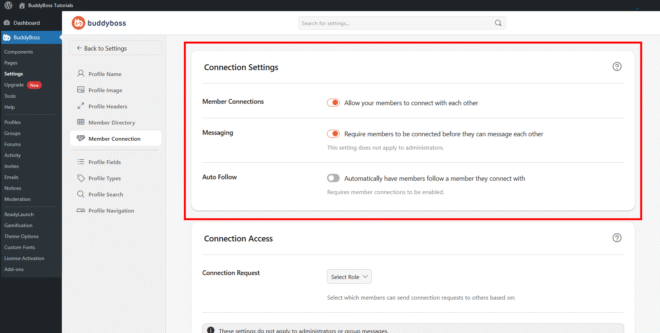
Member Connections
The Allow your members to connect with each other toggle activates the connection system across your site. When enabled, members can send and receive connection requests, building relationships within your community. The settings below – messaging restrictions and auto-follow – depend on this toggle being on.
Messaging Restrictions
The Require members to be connected before they can message each other toggle restricts private messaging to connected members only. When enabled, members must first establish a connection before sending direct messages. This is useful for reducing unwanted contact and keeping communication within your community’s social graph. This restriction does not apply to administrators.
Auto Follow
The Automatically have members follow a member they connect with toggle ensures that when two members connect, they automatically follow each other’s activity as well. This keeps connected members updated on each other’s posts and activity without requiring a separate follow action. This option requires Member Connections to be enabled.
© 2026 BuddyBoss LLC. All Rights Reserved. | buddyboss.com