














REQUIRES: PRO PLAN OR HIGHER • Last updated: Mar 12, 2026 • ~4 min read
The Network Search settings control which community content types are included in global search results across your site. You can enable searching for members, forums, groups, photos, videos, documents, and activity posts, and select exactly which member fields and sub-types are searchable. This manual walks you through each content area.
Tutorial Video
Accessing Network Search Settings
To access these settings, navigate to your WordPress Dashboard, go to BuddyBoss > Settings, then click Network Search from the left menu.
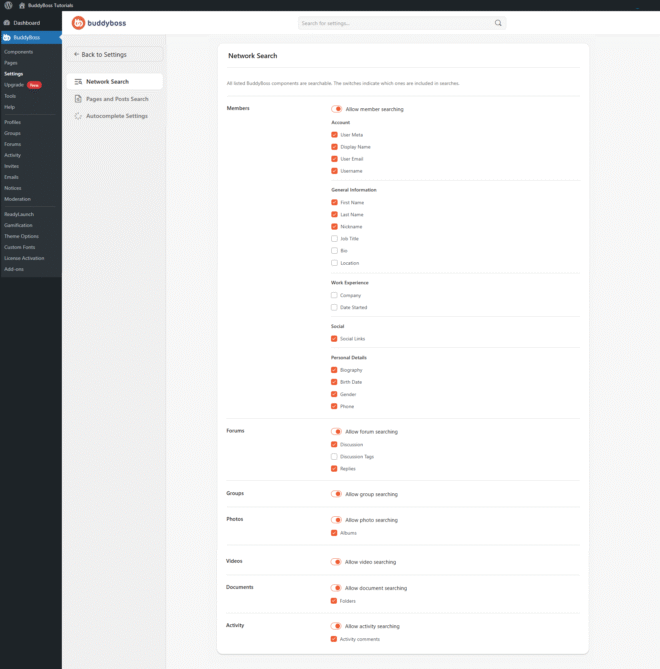
Searchable Content Types
Toggle each content type on or off to control what appears in network search results.
- Members: Enable member searching and select which profile fields are included in results – Account fields (Display Name, User Email, Username), General Information (First Name, Last Name, Bio, Location), Work Experience (Company), Social links, and Personal Details (Gender, Phone, Birth Date).
- Forums: Enable forum searching and choose which sub-types are included – Discussions, Discussion Tags, and Replies.
- Groups: Enable searching across public group content.
- Photos: Enable photo searching, with an option to also include photo albums in results.
- Videos: Enable searching across uploaded videos.
- Documents: Enable document searching, with an option to also include document folders in results.
- Activity: Enable activity feed searching, with an option to also include activity comments in results.
© 2026 BuddyBoss LLC. All Rights Reserved. | buddyboss.com