














REQUIRES: PRO PLAN OR HIGHER • Last updated: Mar 12, 2026 • ~3 min read
The Pages & Posts Search settings control which WordPress content types are included in global search results across your site. You can enable searching for blog posts, pages, media, and custom post types, and select which taxonomies and metadata are included for more relevant results. This manual walks you through each content area.
Tutorial Video
Accessing Pages & Posts Search Settings
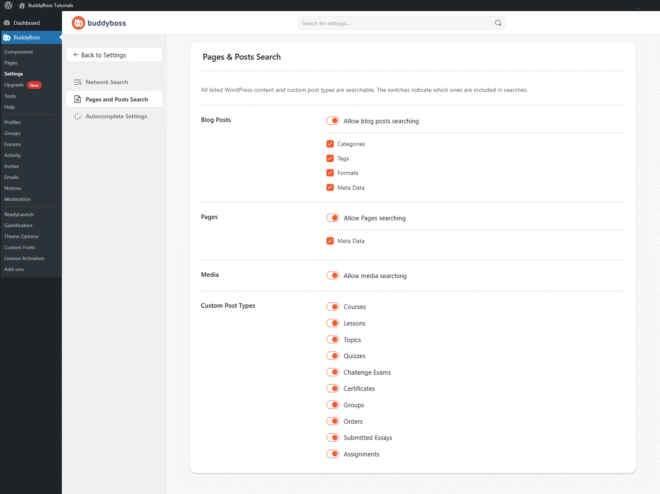
To access these settings, navigate to your WordPress Dashboard, go to BuddyBoss > Settings > Network Search, then click Pages & Posts Search from the left menu.
Searchable Content Types
Enable each content type to include it in search results.
- Blog Posts: Enable blog post searching and optionally include Categories, Tags, Formats, and Meta Data to improve search accuracy.
- Pages: Enable page searching and optionally include Meta Data to make custom field content searchable.
- Media: Allows uploaded files from the WordPress Media Library to appear in search results.
- Custom Post Types: Enable individual custom post types to include them in search. Available types depend on installed plugins – common examples include Courses, Lessons, Topics, Quizzes, Certificates, Groups, Orders, and Assignments from plugins such as LearnDash or WooCommerce.
© 2026 BuddyBoss LLC. All Rights Reserved. | buddyboss.com