
REQUIRES: PRO PLAN OR HIGHER • Last updated: Mar 12, 2026 • ~3 min read
The Profile Type Redirects settings allow you to define custom login and logout redirect behavior for each member type on your site. This lets you guide specific user groups – such as Students, Teachers, or Coaches – to relevant pages based on their role, overriding the global redirect settings for those profile types. This manual walks you through the configuration.
Tutorial Video
Accessing Profile Type Redirect Settings
To access these settings, navigate to your WordPress Dashboard, go to BuddyBoss > Settings > Login & Registration, click Login Redirects from the left menu, then scroll to the Profile Type Redirects section.
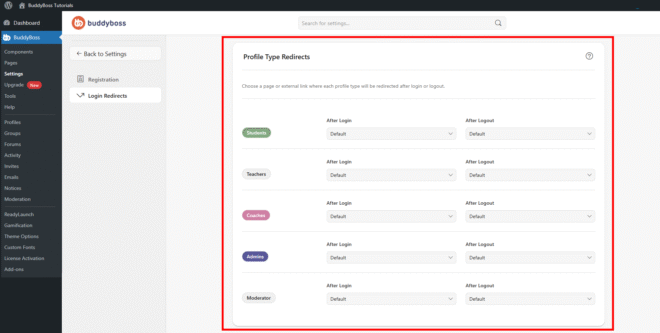
Configuring Redirects by Profile Type
Each profile type on your site – such as Students, Teachers, Coaches, Admins, or Moderators – has its own After Login and After Logout dropdown. For each profile type, select from the three available redirect options:
- Default: Uses the global redirect behavior set in the Login Redirects settings above.
- Custom Page: Select a specific page on your site to redirect this profile type to.
- Custom URL: Enter a custom external link to redirect this profile type to.
Configure the After Login and After Logout dropdowns for each profile type, then click Save Changes to apply.
© 2026 BuddyBoss LLC. All Rights Reserved. | buddyboss.com