
REQUIRES: PRO PLAN OR HIGHER • Last updated: Mar 12, 2026 • ~3 min read
The Registration Restrictions settings allow you to control who can register on your site by restricting or allowing specific email domains and addresses. This helps limit access to your community, improve security, and ensure only approved users can create accounts. This manual walks you through configuring domain and email restrictions.
Tutorial Video
Accessing Registration Restrictions
To access these settings, navigate to your WordPress Dashboard, go to BuddyBoss > Settings > Login & Registration, click Registration from the left menu, then scroll to the Registration Restrictions section.
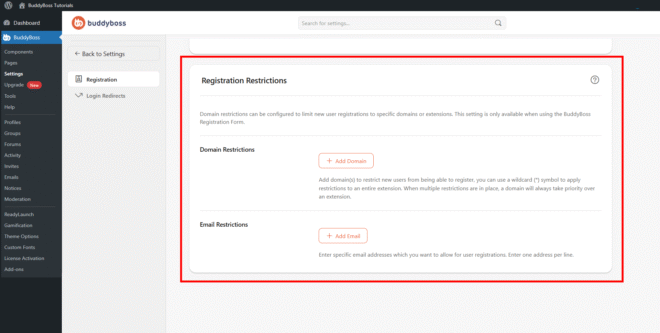
Domain Restrictions
The Domain Restrictions section lets you block registrations from specific email domains or extensions. Click Add Domain and enter the domain or extension you want to restrict. You can use a specific domain such as gmail.com to block all registrations from that provider, or a wildcard such as *.edu to apply the restriction to all addresses under that extension. When multiple restrictions are added, a specific domain takes priority over a broader wildcard extension.
Email Restrictions
The Email Restrictions section lets you specify individual email addresses that are permitted to register on your site. Click Add Email and enter the specific email address you want to allow, adding one address per line. Only the email addresses listed here will be able to complete registration.
© 2026 BuddyBoss LLC. All Rights Reserved. | buddyboss.com