













REQUIRES: PRO PLAN OR HIGHER • Last updated: Mar 12, 2026 • ~4 min read
The Registration settings control how new users sign up for your BuddyBoss community. You can enable or disable registration, choose the form type, add validation options, and configure social login providers. This manual walks you through each setting area.
Tutorial Video
Accessing Registration Settings
To access these settings, navigate to your WordPress Dashboard, go to BuddyBoss > Settings > Login & Registration, then click Registration from the left menu.
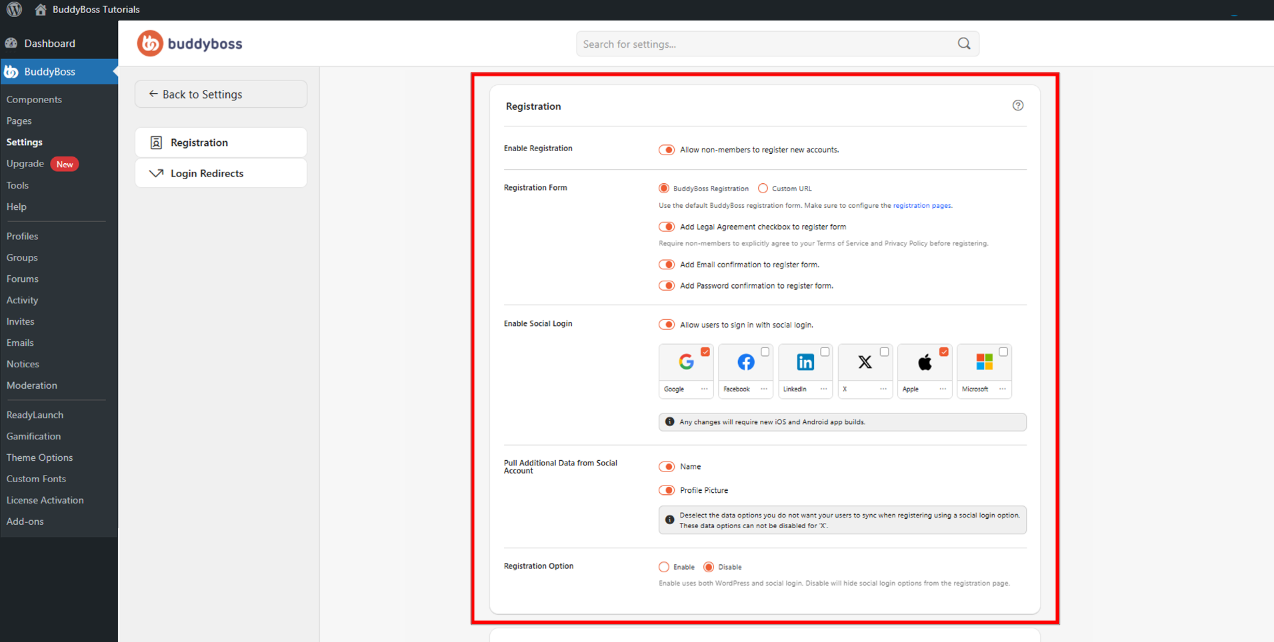
Enable Registration
Toggle Allow non-members to register new accounts on to open your site to new registrations. When disabled, only administrators can create accounts and the registration page will not be accessible to visitors.
Registration Form Type
The Registration Form setting determines where and how new members sign up. Select from two options:
- BuddyBoss Registration: Uses the default BuddyBoss registration form built into your site.
- Custom URL: Redirects new users to a custom or external registration page. Enter your custom URL in the field that appears when this option is selected.
Registration Form Options
These toggles add extra fields and validation steps to the registration form to improve security and ensure accurate sign-ups:
- Add Legal Agreement checkbox to register form: Requires new members to accept your terms before they can complete registration.
- Add Email confirmation to register form: Adds a second email field that members must match to validate their address.
- Add Password confirmation to register form: Requires new members to enter their password twice to confirm it.
Social Login
Toggle Allow users to sign in with social login to let members register and log in using their existing social accounts. Once enabled, configure each provider you want to support:
- X (Twitter)
- Apple
- Microsoft
Note: Changes to social login settings may require new iOS and Android app builds if you are using the BuddyBoss App.
Configure Social Login Data Sync
Under Pull Additional Data from Social Account, choose which information should sync during registration.
Available options include:
- Name
- Profile Picture
When enabled: BuddyBoss imports the selected data from the user’s social account during signup.
Registration Option
Under Registration Option, choose:
- Enable: Allows both WordPress registration abd Social login registration. This is recommended for most communities.
- Disable: Hides social login options from the registration page. Users will only be able to register using the standard registration form.
© 2026 BuddyBoss LLC. All Rights Reserved. | buddyboss.com