














Introduction
When undergoing iOS Test Flight or Apple App Review, you might encounter a “No Products Found” error on your In-App Purchases screen—meaning your in-app products are not appearing on the product page. This issue typically indicates a misconfiguration in your BuddyBoss App settings that prevents your products from being enabled for iOS, potentially affecting your testing or review process.
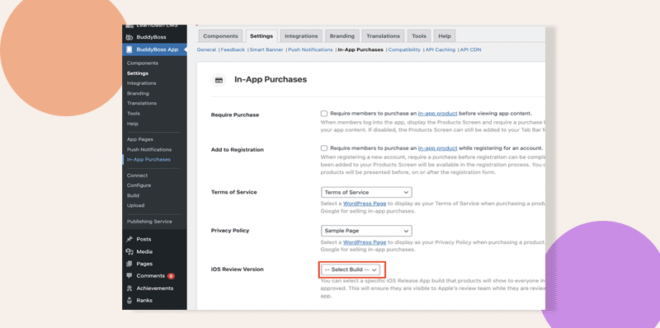
Update iOS Review Version Setting
- Navigate to BuddyBoss App > Settings > In-App Purchases > iOS Review Version.
- Choose the latest build from the available options.
- Click Save to confirm the setting update.
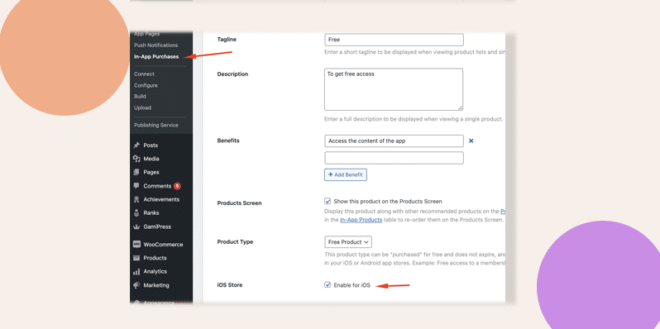
Enable the In-App Product for iOS
- Go to In-App Purchases > Products from your Dashboard.
- Click Edit on the product that is not displaying.
- Enable the product for iOS by selecting the appropriate option.
- Click Save to apply the changes.
Troubleshooting and FAQs
Q: Why are my in-app products not showing up?
A: The error means your in-app products are not enabled for iOS. Follow the steps above to update the iOS review version and enable the product for iOS.
Q: What if the error persists after applying these steps?
A: Double-check that the latest build is selected in In-App Purchases > iOS Review Version and verify that each product is correctly enabled for iOS. If issues continue, review your configuration settings for potential caching or connectivity issues.
Q: Where can I find more information about configuring in-app purchases?
A: Refer to your BuddyBoss App documentation for detailed guidance on in-app purchase settings and troubleshooting techniques.