














Introduction
The Forum Discussion View List Widget in BuddyBoss displays a list of forum discussions along with their view counts. This helps highlight popular topics and encourages members to join in on trending conversation.
Adding and Configuring the Widget
- Go to Appearance > Widgets in your WordPress Dashboard.
- Select the widget area where you want the list to appear (e.g., Activity Directory Left).
- Click the + icon and search for Forum Discussion Views List.
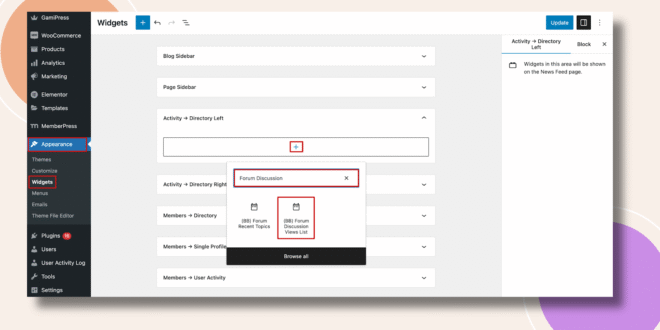
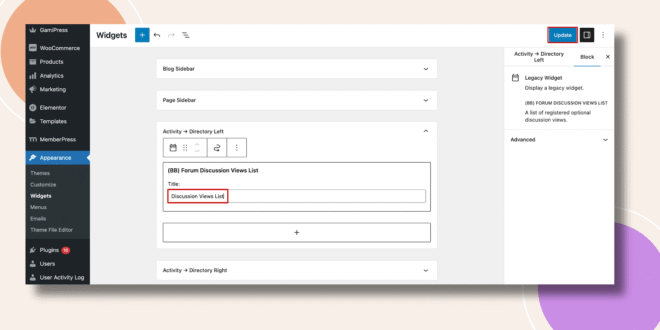
- Add the widget to the selected area.
- Enter a Title (e.g., Most Viewed Discussions).
- Click Update to save your changes.
Verifying the Widget
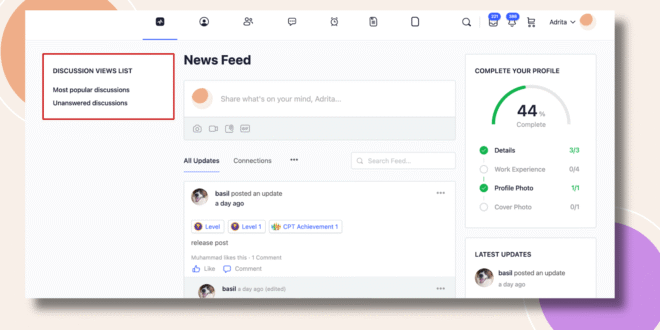
- Go to the Activity Feed on the frontend.
- The Forum Discussion Views List Widget will appear in the sidebar (e.g., left side of the Activity Directory), showing discussions with their view counts.
Troubleshooting and FAQs
Q: The widget isn’t showing on my site.
A: Make sure it was added to an active widget area and that you clicked Update. Clear your site or browser cache if changes don’t appear.
Q: Can I control how many discussions are displayed?
A: The widget displays a default number of discussions. Customization may require theme or child theme adjustments.
Q: Does it include group forums as well?
A: Yes. The widget pulls data from both site-wide and group forums.