














Introduction
The Forum Recent Replies Widget displays the latest replies from your forums in a sidebar or widget area in your BuddyBoss website. This keeps discussions visible, encourages engagement, and helps members stay updated with ongoing conversations. This guide explains how you can add a forum recent replies widget.
Adding and Configuring the Widget
- Go to Appearance > Widgets in your WordPress Dashboard.
- Choose the widget area where you want the replies to appear (e.g., Activity Directory Left).
- Click the + icon and search for Forum Recent Replies.
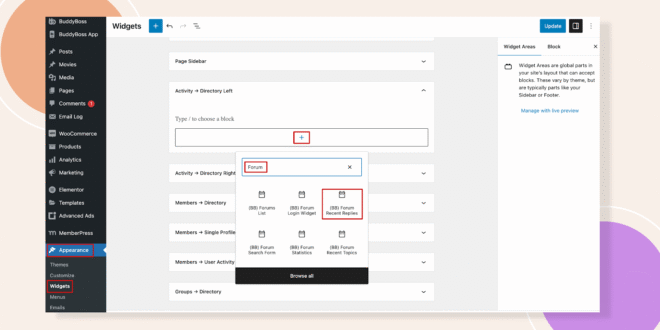
- Click to add the Forum Recent Replies Widget to the selected area.
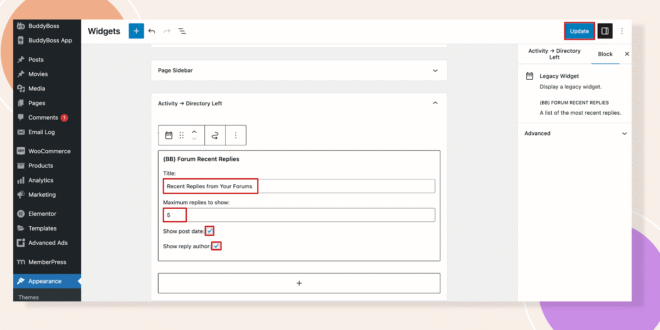
- Configure the widget settings:
- Title: Enter a custom title (e.g., Latest Forum Replies).
- Number of Replies: Set the maximum number of replies to display.
- Show Post Date: Check this box if you want the reply date to appear.
- Show Reply Author: Check this box if you want to display the author’s name.
- Title: Enter a custom title (e.g., Latest Forum Replies).
- Click Update to save your changes.
Verifying the Widget
- Reload your Activity Feed or the page containing the widget area.
The Forum Recent Replies Widget will now display on the sidebar with the settings you applied.
Troubleshooting and FAQs
Q: The widget doesn’t appear after I add it.
A: Confirm that you placed it in an active widget area and clicked Update. Clear your site cache if changes don’t show.
Q: How many replies can I display at once?
A: You can set the maximum number in the widget settings. The default is usually 5, but you can increase or decrease it as needed.