














The “App Release In Progress” error may appear when submitting your BuddyBoss iOS App through the Publishing Service while an existing app version is already being reviewed or processed in App Store Connect. This prevents a new publishing request from proceeding until the current release status is resolved.
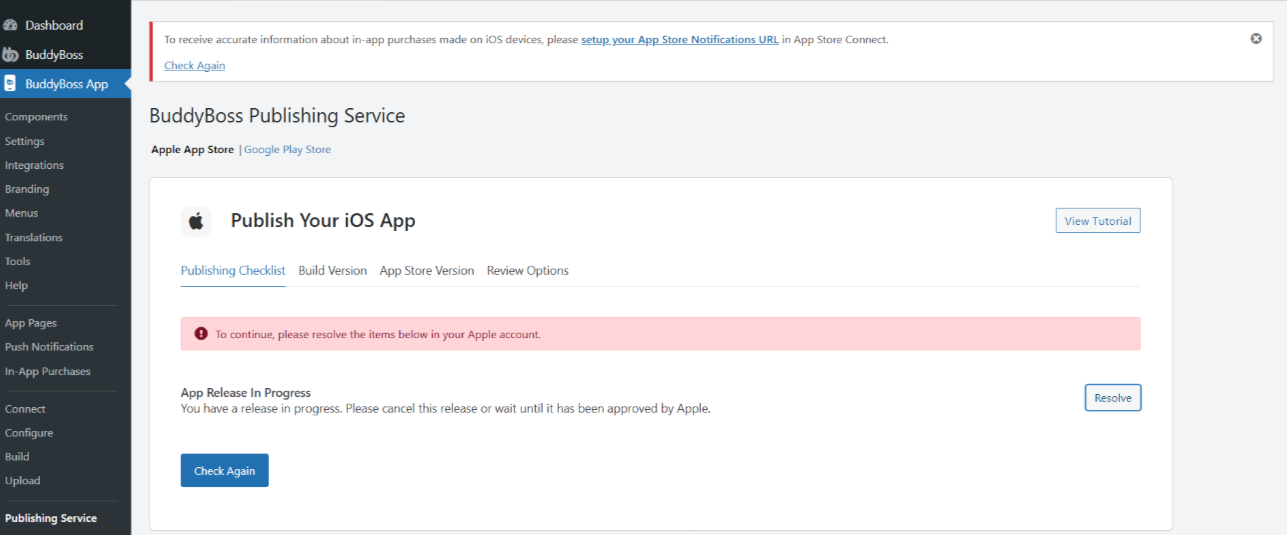
You can resolve this error by checking your app’s status in App Store Connect, completing or removing the existing review submission, and resubmitting your request through BuddyBoss.
Verify Your App Status in App Store Connect
- Log in to App Store Connect.
- Click My Apps and select your app.
- Open the current iOS app version.
- Check the app’s status to determine whether it is Rejected, Waiting for Review, or In Review.
Review the App Status and Take the Appropriate Action
The next steps depend on your app’s current status.
If Your App Is Rejected
- Open the rejection details provided by Apple.
- Review the issues identified during App Review.
- Make the necessary changes to your app or its information.
- Save your changes before proceeding with another submission.
If Your App Is Waiting for Review or In Review
- Confirm that your app is currently undergoing Apple’s review process.
- If you want the existing submission to continue, wait until Apple completes its review.
- If you prefer to submit through the BuddyBoss Publishing Service, remove the current version from review using the available option in App Store Connect.
Note: Removing an app version from review interrupts the current submission. You will need to submit it again when you are ready.
Prepare Your App for BuddyBoss Publishing
If you want to proceed with a new request through the BuddyBoss Publishing Service, make sure there is no active review submission preventing the process.
- In App Store Connect, open your current iOS app version.
- If the app is Waiting for Review or In Review, remove the version from review before proceeding.
- If the app is Rejected or Developer Rejected, review and address any outstanding issues.
- Update the app version information, such as the release notes, if necessary.
- Click Save.
- Confirm that your app version is in a state that allows you to prepare a new submission.
Important: Updating release notes alone may not change the app’s review status. The available actions depend on its current state in App Store Connect.
Resubmit Your iOS Publishing Request
Once your app is ready for a new submission:
- Log in to your WordPress Dashboard.
- Navigate to BuddyBoss App > Publishing Service > Apple App Store.
- Review and complete the publishing requirements.
- Select the appropriate iOS Release App build.
- Confirm your app version and review options.
- Click Submit for Review to send your request to the BuddyBoss Publishing Team.
The BuddyBoss Publishing Team can then review your request and proceed with the submission process.
Note: If the “App Release In Progress” error continues after resolving the existing submission, contact BuddyBoss Support for assistance.