















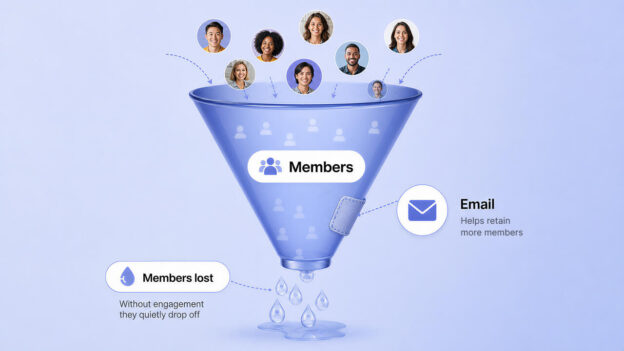
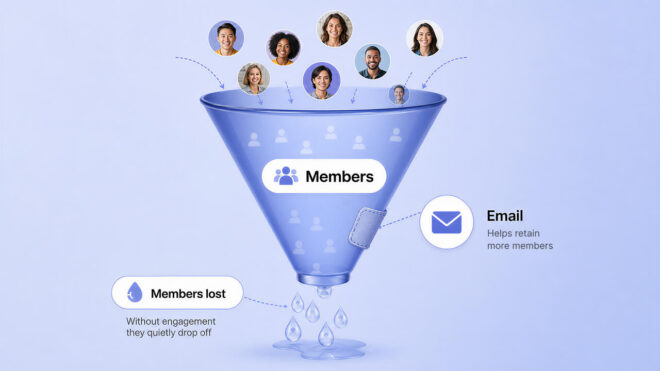
Most community owners lose members quietly. No angry email, no cancellation reason, just a login that stops happening. By the time you notice, the member is already gone.
Here is the number that should change how you think about this. A 5 percent improvement in retention can roughly double a subscription business’s revenue over a few years. Because the math compounds every renewal cycle rather than resetting like a one time sale.
Retention is not a nice to have metric sitting next to growth. For a membership community, it often matters more than growth does.
This guide covers how to connect ActiveCampaign to your BuddyBoss community. And automate the specific emails that catch disengaged members before they cancel, not after.
Why Retention Is an Email Problem as Much as a Content Problem
The instinct when engagement drops is to make more content. More posts, more events, more reasons to log in. That instinct is not wrong, but it misses the actual moment retention is won or lost.
Members who go two weeks without logging in cancel at roughly three times the rate of members who log in weekly.
That gap does not close with better content sitting inside the community, because a disengaged member never sees it. It closes with an email that reaches them somewhere they already are.
The numbers on automated email specifically are hard to ignore. Automated, behavior triggered emails generate 37 percent of all email driven revenue while making up only about 2 percent of total email volume sent.
Automated sequences also see roughly 52 percent higher open rates. Also, 332 percent higher click rates than one off broadcast emails.
Re-engagement sequences sent to inactive contacts recover somewhere between 6 and 22 percent of them, depending on the audience.
Your community platform is where members experience value. Email is how you remind them that value exists when they have quietly stopped checking.
BuddyBoss ActiveCampaign Integration: What You Should Know
This is worth being precise about, since the phrase “official integration” undersells how many moving parts are actually involved.
There are three layers, and each does a different job. Email capture happens through ActiveCampaign’s own AC Forms. Which you embed directly on your BuddyBoss registration page, group pages, or course landing pages to collect emails at the exact moment someone joins.
Event connection is the layer most guides skip. BuddyBoss on its own has no native way to tell ActiveCampaign that a member joined a group or completed a course.
That connection runs through a separate automation plugin. Most commonly Uncanny Automator or Bit Integrations, which watches for BuddyBoss member events and passes them to ActiveCampaign as tags or list actions.
Automation logic is where ActiveCampaign itself takes over. Running the actual welcome sequences, drip campaigns and re-engagement flows once a tag or list action arrives.
None of these three layers replaces either of the others. Skipping the automation connector means ActiveCampaign never learns what members are doing inside BuddyBoss at all. Your emails stay generic instead of triggered by real behavior.
Segmenting Members Before You Send Anything
Sending the same email to every member regardless of what they actually do inside your community wastes the entire point of connecting these two tools in the first place.
Once your automation connector is passing events into ActiveCampaign, use tags to separate members by what they have actually done.
A course based community might tag by course enrolled, lessons completed, or quiz scores. A pure discussion community might tag by group membership, post count, or how recently someone last logged in.
Here is what that looks like in practice. A coaching community tags
- members active in the last 7 days as Engaged
- members inactive 14 to 30 days as At Risk
- and members inactive 30 plus days as Dormant.
Each tag triggers a different automation:
Engaged members get the drip sequence, At Risk members get the re-engagement sequence, and Dormant members get a different.
Lower pressure win-back message instead of the same content the active members are already seeing.
This single change (sending the right sequence to the right segment instead of one sequence to everyone) is usually what separates an automation setup that quietly underperforms from one that actually moves the retention number.
Letting AI Handle the Segmentation and Timing in 2026
Everything above describes building segments and timing by hand, tagging rules yourself, guessing at send times. ActiveCampaign’s Active Intelligence layer, its built in AI suite, now does a meaningful share of this automatically.
AI Suggested Segments analyzes your contact data and surfaces groups you might not think to build manually, including an at-risk segment based on declining engagement patterns rather than a fixed day count you set yourself.
This is available from the Plus plan, the same tier already recommended above for its automation depth.
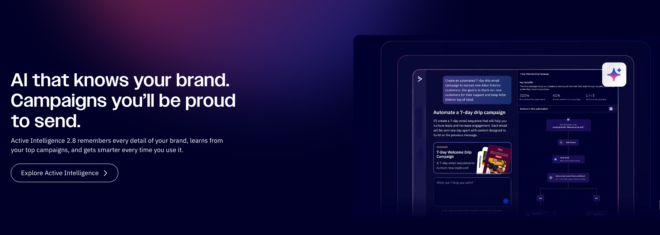
Predictive Sending, available on higher tiers, sends each automated email at the specific hour that contact individually tends to open email, rather than one fixed send time for the whole list. For a re-engagement sequence specifically, timing is a meaningful part of whether a quiet member notices the email at all.
Autonomous Insights, ActiveCampaign’s newer proactive layer, reviews your campaign and automation performance on a weekly cadence without being asked, flagging when a specific sequence is underperforming and suggesting what to adjust.
For a community owner running four separate lifecycle sequences, this replaces manually checking open and click rates across each one.
None of this replaces the setup described in this guide. The three-layer stack, event connection through an automation plugin, and the four core sequences, is still the foundation.
Active Intelligence works on top of that foundation, refining who gets which sequence and when, rather than building the sequences for you from nothing.
The Four Emails Worth Automating for Your
Not every automated email matters equally. These four cover the actual moments where members either commit to the community or quietly drift away.
The welcome sequence
Sent the moment someone joins, this sets expectations and points to one small first action. Welcome emails average an 83 percent open rate, the highest of any automated email type, because the member is paying attention right after signing up.
The engagement drip
Triggered by course enrollment or group joining, this sequence keeps momentum going between community visits with reminders, tips, or a nudge toward the next lesson or discussion.
The re-engagement sequence
Triggered by inactivity, typically 14 to 30 days without a login, this is the highest leverage email in the entire stack given how sharply cancellation risk rises once a member goes quiet.
The renewal or save sequence
Triggered ahead of a subscription renewal or right after a cancellation request, this is the last real chance to keep a member before the relationship formally ends.
Setting Up the BuddyBoss ActiveCampaign Integration
Step 1: Connect ActiveCampaign to your site
Install the automation connector plugin of your choice, Uncanny Automator or Bit Integrations, and authorize it with your ActiveCampaign account URL and API key from ActiveCampaign’s Settings and Developer menu.
Step 2: Embed your capture forms
Add ActiveCampaign’s AC Forms block to your BuddyBoss registration page and any group or course landing pages where you want to capture emails outside the standard signup flow.
Step 3: Build your first recipe
Inside your automation connector, create a new recipe with a BuddyBoss trigger, such as a user joining a group or completing a course, and an ActiveCampaign action, such as applying a tag or adding the contact to a list.
Step 4: Build the matching automation in ActiveCampaign
In ActiveCampaign, create an automation that starts when that same tag is applied, then build out the welcome or drip sequence tied to it.
Step 5: Set up inactivity tracking
Configure ActiveCampaign’s site tracking or use your automation connector to detect a period without a BuddyBoss login, then trigger the re-engagement sequence from that signal.
Step 6: Test the full chain
Join your own community as a test account, confirm the tag applies correctly in ActiveCampaign, and confirm the automation fires as expected before it touches real members.
Consent and Compliance Come First
Automated does not mean exempt from the rules that already apply to any email list, and this is the part most setup guides skip entirely.
Members should explicitly opt in to marketing emails somewhere in the registration flow, separate from the account creation itself, and every automated sequence needs a working unsubscribe link.
If your community has members in the EU or UK, GDPR requires that consent be freely given and specific, not bundled silently into account signup.
ActiveCampaign includes built in compliance tools for this, including double opt-in forms and automatic unsubscribe handling, so the practical work is mainly making sure your AC Forms setup actually uses them rather than skipping straight to single opt-in for a slightly higher list count.
Common Mistakes to Avoid
Skipping the automation connector entirely
Some site owners install ActiveCampaign’s forms and stop there, which only captures emails without ever connecting member behavior. This gets you a mailing list, not a retention system.
Sending the re-engagement email too late
Waiting 60 or 90 days to flag inactivity means the member has already mentally left. Given the three times higher cancellation rate at two weeks, the trigger should fire far earlier than most site owners assume.
Building one giant automation instead of four focused ones
A single sprawling sequence trying to handle onboarding, engagement and re-engagement together is harder to test and harder to fix when one part underperforms. Keep the four sequences separate.
Choosing the Starter plan and hitting the automation limit
ActiveCampaign’s Starter tier caps automations at five actions, which is not enough for a proper branching sequence with conditions. Most community setups need at least the Plus tier to build this correctly.
What a Re-Engagement Sequence Actually Looks Like
Since this is the single highest leverage email in the stack, it is worth being specific rather than leaving it abstract.
A three email re-engagement sequence, triggered at day 14 of inactivity, typically works like this.
- Email one is short and personal, noting what the member is missing and linking directly to the most active discussion or newest content, not the homepage.
- 2nd Email, sent three or four days later if there is still no login, offers something concrete, a quick win, a highlighted resource, or an invitation to a specific upcoming event.
- Email three, the final one, asks directly whether the community is still the right fit and offers an easy way to pause or adjust rather than silently lapsing.
That third email matters more than it looks.
Members offered a pause option instead of a binary stay or cancel choice are meaningfully more likely to stay engaged long term, since canceling feels like less of a loss when the alternative is a low pressure step back rather than a full commitment to leave.
BuddyBoss ActiveCampaign Integration Pricing Reality Check
ActiveCampaign’s Starter plan runs 15 dollars a month for 1,000 contacts, but its five action automation limit makes it impractical for the branching sequences described here.
The Plus plan, roughly 49 dollars a month at the same contact tier, is the realistic starting point for a real retention system.
An automation connector plugin adds a separate cost. Uncanny Automator’s single site license runs roughly 150 to 200 dollars a year, and Bit Integrations offers a comparable free tier with paid upgrades for advanced triggers.
BuddyBoss Pro runs 299 dollars a year and includes the community platform this entire retention system is built around.
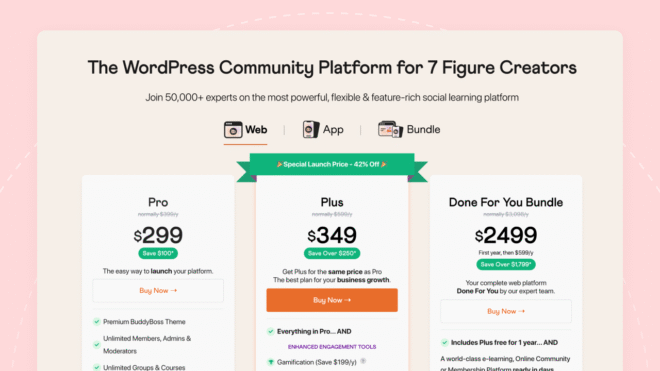
BuddyBoss Plus starts at 349 dollars for the first year and renews at 599 dollars annually, adding native gamification, which pairs well with an engagement drip sequence built around badges or milestones.
A realistic first year total for this stack lands somewhere between 900 and 1,300 dollars, depending on contact volume and which automation connector you choose.
Always confirm current numbers on each platform’s live pricing page, since ActiveCampaign in particular has changed its tier structure more than once in recent years.
Why ActiveCampaign Specifically, Not Just Any Email Tool
A fair question, given how many email platforms exist. The difference for a community specifically comes down to automation depth, not inbox design.
Simpler tools like Mailchimp handle broadcast newsletters well but offer thinner branching logic for the kind of conditional, multi-path sequences described in this guide.
ActiveCampaign’s automation builder supports the if-this-then-that branching that a real segmented re-engagement system needs, tagging members differently based on behavior and routing them into genuinely different email paths rather than one sequence with minor variable swaps.
That branching capability is also exactly what the automation connector plugins are built to feed.
Uncanny Automator and Bit Integrations both list ActiveCampaign as a native integration specifically because its tagging and automation model matches how BuddyBoss member events naturally translate into email actions.
FAQs on BuddyBoss ActiveCampaign Integration
Does BuddyBoss integrate with ActiveCampaign?
Yes. BuddyBoss has an official ActiveCampaign integration built around AC Forms for email capture, combined with an automation connector plugin like Uncanny Automator to pass BuddyBoss member events into ActiveCampaign as tags or automations.
Do I need a separate plugin to connect BuddyBoss events to ActiveCampaign?
Yes. Embedding ActiveCampaign’s forms alone only captures emails. Connecting actual BuddyBoss member behavior, such as joining a group or completing a course, requires an automation connector like Uncanny Automator or Bit Integrations.
What is the most important automated email for community retention?
The re-engagement sequence, triggered by inactivity around the 14 to 30 day mark. Members who go quiet for two weeks cancel at roughly three times the rate of active members, making this the highest leverage automation in the stack.
Which ActiveCampaign plan do I need for a BuddyBoss community?
The Plus plan at roughly 49 dollars a month for 1,000 contacts is the realistic minimum, since the cheaper Starter plan caps automations at five actions, too limited for branching retention sequences.
How long does it take to notice a member is at risk of cancelling?
Inactivity of two weeks is the point where cancellation risk rises sharply, which is why re-engagement automations should trigger well before the 60 or 90 day mark many site owners default to.
Does this work for a community without courses, just groups and discussions?
Yes. The same three-layer setup applies. Instead of triggering on course enrollment or completion, your automation connector can trigger on group joins, post activity, or login frequency, and the segmentation and re-engagement logic works exactly the same way.
Is this kind of email automation GDPR compliant?
It can be, provided consent is collected explicitly and separately from account signup, and every automated email includes a working unsubscribe link. ActiveCampaign includes built in double opt-in and unsubscribe tools to support this, but the setup still needs to be configured correctly rather than assumed.
Does ActiveCampaign have AI features for community retention?
Yes. ActiveCampaign’s Active Intelligence suite includes AI Suggested Segments, which can surface at-risk contacts automatically, and Predictive Sending, which times each email to the individual contact rather than the whole list. These refine the segmentation and timing described in this guide rather than replacing the underlying automation setup.
Ready to Stop the Quiet Churn?
A community platform gives members somewhere to belong. Email automation is what reminds them that place exists on the days they forget to check. Neither one works well without the other, which is really the whole argument for connecting these two tools in the first place.
Explore the BuddyBoss integrations hub to see how ActiveCampaign fits alongside your existing stack, or visit the BuddyBoss website platform page for the full community feature set.
Check current BuddyBoss pricing before choosing a plan, since tiers and promotional rates are updated periodically.
Already building your stack? See our guides on building a membership community store with WooCommerce and BuddyBoss and customizing your community design with Elementor to round out the commerce and design layers alongside this retention system.
Interested in earning by recommending this stack?
The BuddyBoss Affiliate Program guide explains how the program works, the commission breakdown shows exact payouts, and you can apply directly through the affiliate application page.
