















If you already run a WooCommerce store, you have probably had this thought more than once. What if your customers did not just buy from you once and disappear. What if they stuck around, paid every month, and actually talked to each other.
That is the membership community model, and it is one of the few WordPress business models where the numbers genuinely support the effort.
The global membership platform market was valued at 7.9 billion dollars in 2025 and is projected to reach 14.3 billion dollars by 2033, a compound annual growth rate of 14.7 percent.
Store owners are not chasing a trend here. They are chasing a real, growing category.
This guide is written for WooCommerce store owners who want more than a payment gate. You will get the exact plugin stack, a step by step build process, honest pricing, and the mistakes that quietly kill most membership launches.
Who This Model Actually Works For
This stack is not the right move for every WooCommerce store. It works best for three specific situations, and knowing which one you are in shapes almost every decision below.
Course and coaching businesses selling access to training content, where students benefit from seeing and talking to each other, not just consuming videos alone.
Product based businesses building a loyalty layer, where a recurring membership fee unlocks a private group, early access to new products, and member only pricing on top of the existing WooCommerce catalog.
Niche professional or hobbyist communities that happen to monetize through WooCommerce, such as a mastermind group, an association, or a paid newsletter with a members only discussion space.
If your store simply needs to restrict a handful of pages to paying customers with no ongoing engagement expected, a lighter WooCommerce Memberships only setup may be all you need. This guide is for stores where retention and belonging are the actual growth strategy.
Why a WooCommerce Store Alone Does Not Create a Community
WooCommerce is the world’s most installed eCommerce platform, powering more than 4 million active websites. It is exceptional at selling products, handling checkout, and processing payments. What it was never built to do is make people feel like they belong somewhere.
Content gating is not community. Locking a page behind a login form restricts access. It does not create the feeling of being part of something. That distinction matters more than most store owners realize before they launch.
Here is the uncomfortable stat behind that gap. Research on membership site owners found that roughly two out of three are not satisfied with the engagement levels inside their own community. The plugin worked. The access control worked. The belonging did not happen on its own.
The good news is that belonging is not mysterious. It comes from specific features: member profiles, group discussions, activity feeds, direct messaging, and a sense that other real people are present.
WooCommerce does not include any of that by default, and no membership plugin was designed to add it either. That is a separate layer, and it is the one most guides skip entirely.
The WooCommerce Membership Community Stack You Actually Need
Most articles about WooCommerce membership sites talk about one plugin as if it solves everything. In practice, a real membership community store needs three separate jobs done well, and no single plugin does all three at a professional level.
Commerce
WooCommerce handles products, checkout, payment gateways and order management. This is the foundation everything else sits on.
Access and billing
A membership or subscription plugin controls who can see what, and how they get billed on a recurring basis. This is WooCommerce Memberships, WooCommerce Subscriptions, or both together.
Community
A dedicated community layer gives members profiles, groups, forums, activity feeds and a mobile experience. BuddyBoss fills this role, styled specifically for WooCommerce through the BuddyBoss Theme and its WooCommerce integration.
Skip any one of these three layers and the site falls short in a predictable way. If you skip commerce tools and you cannot sell reliably. Skip access and billing and you cannot restrict content or automate renewals.
If you skip community and you built an expensive content locker, not a community.
WooCommerce Memberships vs WooCommerce Subscriptions
This is one of the most searched and most misunderstood questions in the WooCommerce ecosystem, and getting it wrong wastes money on the wrong plugin.
WooCommerce Memberships controls access. It restricts posts, pages, products or entire categories to members only, and it can drip content over time so new members do not get everything on day one. Pricing for a single site license runs around 199 dollars a year.
WooCommerce Subscriptions controls billing. It charges customers on a repeating schedule, weekly, monthly or annually, and manages renewals, failed payments and cancellations. Pricing for a single site license also runs around 199 dollars a year.
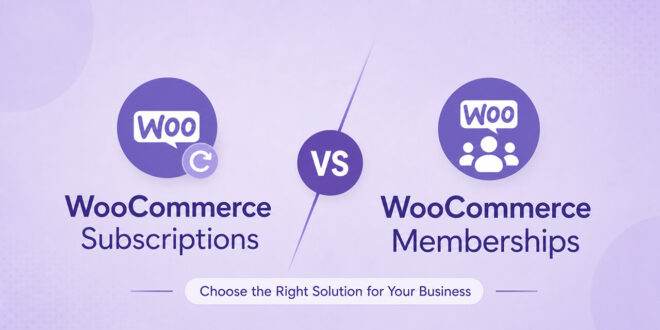
Here is the part that trips people up. Neither plugin fully replaces the other, and buying one hoping to save money on the other almost always leads to a rebuild later.
If you only need to restrict content or products with a one time payment or a manually assigned status, WooCommerce Memberships alone is enough. Charge customers on a recurring basis for physical or digital products with no access restriction, WooCommerce Subscriptions alone is enough.
If you want both, a member pays monthly and automatically keeps or loses access based on that payment, you need both plugins working together. That combined recurring membership setup is what most community stores actually want.
A Quick Note on Alternatives
WooCommerce Memberships and WooCommerce Subscriptions are official WooCommerce.com extensions, but they’re separate paid add-ons, not part of WooCommerce core.
If you’d rather not add another WooCommerce-specific extension to the mix, MemberPress and Paid Memberships Pro are two well-established membership plugins worth exploring.
Both work alongside WooCommerce for the storefront side, and both have their own official BuddyBoss integrations for the community layer, so you’re not locked into the WooCommerce-specific extensions to make this stack work.
Building Your Membership Community Store with WooCommerce and BuddyBoss (Step by Step)
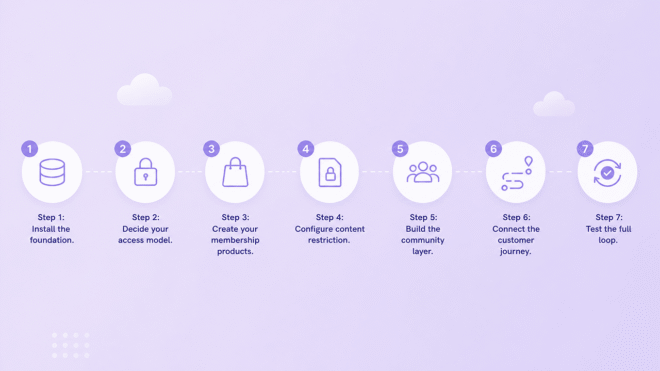
Step 1: Install the foundation
Set up WordPress, install WooCommerce, and install the BuddyBoss Platform plugin alongside the BuddyBoss Theme. The theme is what styles WooCommerce pages to match your community rather than looking like a generic default store.
Step 2: Decide your access model
Choose whether members get access through a one time purchase, a recurring subscription, or a free tier with paid upgrades. This decision determines whether you need WooCommerce Memberships, WooCommerce Subscriptions, or both.
Step 3: Create your membership products
Build the actual WooCommerce products customers will buy. A membership plan is not itself a product type. Instead, you create a product, then tie a membership plan to that product so purchasing it grants access.
Step 4: Configure content restriction
Inside WooCommerce Memberships, decide exactly what a member unlocks: specific pages, a private forum, downloadable resources, or member only pricing on other products.
Step 5: Build the community layer
Inside BuddyBoss, set up groups, activate the activity feed, enable member profiles with custom fields, and decide whether every member joins one shared group or self selects into topic based groups.

Step 6: Connect the customer journey
Map what happens the moment someone buys. New WooCommerce customers should land inside the community automatically, not receive a generic order confirmation and nothing else.
Automation tools like Uncanny Automator can trigger a new member being added to a specific BuddyBoss group the instant their WooCommerce order completes, removing manual onboarding work entirely.
Step 7: Test the full loop
Buy your own membership as a test customer. Confirm access unlocks correctly, the welcome experience feels intentional, and renewal or cancellation behaves the way you expect before real customers go through it.
Adding a Membership Community to Your Existing WooCommerce Store
Most WooCommerce store owners reading this are not starting from scratch. You already have products, customers and order history, and the idea of touching any of it feels risky. The good news is that this stack was not designed for greenfield builds only.
WooCommerce Memberships, Subscriptions and BuddyBoss all install alongside your existing store without touching current products or past orders. Your existing catalog, customer accounts and payment history stay exactly as they are. You are adding a new layer on top, not replacing what already works.
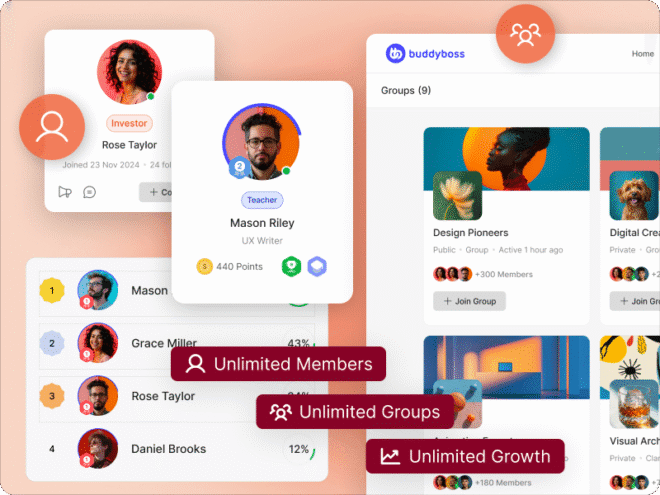
The safest rollout is gradual rather than instant. Launch the community area quietly for a small group first, a handful of existing customers or an email list segment, before opening membership signup to your full audience.
This gives you time to catch configuration issues while the stakes are still low, and it means your first real members become your seed content instead of walking into an empty room.
One more question that comes up constantly at this stage: does this work on mobile.
BuddyBoss communities are fully responsive on any device by default, and store owners who want a dedicated branded app in the App Store and Google Play can add the BuddyBoss mobile app on top of the same web platform without rebuilding anything.
What BuddyBoss Adds on Top of Gated Content
The gap between a gated WooCommerce store and an actual community shows up the moment a real member logs in. Gated content answers “can I see this.” Community answers “do I want to come back.”
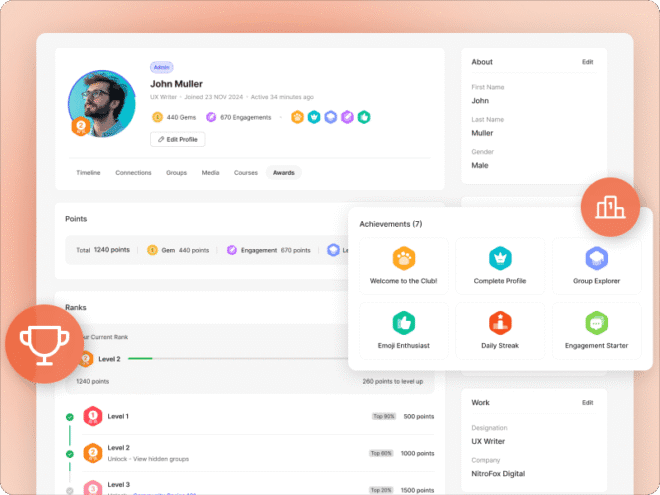
BuddyBoss adds member profiles with custom fields, private and public groups, a social activity feed, direct and group messaging, and optional gamification with points, badges and leaderboards on the Plus plan. None of this exists inside WooCommerce or a membership plugin by default.
The engagement math backs this up clearly.
More than 80 percent of consumers say they are more likely to try new products when they are part of a brand community, and members inside a loyalty or community structure tend to spend 67 percent more with a 14 percent higher average order value than customers with no community connection.
There is also a retention argument that matters more the longer you run the business. A membership site built purely on content access competes on price and content volume, both of which are easy for a competitor to copy.
Community Ensures Real Engagement and Control over Data
A membership site built on community competes on relationships, which are much harder to replicate and much harder for a member to walk away from.
Here is what that looks like in real numbers. A community of 500 paying members at 29 dollars a month generates 14,500 dollars in monthly recurring revenue, and that figure is far more predictable than one time product sales because it does not reset to zero every month.
The variance between a good month and a bad month shrinks dramatically once revenue is subscription based rather than transaction based, which makes forecasting, hiring and reinvestment decisions much easier to plan around.
Community also changes the kind of data you collect. Logged in members who post, comment and show up in groups generate far more behavioral signal per session than an anonymous shopper browsing a product page.
That signal is what lets you spot a member drifting toward cancellation weeks before they actually cancel, giving you time to re-engage them instead of finding out after the fact.
Pricing Reality Check for Your WooCommerce Membership Community
Transparency matters here, because plugin stacks add up fast and hidden costs kill momentum after launch. Here is a realistic first year cost for this exact stack, based on current published pricing that you should always confirm at checkout.
WooCommerce core: free. It is open source and does not cost anything to install.
WooCommerce Memberships: around 199 dollars a year if you need content and product access restriction.
WooCommerce Subscriptions: around 199 dollars a year if you need recurring billing, often used alongside Memberships for a combined recurring membership model.
BuddyBoss Pro: 299 dollars a year for the Theme, Platform Pro plugin, and full community and integration features on one site. BuddyBoss Plus runs 349 dollars a year and adds native gamification and automatic media offloading.
Payment processing: standard card processing fees from your gateway, typically around 2.9 percent plus a small fixed fee per transaction, separate from any plugin cost.
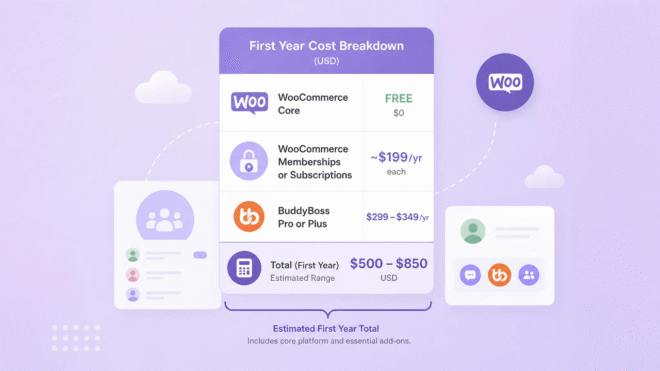
A full commerce, access and community stack for a single site typically lands between 500 and 850 dollars in the first year before hosting, depending on whether you need both Memberships and Subscriptions and which BuddyBoss tier you choose.
Compare that to the LTV to CAC ratio for membership businesses, which tends to run around 6 to 1 versus roughly 2 to 1 for one time transactional stores, and the annual cost is easier to justify against the revenue a retained member generates over time.
Always confirm current numbers on the live pricing pages before you commit, since promotional rates and plan structures do change.
Common Mistakes to Avoid while Building Your Community

Treating community as a launch afterthought
Groups and profiles that get configured the week before launch feel empty on day one, because there is no content or conversation seeded yet. Seed at least a few discussions before members arrive.
Choosing Subscriptions when you needed Memberships, or the reverse
This is the single most common expensive mistake in this stack, and it usually means buying a second plugin a few months later once the gap becomes obvious.
Skipping the onboarding automation
A member who pays and then receives nothing but a generic order email loses momentum immediately. The automated group assignment in step 6 above is not optional polish, it is the difference between a member who engages in week one and one who never logs in again.
Ignoring hosting requirements
A community layer with an active feed, messaging and groups is more resource intensive than a standard WooCommerce store. Underpowered shared hosting is the most common cause of a slow or unstable membership community site.
Frequently Asked Questions
What is the difference between WooCommerce Memberships and WooCommerce Subscriptions?
Memberships controls access, meaning what a member can see or buy. Subscriptions controls billing, meaning how and when a customer gets charged on a recurring basis. Many recurring membership sites use both together.
Can WooCommerce alone build a real membership community, not just gate content?
No. WooCommerce and its membership extensions handle commerce and access control well, but they do not include profiles, groups, activity feeds or messaging. A dedicated community plugin like BuddyBoss is needed for the actual community layer.
What plugins do I need for a WooCommerce membership site with community features?
At minimum, WooCommerce for commerce, WooCommerce Memberships or Subscriptions (or both) for access and billing, and a community platform like BuddyBoss for the social and engagement layer.
Is BuddyBoss or a WooCommerce only stack better for building community?
A WooCommerce only stack is faster to set up and cheaper if the goal is simply selling gated content or products. If member engagement, retention and a sense of belonging are the actual business goal, adding BuddyBoss on top of WooCommerce closes a gap that WooCommerce and membership plugins were never designed to fill.
How much does a WooCommerce membership community site cost to build in 2026?
Plan for roughly 500 to 850 dollars in the first year for plugin licensing alone, covering WooCommerce Memberships or Subscriptions and BuddyBoss, plus your existing hosting and standard payment processing fees. Confirm current pricing on each product’s official page before purchasing.
Do I need custom development to connect WooCommerce and BuddyBoss?
No. WooCommerce and BuddyBoss both style and integrate together out of the box through the BuddyBoss Theme, and automation platforms like Uncanny Automator handle the onboarding logic between a purchase and community access without writing code. Custom development is only needed for unusual edge cases, not the core setup described in this guide.
Can I add a membership community to a WooCommerce store I already have live?
Yes. WooCommerce Memberships, Subscriptions and BuddyBoss all install on top of an existing store without altering current products, customers or order history. A gradual rollout to a small group first is safer than opening signup to your full audience on day one.
Is a WooCommerce membership community accessible on mobile?
Yes. The community area is fully responsive by default on any device through a browser. Store owners who want a dedicated branded app can add the BuddyBoss mobile app on top of the same setup without a rebuild.
Are WooCommerce Memberships and WooCommerce Subscriptions the only options for this stack?
No. They’re the most direct fit since they’re built specifically for WooCommerce, but MemberPress and Paid Memberships Pro are both established alternatives that handle membership access and billing. Either can run alongside WooCommerce for commerce, and both have official BuddyBoss integrations for the community layer.
Do MemberPress or Paid Memberships Pro work with BuddyBoss the same way WooCommerce Memberships does?
Yes. BuddyBoss maintains official integrations with both, styling their pages consistently with the BuddyBoss Theme and supporting membership-based access to groups, forums, and courses. The choice between them and the WooCommerce-specific extensions usually comes down to whether you want your membership logic tied closely to WooCommerce or handled by a separate, dedicated membership plugin.
WooCommerce Membership Community: Ready to Build Yours?
A WooCommerce store can sell almost anything. A WooCommerce store paired with the right access plugin and a real community layer can build something customers do not want to cancel.
If you want to see the full feature set that makes this stack work, visit the BuddyBoss integrations hub to explore how BuddyBoss connects with WooCommerce and other tools in your stack, or head straight to the BuddyBoss website platform page to see the community and course features included in Pro and Plus.
Check current BuddyBoss pricing before you commit to a plan, since tiers and promotional rates are updated periodically.
If you are building this as an affiliate resource or want to earn by recommending this exact stack, the BuddyBoss Affiliate Program guide walks through how the program works, and you can see the full commission breakdown before applying through the affiliate application page.
