















Most community platforms give you two choices. Accept the default template, or hire a developer.
BuddyBoss paired with Elementor gives you a third option, and it is the one most community owners actually want.
Elementor now powers more than 21 million websites, accounting for roughly 13 percent of all sites globally in 2026. It is not a niche tool.
It is the design layer a huge share of WordPress site owners already know how to use, which is exactly why BuddyBoss built an official integration around it instead of forcing everyone into custom code.
This guide covers exactly what Elementor can customize inside your BuddyBoss community, the setup steps, and the design decisions that actually affect whether members stick around. Yes, learn all about BuddyBoss Elementor integration with pros and cons.
What Elementor Actually Customizes in a BuddyBoss Community
This is the part most guides get vague about, and it is worth being precise here because it changes what you should expect before you start.
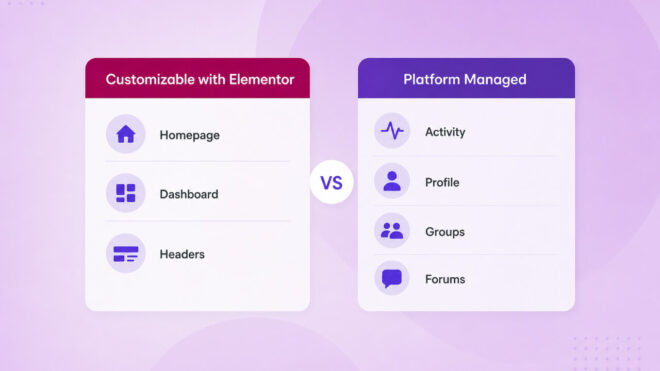
Elementor gives you full design control over marketing pages, landing pages, your member dashboard, and site-wide elements like headers and footers through Elementor Theme Builder.
You can design these from a blank canvas or start from a BuddyBoss prebuilt template and adjust it.
Here is the honest trade off. Core BuddyBoss templates, meaning the Activity feed, Profile pages, Groups and Forums, remain managed by the BuddyBoss platform itself rather than fully rebuilt inside Elementor.
This is intentional. Those templates carry the actual social functionality of your community, and BuddyBoss keeps them platform controlled to guarantee stability and feature consistency as the platform updates.
In practice this means you get complete creative freedom over the pages members see first and the pages that represent your brand. While the pages members use every day for actual community interaction stay fast, stable and automatically compatible with future BuddyBoss updates.
Elementor Free vs Elementor Pro: What You Actually Need
This question comes up constantly, and getting it wrong means a frustrating hour spent looking for a button that will not appear.
BuddyBoss Platform widgets, the ones that display social content like member grids or activity summaries, are listed under the standard WordPress widgets category and work with the free version of Elementor.
Elementor Theme Builder, the tool that lets you design custom site-wide headers and footers, and the prebuilt Member Dashboard template, both require Elementor Pro.
If you do not see the Edit with Elementor button on certain templates, or your custom header is not appearing site-wide, an inactive Elementor Pro license is the most common cause.
For most community owners, Elementor Pro is worth the license cost specifically because of these two features. A generic header and a default dashboard are two of the fastest ways to make a paid community feel unfinished.
Using AI to Customize Your BuddyBoss Design with Elementor in 2026
This is the question most 2026 guides on this topic skip entirely, and it changes how much time the rest of this process actually takes.
Elementor now ships with two layers of built in AI.
The first is in-editor Elementor AI, which generates custom CSS, copy and images without leaving the page you are working on. Select a widget, describe the hover effect or layout tweak you want in plain language, and the code gets written and applied on the spot.
The second, more significant layer is Angie, a free agentic AI plugin built by Elementor specifically for WordPress.
Angie can generate custom Elementor widgets, full landing pages, and CSS or JavaScript snippets from a single written prompt, and it works with awareness of your site’s actual theme, active plugins and content structure rather than generating generic code in a vacuum.
You can describe a widget you need, and Angie builds it as a real, editable part of your site inside a safe sandbox you can preview before anything goes live.
About BuddyBoss
For a BuddyBoss site specifically, this AI layer is most useful on exactly the same pages Elementor already customizes: your homepage, your member dashboard, and any custom section or widget you want that does not exist in the standard widget library.
It does not change the platform managed boundary described earlier. Angie building you a custom CSS snippet for your dashboard is genuinely useful. Asking it to rebuild your Activity feed is not, since that template stays with the BuddyBoss platform regardless of which tool writes the code.
General purpose AI assistants like ChatGPT or Claude are also commonly used alongside this workflow, mainly for drafting homepage copy, brainstorming a layout direction, or writing a CSS snippet you paste into Elementor’s custom CSS field yourself.
The difference is that these tools do not see your live site the way Angie does. They can write good code and good copy, but you are the one moving it into the editor and checking it against your actual design.
Either way, the same rule applies that applied before AI entered the picture: test any generated code on a staging copy of your site before it touches a live community with real members in it.
BuddyBoss Elementor Integration: What to Gather First Before You Start
A faster build starts with a short prep list, not an empty Elementor canvas. Skipping this step is the main reason redesigns stretch from a weekend project into a month long one.
Gather your logo in a few sizes, your brand colors as exact hex codes, and two to three fonts you want to lock in globally. Have your actual homepage copy ready rather than placeholder text, since placeholder text almost always gets forgotten and shipped by accident.
Collect a handful of real member photos or avatars if you have any existing users, since a dashboard mockup with real faces looks dramatically more convincing during design review than generic stock icons.
Most solo site owners can complete the homepage, member dashboard and header setup described below in a single focused day.
Adding custom sections, a full brand style guide, and third-party widget integrations typically stretches that to three to five days of part time work.
Setting Up Elementor with BuddyBoss (Step by Step)
Step 1: Confirm your plugins
You need the BuddyBoss Platform plugin active, Elementor installed, and Elementor Pro active if you plan to use Theme Builder or the Member Dashboard template.
Step 2: Design your homepage
Create a new page, click Edit with Elementor, then open the BuddyBoss icon inside the editor to browse prebuilt sections and full page templates. Insert a section, then edit the text, images and colours to match your brand rather than starting from a blank canvas.
Step 3: Build your member dashboard
From WordPress, go to Pages, add a new page, and open it in Elementor. Click the BuddyBoss icon, go to the Pages tab, and insert the Dashboard template. This gives every logged in member a personalized page built entirely in Elementor.
Step 4: Hide the default page title
Inside the dashboard page settings, go to Page Layout, select Elementor Full Width, and toggle Hide Title on for a cleaner look without a redundant heading sitting above your custom design.
Step 5: Design site-wide headers and footers
Open Elementor Theme Builder, create a new header template, and set its display conditions to Entire Site so it appears consistently across every page, including the pages BuddyBoss manages natively.
Step 6: Add a custom forums or member directory page
Create a new page, open it in Elementor, and drag the Forums widget or Members widget from the BuddyBoss widget group onto the page to build a fully custom listing experience around that platform managed content.
Step 7: Test on mobile
Elementor’s responsive controls let you adjust spacing, font size and layout separately for desktop, tablet and mobile. Community sites see the majority of return visits from mobile, so this step is not optional polish.
Design Decisions That Actually Affect Engagement
A custom design is not just about looking nicer. Custom designed landing pages convert 160 percent better than generic theme templates, and that gap holds true whether the visitor is joining a course, a store, or a community.
Speed matters just as much as visuals. A site that loads in 1 second converts at roughly 3 times the rate of a site that takes 5 seconds to load, and Elementor’s newer flexbox based containers can improve Largest Contentful Paint scores by 15 to 25 percent compared to older layout structures.
A beautifully designed dashboard that loads slowly will still lose members before they see it.
Keep your custom header simple. The most common design mistake on community sites is a header crowded with too many menu items competing for attention.
Limit your primary navigation to five items or fewer, and let the member dashboard, not the header, carry the personalized experience.
Keep your custom header simple. The most common design mistake on community sites is a header crowded with too many menu items competing for attention.
Limit your primary navigation to five items or fewer, and let the member dashboard, not the header, carry the personalized experience.
Whitespace is not wasted space. A cluttered homepage or dashboard makes a paid community feel chaotic before a member has read a single word.
Generous spacing around your activity feed, profile cards and calls to action signals quality even before anyone reads the copy.
Does Elementor Slow Down a BuddyBoss Site
This is a fair concern, since page builders have a reputation for adding bloat. In practice, the performance impact comes down to how the site is configured, not the builder itself.
Elementor’s newer container based layouts, built on flexbox rather than the older section and column system, are lighter than older Elementor pages and load faster by default.
Compressing images before upload, limiting the number of animations on a single page, and avoiding stacking multiple heavy widget libraries all matter more to load time than the fact that Elementor is running at all.
BuddyBoss communities with an active feed, messaging and groups are already more resource intensive than a static brochure site, page builder or not. Proper hosting matters more to overall speed than which design tool built the header.
Keep Your Design Consistent Across Web and Mobile
If members access your community through a browser and a branded mobile app, design consistency between the two matters more than most site owners plan for upfront.
Your Elementor customized header, colors and fonts apply to the web experience only.
The BuddyBoss App uses its own branding configuration, covering splash screens, navigation elements and in-app colors, set up separately inside the app customization settings.
The practical fix is simple. Export your exact hex codes, logo files and font choices from your Elementor Theme Builder setup, then reuse those same assets when configuring the app.
Members should never feel like they landed on a different brand when they switch from their phone to their laptop.
BuddyBoss Elementor Integration: Common Mistakes and Troubleshooting
Assuming free Elementor covers everything
The Member Dashboard template and Theme Builder both require Elementor Pro. Confirm your license before you build your design plan around either feature.
Distorted profile pictures in the dashboard template
This is a known and documented issue in the Elementor Member Dashboard template, usually resolved by adjusting the image widget’s crop and aspect ratio settings rather than the image itself.
Custom header not appearing everywhere
This almost always traces back to the display conditions on the header template inside Theme Builder. Set the condition to Entire Site rather than a specific page or post type.
CSS conflicts with third-party widget packs
Add on widget libraries like Element Pack expand your options significantly, but always test new widgets on a staging site first, since conflicting CSS between different widget sources is the most common visual bug on customized community sites.
Rebuilding core templates from scratch
Some site owners try to recreate the Activity feed or Profile pages entirely inside Elementor. This is unnecessary and creates ongoing maintenance risk, since those platform managed templates are already built to stay compatible with future BuddyBoss updates automatically.
Pricing and Cost Reality Check for 2026
Elementor’s free version costs nothing and covers basic page building with BuddyBoss widgets. Elementor Pro pricing varies by plan tier based on the number of sites, and is required for Theme Builder and the Member Dashboard template, so confirm current tier pricing directly on Elementor’s pricing page before you commit.
BuddyBoss Pro runs 299 dollars a year and includes the Theme, Platform Pro plugin, and the full Elementor integration described in this guide on a single site license. BuddyBoss Plus runs 349 dollars a year and adds native gamification and automatic media offloading on top of the same design toolkit.
If you also want the Element Pack add-on for additional third-party widgets, that is a separate license from BdThemes, not from BuddyBoss or Elementor, and is entirely optional rather than required for a polished result.
Always verify current numbers on the official pricing pages before purchasing, since promotional rates change.
Frequently Asked Questions
Does BuddyBoss work with Elementor?
Yes. BuddyBoss has an official Elementor integration that includes prebuilt widgets, sections and page templates, plus support for Elementor Theme Builder and a dedicated Member Dashboard template.
Do I need Elementor Pro for BuddyBoss customization?
For basic widgets and page building, no. For Elementor Theme Builder, which controls site-wide headers and footers, and the Member Dashboard template, yes, Elementor Pro is required.
Can I customize the BuddyBoss member profile or activity feed with Elementor?
Not fully. Those core templates remain managed by the BuddyBoss platform for stability and automatic compatibility with future updates. Elementor customizes your homepage, dashboard, headers, footers and other marketing or landing pages instead.
Why is the Edit with Elementor button missing on some pages?
This usually means Elementor Pro is not installed or active, or the specific BuddyBoss template does not support Elementor editing by design, since some core templates are intentionally locked to the platform.
Is Elementor customization mobile friendly for community sites?
Yes. Elementor includes responsive design controls for desktop, tablet and mobile, and testing your custom header, dashboard and landing pages on mobile is an essential step before launch given how much community engagement happens on phones.
How long does it take to customize a BuddyBoss site with Elementor?
A homepage, member dashboard and site-wide header typically take a single focused day for a solo site owner working from prepared brand assets. A fuller redesign with custom sections and third-party widgets usually takes three to five days of part time work.
Do I need Element Pack or other Elementor add-ons for BuddyBoss?
No. The official BuddyBoss and Elementor integration covers the core widgets, Theme Builder and Member Dashboard template on its own. Add-on widget packs like Element Pack are optional and only worth adding if you need specific extra widgets they provide.
Can I use AI to customize my BuddyBoss design in Elementor?
Yes. Elementor’s built in AI can generate CSS, copy and images directly inside the editor, and Elementor’s free Angie plugin can build custom widgets and page sections from a written prompt. General AI assistants like ChatGPT or Claude can also help draft copy or write CSS you paste in yourself, though they cannot see your live site the way Angie can.
BuddyBoss Elementor Integration: Ready to Design Your Community?
A default template gets a community online. A custom designed one gets members to stay, because the experience finally looks and feels like something worth belonging to.
Explore the BuddyBoss website platform page to see the full design toolkit included in Pro and Plus, or visit the BuddyBoss integrations hub to see how Elementor fits alongside other tools in your stack.
Check current BuddyBoss pricing before choosing a plan, since tiers and promotional rates are updated periodically.
If you want to build a WooCommerce powered community alongside your Elementor design, see our guide on building a membership community store with WooCommerce and BuddyBoss for the full commerce and access setup.
Looking beyond design specifically? Our broader roundup on BuddyBoss customization ideas covers gamification, moderation and mobile app branding, the parts of a community that sit outside what Elementor touches.
