
REQUIRES: PRO PLAN OR HIGHER • Last updated: Mar 12, 2026 • ~3 min read
The Group Settings control how groups are created, how members interact within groups, and how they receive updates. You can enable group creation for all members, allow group subscriptions, and configure group messaging. This manual walks you through each setting.
Tutorial Video
Accessing Group Settings
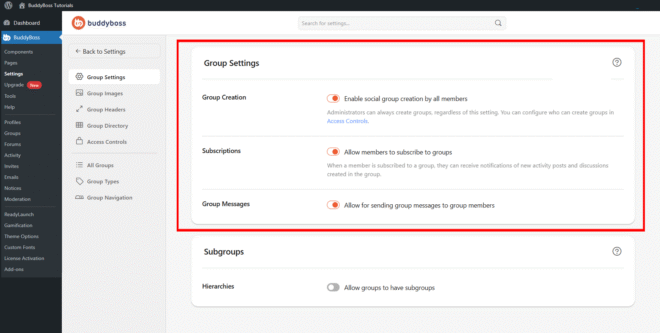
To access these settings, navigate to your WordPress Dashboard, go to BuddyBoss > Settings > Social Groups, then click Group Settings from the left menu.
Group Creation
Toggle Enable social group creation by all members on to allow any member to create groups within your community. When disabled, only administrators can create groups. Note that administrators can always create groups regardless of this setting, and you can further refine who is permitted to create groups using Access Controls.
Group Subscriptions
Toggle Allow members to subscribe to groups on to enable group subscriptions. When enabled, members can subscribe to groups they belong to and will receive notifications for new activity posts and discussions within those groups.
Group Messages
Toggle Allow for sending group messages to group members on to allow members to send a message to all members within a group at once. This improves communication and collaboration within your community’s groups.
© 2026 BuddyBoss LLC. All Rights Reserved. | buddyboss.com