











Introduction
The bbPress GDPR requires companies and site owners to be transparent about how they collect, use, and share personal data. It also gives individuals more access and choice when it comes to how their own personal data is collected, used, and shared.
bbPress GDPR plugin extends new Data Export & Data Erasure feature bundled with WordPress 4.9.6 Release.
This plugin covers all bbPress native components.
- Forums (Delete/Export on user requests)
- Topics (Delete/Export on user requests)
- Replies (Delete/Export on user requests)
The integration works and requires the BuddyBoss Platform installed and activated on your website.
BuddyBoss Platform is a fork and forge of the BuddyPress plugin and bbPress plugin. Any plugin developed for the BuddyPress and bbPress plugin is supported by the BuddyBoss Platform.
You do NOT need to install the BuddyPress plugin or the bbPress plugin separately. BuddyBoss Platform acts as a replacement for both the plugins.
Installing the plugin
To install the plugin:
- Download the bbPress GDPR plugin from the link below
https://wordpress.org/plugins/bbp-gdpr/ - Extract the downloaded bbp-gdpr.zip file to the WordPress plugins folder yourhostname/wordpress/wp-content/plugins OR
Go to your WordPress Dashboard > Plugins > Add New. Click the Upload Plugin button. Browse to the download file location, select the bbp-gdpr.zip & install the plugin. - Click the Activate Plugin button to activate the bbPress GDPR plugin on your website. OR
To activate the plugin on your website site go to WordPress Dashboard > Plugins and then click the Activate button for bbPress GDPR.
Exporting and erasing personal data
To export personal data:
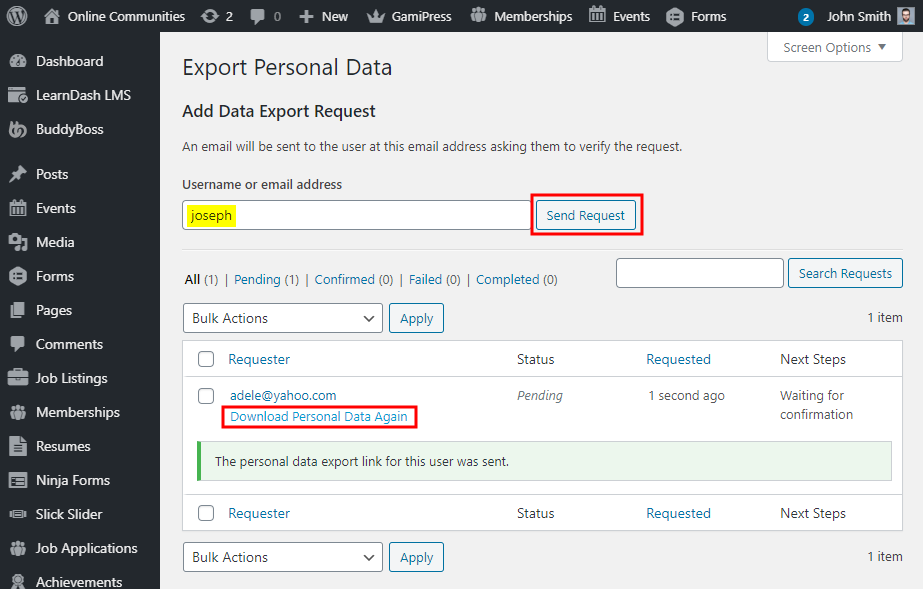
- Go to WordPress Dashboard > Tools > Export Personal Data.
- Enter the username/email address of the user whose personal data you want to export and then click the Send Request button.
- Click the Download Personal Data Again link to download the user’s data as a .zip file.
To erase personal data:
- Go to WordPress Dashboard > Tools > Erase Personal Data.
- Enter the username/email address of the user whose personal data you want to erase and then click the Send Request button.