














Introduction
The Fluent Support is a self-hosted customer support and help desk plugin for WordPress. It enables you to manage customer conversations from multiple channels, including support forms, contact forms, email, and external websites, all from a single dashboard.
When used with BuddyBoss Platform, Fluent Support Pro automatically displays a user’s BuddyBoss group information within support tickets, giving support agents additional context when assisting community members.
Features
Fluent Support includes a wide range of help desk features, including:
- Unlimited support tickets
- Unlimited support agents
- Unlimited customers
- Unlimited products
- Unlimited tags
- Multiple support channels
- Email support management
- Ticketing forms
- Contact form integration
- Customer conversation history
- Self-hosted support system
BuddyBoss Integration
Fluent Support Pro includes a built-in integration with BuddyBoss Platform.
When both plugins are installed and activated, support agents can view a customer’s BuddyBoss group information directly within the ticket.
The following information is displayed:
- BuddyBoss Group Name
- Date the user joined the group
This allows agents to quickly identify a customer’s community memberships without leaving the support interface.
Note: No additional add-on is required for this integration. However, you must be using Fluent Support Pro and have BuddyBoss Platform installed and activated.
Requirements
Before using the integration, ensure that:
- Fluent Support Pro is installed and activated.
- BuddyBoss Platform is installed and activated.
Once both plugins are active, the BuddyBoss integration works automatically.
View a User’s BuddyBoss Group Details
To view a customer’s BuddyBoss group information:
- Log in to your WordPress Admin Dashboard.
- Go to Fluent Support > Tickets.
- Open the support ticket you want to review.
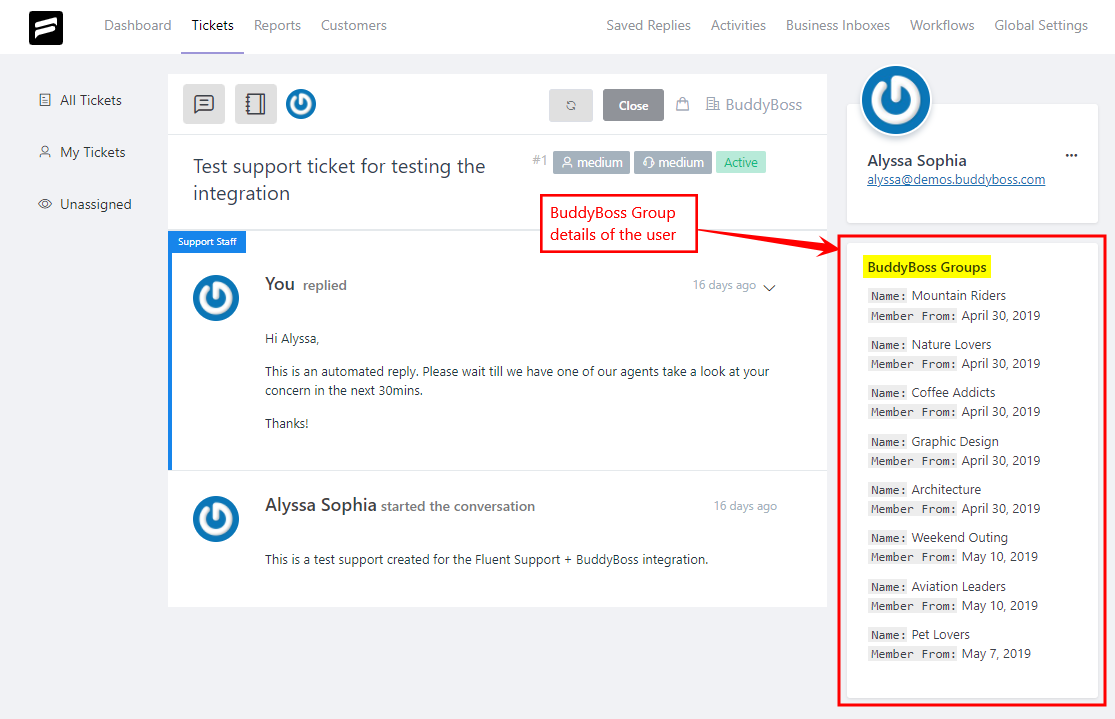
- View the BuddyBoss Group information displayed in the ticket details.
The ticket will display:
- The name of the BuddyBoss group the user belongs to.
- The date the user joined that group.
For further setup and tutorials, refer to the official documentation of the Fluent Support plugin.