














Introduction
The BuddyPress Featured Members plugin allows site administrators to highlight selected members and showcase them throughout the community. Featured members can be displayed on the Members directory, embedded using a shortcode, or added to your site with a widget.
The plugin is fully compatible with BuddyBoss Platform, allowing you to use all of its features without installing the BuddyPress or bbPress plugins separately.
Note: BuddyBoss Platform is a fork and replacement for both BuddyPress and bbPress. Any plugin developed for BuddyPress or bbPress, including BuddyPress Featured Members, is supported by BuddyBoss Platform.
Requirements
Before installing the plugin, ensure that:
- BuddyBoss Platform is installed and activated.
- You do not need to install BuddyPress or bbPress separately.
Install the Plugin
To install BuddyPress Featured Members:
- Download the BuddyPress Featured Members plugin from your BuddyDev account.
- Go to WordPress Dashboard > Plugins > Add New.
- Click Upload Plugin.
- Select the downloaded bp-featured-members.zip file.
- Click Install Now.
- Click Activate Plugin.
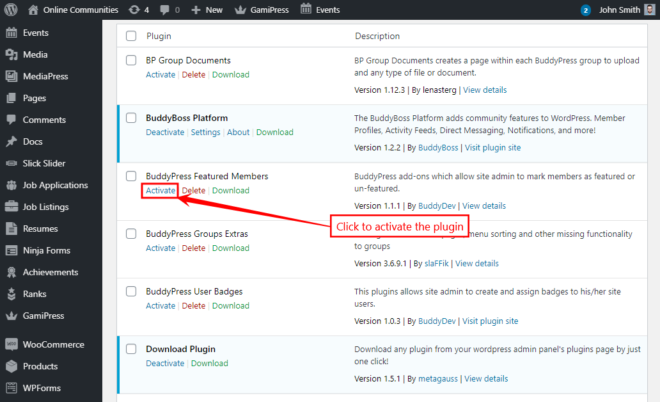
Alternatively, you can manually extract the bp-featured-members.zip file into your WordPress installation at:
yourhostname/wordpress/wp-content/plugins
Then activate the plugin from:
WordPress Dashboard > Plugins
Activate the Plugin
The BuddyPress Featured Members plugin will only function when BuddyBoss Platform is installed and activated.
No additional activation steps are required after the plugin has been activated.
Mark Members as Featured
To feature a member:
- Log in as a site administrator.
- Navigate to the member’s profile page.
- Click the Set Featured button.
Repeat these steps for any additional members you want to feature.
Display Featured Members
Once members have been marked as featured, they can be displayed in several ways:
- A dedicated Featured Members section on the Members directory.
- Using the Featured Members widget.
- Using the plugin’s shortcode to display featured members anywhere shortcodes are supported.