
Last updated: Mar 12, 2026 • ~2 min read
The Site Layout setting lets you choose whether your site uses the built-in ReadyLaunch experience or your active WordPress Theme layout. This manual walks you through the two options.
Tutorial Video
Selecting a Site Layout
Navigate to your WordPress Dashboard, go to BuddyBoss > Settings > Appearance > General, then scroll to the Site Layout section. Use the Layout dropdown to select one of the two available options:
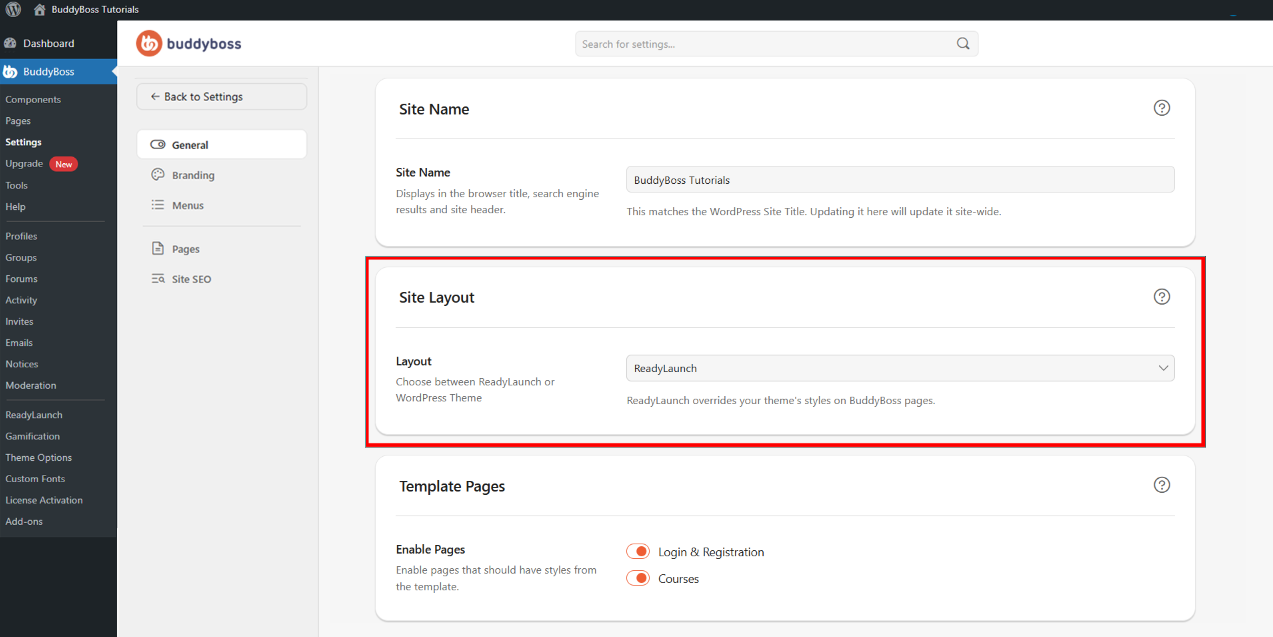
- ReadyLaunch: Uses BuddyBoss’s built-in launch-ready layout system with a simplified setup, built-in design structure, and optimized onboarding experience. Recommended for new sites that want to launch quickly using BuddyBoss’s native design.
- WordPress Theme: Uses your currently active WordPress theme to control the site’s front-end appearance. Ideal when you already use a custom theme, need advanced theme customization, or rely on theme-specific layouts and templates.
© 2026 BuddyBoss LLC. All Rights Reserved. | buddyboss.com