
Introduction
If you choose not to renew, you can easily cancel at any time through the BuddyBoss Dashboard prior to your renewal date.
This guide will walk you through the process of canceling your subscription to ensure your request is completed correctly, allowing you to manage your subscription preferences directly.
How to Cancel a Subscription
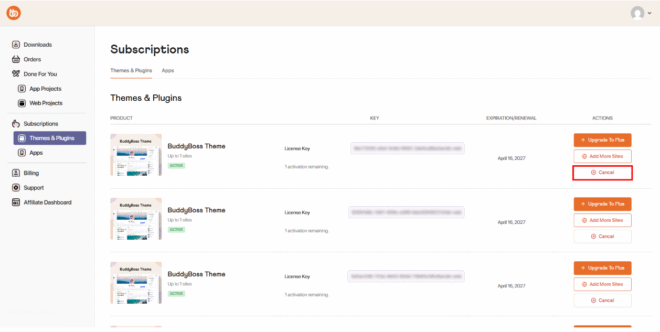
- Go to your BuddyBoss Account.
- Navigate to Subscriptions.
- Select the subscription you want to cancel.
- Click Cancel and follow the on-screen steps.
What Happens After Cancellation
Pending Cancellation
Once you have confirmed the cancellation:
- Your subscription status changes to Pending Cancellation.
- Your access remains active until the end of your current billing period.
- Your subscription will not renew automatically.
- No further payments will be charged.
Final Cancellation
- At the end of the billing period, your subscription will automatically change to Cancelled.
- Access to subscription features will end at this point.
- Your subscription completes its full billing cycle.
Reactivating Your Subscription
If you change your mind, you can reactivate anytime before the current billing period ends:
- Go to your My Account area.
- Click Reactivate Subscription.
- Your subscription will return to Active, and billing will resume as normal.