














App Store Server Notifications allow Apple to send information about important In-App Purchase events to your website, including subscription status changes and refunds.
To receive these notifications, you need to configure the appropriate server URL for your app in App Store Connect.
Configure the App Store Server Notifications URL
- Log in to App Store Connect.
- Click Apps and select your app.
- Under General, click App Information.
- Scroll to General Information and locate App Store Server Notifications.
- Under Production Server URL, click Set Up URL.
- Enter your BuddyBoss App Store Server Notifications URL:
<siteurl>?ios_s2s_notification=1
Replace <siteurl> with the root URL of your website.
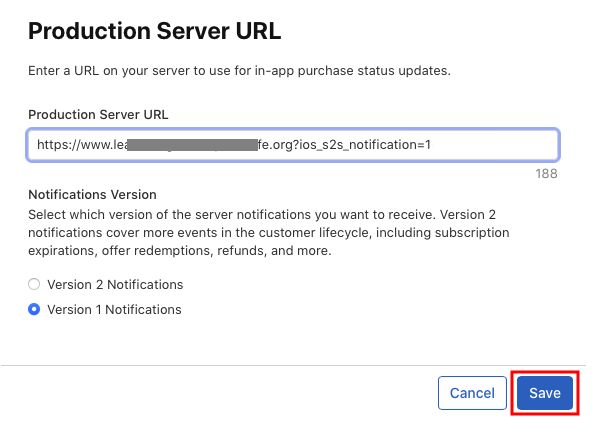
- Select the App Store Server Notifications version supported by your BuddyBoss App configuration.
- Click Save.
Configure the Sandbox Server URL
App Store Connect also allows you to configure a separate Sandbox Server URL for In-App Purchase testing.
If required by your BuddyBoss configuration, click Set Up URL under Sandbox Server URL and enter the appropriate BuddyBoss sandbox notification URL.
Note: The Production and Sandbox Server URLs correspond to Apple’s production and sandbox In-App Purchase environments.
If You Are Not Using In-App Purchases
If your app does not use In-App Purchases, you can disable the In-App Purchases component.
- Navigate to WordPress Dashboard > BuddyBoss App > Components.
- Locate In-App Purchases.
- Disable the component.
Troubleshooting
- If you get the following error, check if you are missing the trailing forward slash at the end (/).

- If you’re not seeing the Notification Server section on your Apple Developer Account, create your first In-App Subscription.
- If you are running a release app and a test app, you will have to number the URLs as seen in the screenshot above. For example:
- Product Server URL: <siteurl>?ios_s2s_notification=1/
- Sandbox Server URL: <siteurl>?ios_s2s_notification=2/
- Finally, if you’re not using In-App Purchases (IAP) – disable the BuddyBoss App Component via WordPress Dashboard > BuddyBoss App > Components > In-App Purchases.