














Introduction
WP Affiliate Manager is a WordPress affiliate management plugin that helps you create and manage an affiliate program for your website. It allows you to recruit affiliates, track referrals, manage commissions, and monitor affiliate performance from your WordPress dashboard.
The plugin integrates with a variety of popular eCommerce, membership, and payment plugins, making it easy to reward affiliates for successful referrals.
Supported Integrations
- WooCommerce
- Simple Shopping Cart
- WP eCommerce
- JigoShop
- Easy Digital Downloads
- iThemes Exchange
- WP eStore
- Sell Digital Downloads
- Paid Membership Pro
- S2Member
- Simple Membership
- Stripe Payments
The plugin features include:
- Unlimited affiliates
- Real-time reporting
- Set your own payout rate per affiliate
- Flat rate or percentage based payouts
- PayPal compatible
- Unlimited creatives and ads for affiliates
- Customizable affiliate registration
- Affiliate ad impression tracking
- Customized messages for affiliates
- Translation ready
- MailChimp and MailPoet compatible
Installing the plugin
To install the plugin:
- Download the WP Affiliate Manager plugin from the link below
https://wordpress.org/plugins/affiliates-manager/ - Extract the downloaded affiliates-manager.zip file to the WordPress plugins folder yourhostname/wordpress/wp-content/plugins OR
Go to your WordPress Dashboard > Plugins > Add New. Click the Upload Plugin button. Browse to the download file location, select the affiliates-manager.zip & install the plugin. - Click the Activate Plugin button to activate the WP Affiliate Manager plugin on your website. OR
To activate the plugin on your website site go to WordPress Dashboard > Plugins and then click the Activate button for WP Affiliate Manager.
Setting up the plugin
To set up the plugin:
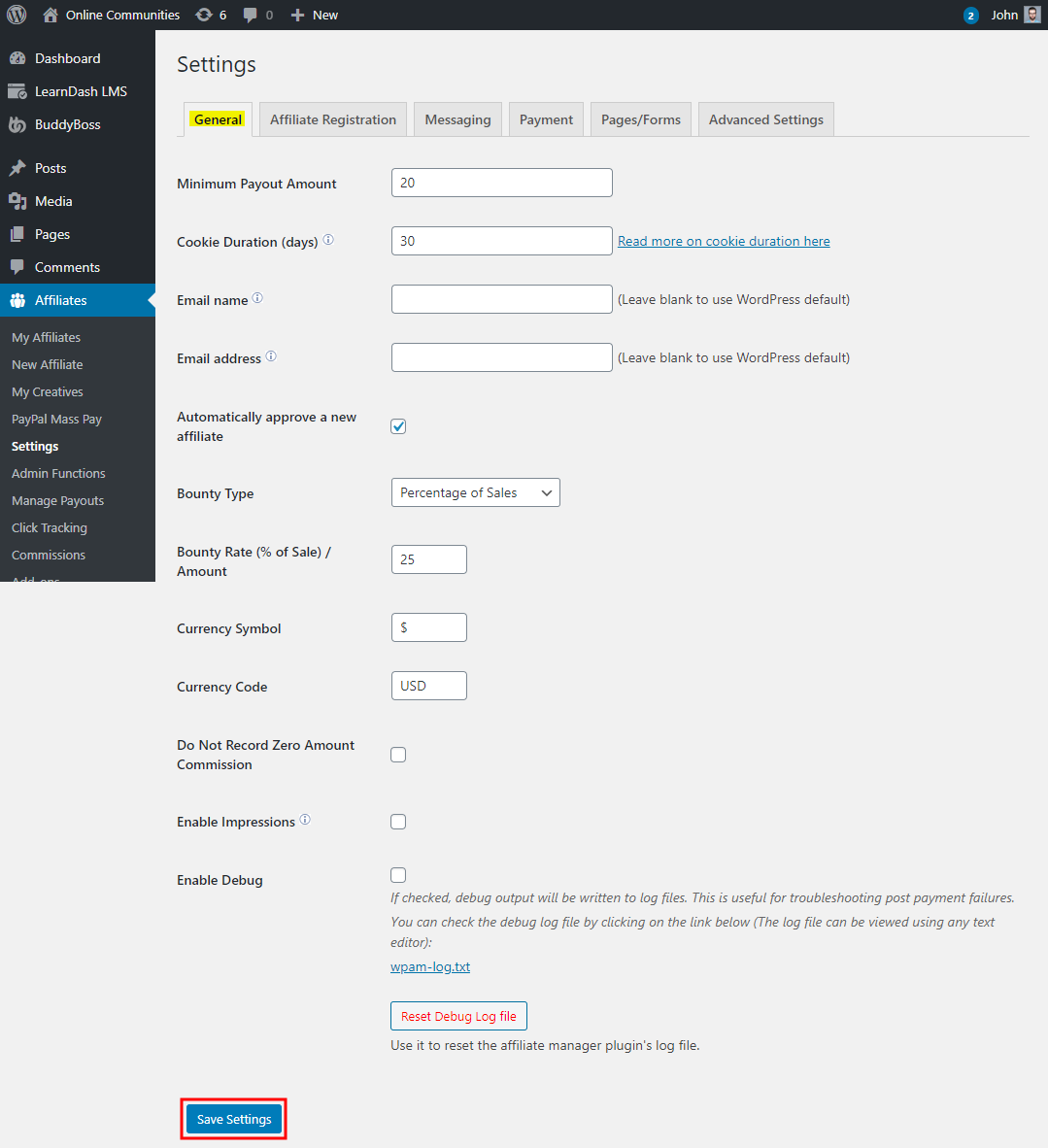
- Go to WordPress Dashboard > Affiliates > Settings.
- In the General tab, make the preferred changes to the settings.
- Click the Save Settings button.
You can create and manage all your affiliates via WordPress Dashboard > Affiliates > My Affiliates.
For further setup and usage tutorials, refer to the official documentation of WP Affiliate Manager.