











In-App Purchases
WP Fusion works with the BuddyBoss App to allow in-app purchases to be connected to tags in your CRM. This means you can apply a tag whenever someone buys a product in your app that will allow content to be unlocked on your site, trigger automated enrollments into courses and memberships, and more.
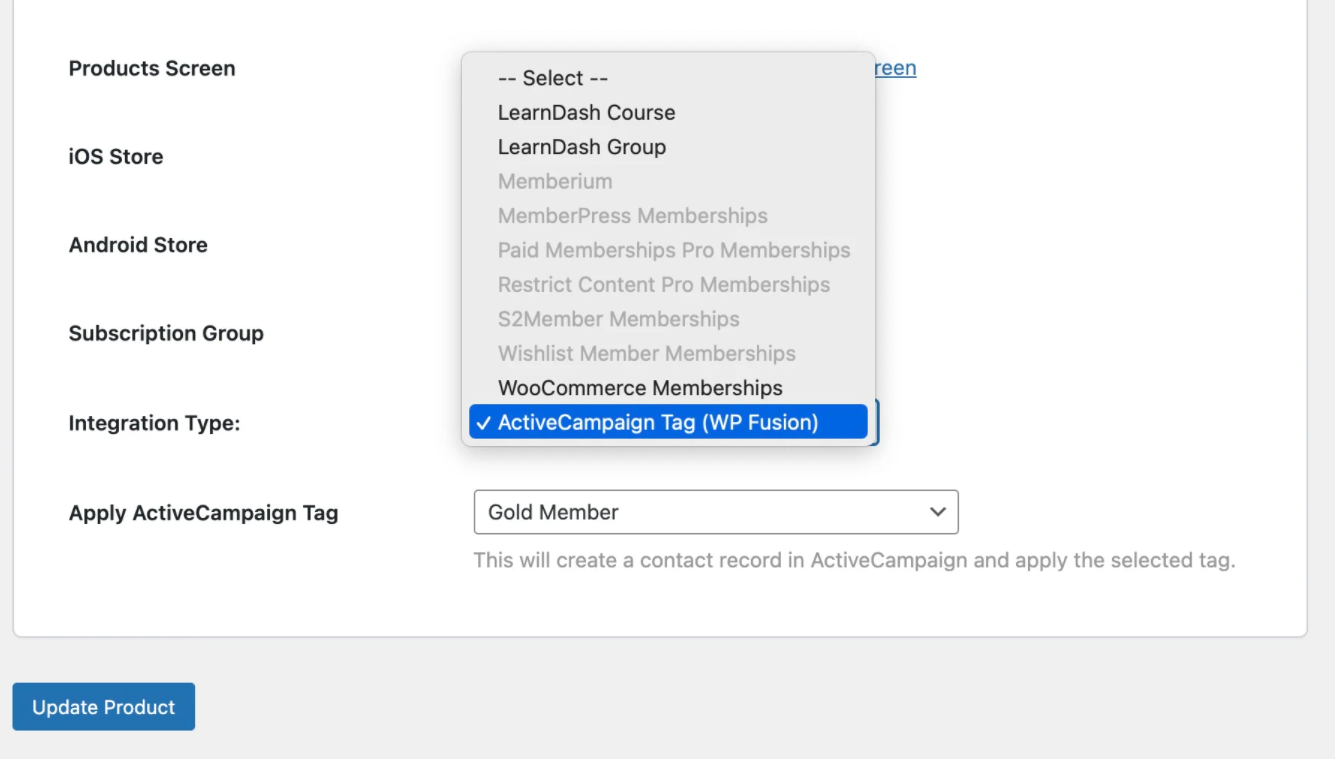
To set this up go to BuddyBoss App> In-App purchases> Product and then select Edit Product on the app product option.
From the Integration Type menu, select your CRM, and then in the dropdown below, select the tag that should be applied at purchase
Push Notifications
You can segment your members using tags in your CRM when you send push notifications from your app with BuddyBoss App and WP Fusion.

Once you select the Filter members, choose WP Fusion from the filters dropdown, and select your CRM.
For detailed information, please visit the WP official documentation.