














WP Fusion automatically sends new BuddyBoss users to your connected CRM. Any custom fields created with the BuddyBoss profile fields editor will show up under the Contact Fields tab in the WP Fusion settings, and you can map them to any field in your CRM. Once selected, any updates to the user’s profile will automatically be synced.
When the user is added to the group, the tag will be applied. When the user is removed from the group, the tag will be removed.
Likewise, applying this tag to a user in your CRM or from another integration will automatically add the user to the group. Removing the tag in your CRM (or if the user doesn’t have the tag) will remove the user from the group.
The integration does not require any additional add-ons.
Auto enrolling users to BuddyBoss groups
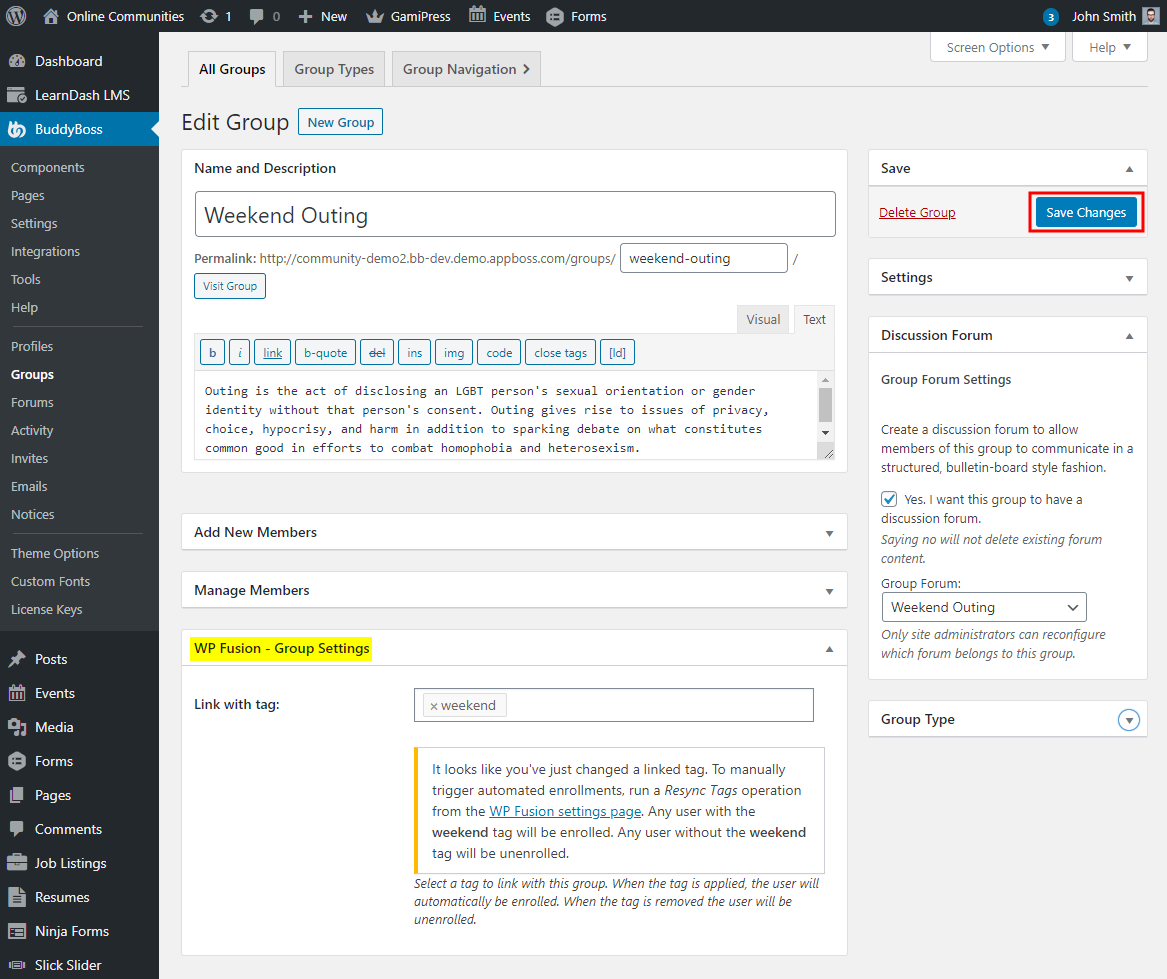
To link a tag to a BuddyBoss group:
- Go to WordPress Dashboard > BuddyBoss > Groups.
- Click the Edit link to edit the preferred BuddyBoss group.
- In the WP Fusion – Group Settings meta box, enter the tag for linking the group.
- Click the Save Changes button.
For further setup, usage and webhooks, refer to the official documentation of WP Fusion + BuddyBoss Integration.
Member Access Control
BuddyBoss Platform Pro has the Member Access Control feature which allows you to customize how users interact with various membership components based on their membership level. WP Fusion integrates with the Member Access Controls system to allow you to use tags (or lists / groups) in your connected CRM to personalize the member experience.

In this example, only members with the Infusionsoft tag Premium Member can send private messages.
You can set this functionality by selecting the access conditions from the dropdown and then choosing the required tags, lists or segments.
Profile Type Auto-Assignment
WP Fusion also works with BuddyBoss profiles to specify a profile tag to be linked to the CRM tag. Any user with that particular profile type will have the tag automatically added and whenever the user is removed, the tag would be removed as well.
For more information follow the official WP Fusion documentation.