














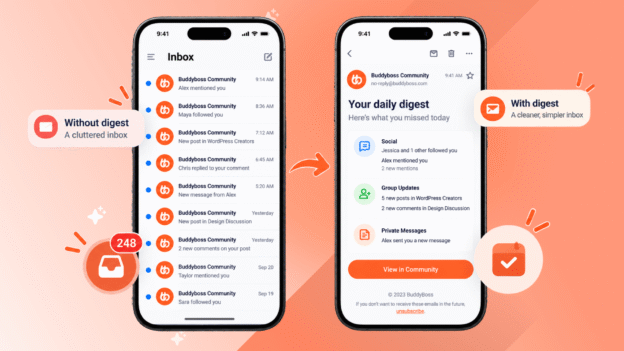
BuddyBoss Email Digest is live in Platform v3.5.0 and Addons v1.2.0. Members choose daily or weekly notification summaries instead of one email per event.
Available on the Start plan ($99/yr) and every plan above it. Explore BuddyBoss plans.
There is a pattern every community builder runs into eventually. A member joins, engages well, and then quietly disappears. Not from the community. From the inbox.
One email per mention, per comment, per reply, per new follower. They stop opening. They unsubscribe. And email, the one channel that brings drifted members back, goes silent permanently.
BuddyBoss Email Digest fixes that notification issue. Members choose whether notifications arrive one at a time or grouped into a daily or weekly summary. In-app notifications are untouched. The community keeps its email channel. Members keep their sanity.
This article covers everything in the release: what shipped, how it works for members, how to configure it as an admin, what plan you need, and answers to the questions support will get most.
The Retention Problem Hiding in Every Inbox
Most community builders think of email unsubscribes as a deliverability problem. In reality, they are a retention problem.
A member joins, engagement is good, and then their inbox fills up with one email per mention, per comment, per reply, per follow. They don’t reply by engaging less, unsubscribe from everything, or just stop opening.
They do not slow down inside the community but unsubscribe from the emails. And here is the part that matters: email is how communities bring people back. A member who has drifted quiet for a week is reachable by email. Once that channel is gone, there is no recovery mechanism. They are out of the loop permanently.
For years the only options were all or nothing. Receive every notification immediately, or turn them off. Email Digest adds the middle option that was always missing.
- What changes: how often email arrives.
- What stays the same: in-app notifications, activity streams, web push, and complete member control over which events email them at all.
What BuddyBoss Email Digest Actually Does
Email Digest is a grouping layer on top of the notification system that already exists.
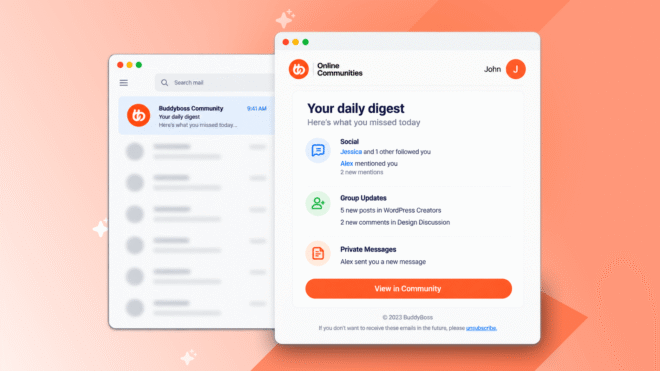
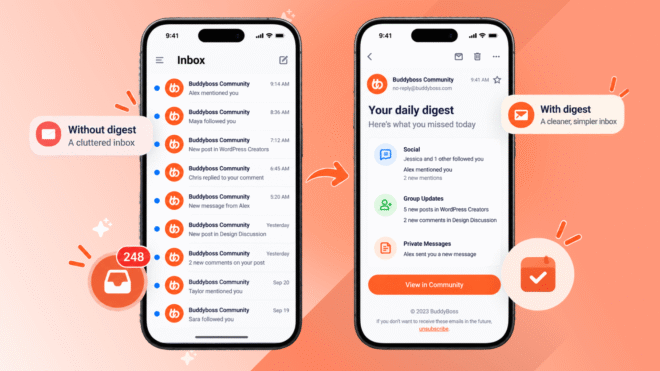
Eligible notification emails are collected in the background as activity happens. At the scheduled time, one summary goes out instead of dozens of individual messages. That is the mechanism. Nothing else about the notification system changes.
One definition matters enough to state here and repeat later.
Off does not mean stop all emails. Off means emails arrive immediately and individually, exactly as they do today.
The Email Digest setting has three options: Off, Daily Digest, and Weekly Digest.
- Off is immediate delivery
- Daily and Weekly batch eligible notifications into a single scheduled email
Which notifications email a member at all is a separate existing control that Email Digest does not touch.
This distinction exists because an earlier version of this feature in development described a fourth option that would stop notification emails entirely. That is not what shipped.
There are three options, and Off means immediate delivery, not no delivery.
Ten Notification Types Across Three Categories
Ten notification types are eligible for Email Digest, split across three categories that admins control independently.
Social
- Mentions
- Group mentions
- Comments on your post
- Replies to your comment
- New activity from people you follow
- New followers
Group Updates
- New group activity
- Group details changed
Private Messages
- Unread private messages
- New group messages
Private Messages works differently from the other two categories.
Even when an admin enables it in the digest, each member must also explicitly opt in from their own notification preferences before private message notifications are included in their digest.
Admin enabling makes the option available. The member decides whether to use it.
Always immediate, never digested: Connection requests, invitations, account activation, password resets and all administrative mail. Anything time-sensitive goes out straight away regardless of settings.
Inside the digest, items roll up rather than list flat. Two separate follow events render as a single line: “Jessica and 1 other followed you.” Sections are clearly labelled. Each item links directly back to the relevant content on the site.
An unsubscribe link sits in the footer of every digest.
How Your Community Members Control Their Email Digest
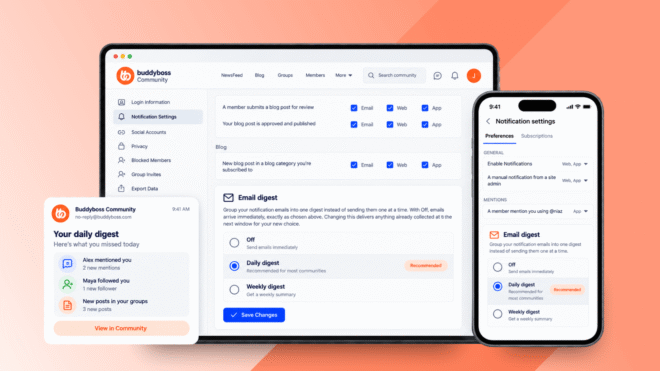
Every member controls their own preference. The setting lives under Profile Dropdown, then Account Settings, then Notification Settings. Scroll down to the Email Digest section.
Three options are available:
Daily Digest: supported notification emails are collected and delivered in one daily summary at the time the admin has configured.
Weekly Digest: supported notification emails are collected and delivered in one weekly summary on the day and time the admin has configured.
Off: Email Digest is disabled. Notification emails arrive immediately and individually, as they always have. In-app notifications continue normally.
The same setting is available in the BuddyBoss App. It is the same control with the same value, not two separate settings that can disagree. A member changes it once and it applies everywhere.
When a member changes their preference mid-cycle, pending digest notifications are automatically managed based on the newly selected option. Nothing gets lost in the transition.
Unsubscribing from the digest footer returns a member to immediate delivery. It does not stop notification emails.
A member can resubscribe at any time from Account Settings, Notification Preferences, by selecting a digest frequency.
How to Set Up BuddyBoss Email Digest
Before you begin, confirm you are on the Start plan or above with both BuddyBoss Platform and BuddyBoss Addons installed and active, updated to v3.5.0 and v1.2.0 respectively. Check which plan you are on if you are not sure.
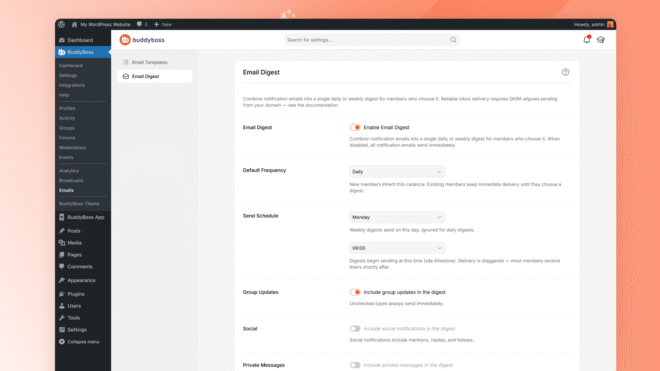
Go to BuddyBoss, then Settings, scroll to Notifications and click Settings, then open the Email Digest tab.
The full step-by-step instructions are in the Email Digest documentation. Here is an overview of what you will configure.
1. Enable Email Digest
The master toggle is off by default. Existing members stay on immediate delivery until they actively choose a digest cadence. New members who register after you enable it inherit the default frequency you set. Nobody’s email changes silently.
2. Set the Default Frequency and Send Schedule
Choose Daily or Weekly as the default for new members. Set the send time, which follows your site’s own timezone. For weekly digests, also choose the day of the week.
Delivery is staggered across larger communities, so members receive their digest shortly after the configured time rather than all at once.
3. Choose Which Categories Are Eligible
Three independent toggles control which categories are included in digests: Group Updates, Social, and Private Messages. Anything not toggled continues to send immediately, unchanged.
On Private Messages specifically: even with this toggle enabled, each member must also opt in from their own notification preferences before private message notifications are included in their digest.
4. Add a Digest Heading
An optional field that places a short note at the top of every digest email. Use it as a brief newsletter-style message from the community, or leave it blank. This is the setting that turns the digest into something members look forward to opening rather than just a notification summary.
5. Customise the Digest Email Templates
Both digest templates, Your Daily Digest and Your Weekly Digest, are fully editable. Go to BuddyBoss, then Emails, and they appear alongside every other notification email template. Customise them the same way you would any other BuddyBoss email.
6. Verify With the Last Run Status and a Test Digest
The settings panel shows when the digest last ran, how many members were processed, and how many emails were queued. This is the fastest way to confirm the process is working before rolling out to your community.
Use Send Test Digest to send a live preview to your own email address using your own pending notifications. It does not affect member digests or their pending notifications.
Pricing Plans and Feature Availability
Email Digest is available on the Start plan ($99/yr) and every plan above it, with an active BuddyBoss Addons licence. It is not available on Free or Lite.
Required versions:
- BuddyBoss Platform v3.5.0 or later
- BuddyBoss Addons v1.2.0 or later
- Administrator access to your WordPress site
See all BuddyBoss plans and pricing
Common Questions About BuddyBoss Email Digest
Will Off stop all my notification emails?
No. Off means notification emails arrive immediately and individually, exactly as they do today. The Email Digest setting only controls grouping. Which notifications email a member at all is decided by the existing Email checkboxes in their notification preferences, and those are completely unchanged by this feature.
Does Email Digest affect in-app notifications?
No. In-app notifications, activity streams and web push continue exactly as before. Email Digest only changes email delivery timing.
What happens when a member changes their preference mid-cycle?
Pending digest notifications are automatically managed based on the newly selected option. The transition is handled in the background with no action needed.
Can members unsubscribe from the digest?
Yes, with one click from the footer of any digest email. This returns them to immediate delivery. They can resubscribe at any time from Account Settings, Notification Preferences, by selecting a digest frequency.
Do existing members get moved to a digest automatically?
No. Existing members stay on immediate delivery until they actively choose a cadence. Only new members who join after an admin enables the feature inherit the default frequency.
Why does Private Messages work differently from the other two categories?
For Group Updates and Social, the admin toggle is enough to make those notifications eligible for the digest. For Private Messages, each member must also opt in from their own notification preferences. This is intentional: private messages are more personal, and the design keeps member intent in control of whether they are delayed.
Does the Email Digest setting work in the BuddyBoss App?
Yes. The member’s digest preference is available in the app as well as on the web. It is the same setting in both places, not two separate controls. Admin configuration stays in the web admin.
Also Shipped in Platform v3.5.0
This is a large release. 54 issues shipped across Platform v3.5.0, Platform Pro v3.3.2, Theme v2.22.0, Addons v1.2.0 and App Plugin v3.2.5. A few fixes from this release:
Profiles
- privacy fix. A member’s full name could appear in page source code and social sharing previews even when only their first name was set to display. Fixed. Update recommended.
- security fix. New users could be granted incorrect account permissions during self-registration. Fixed. Update recommended.
- Forums. Changing a discussion’s visibility to private was silently reverted to public after saving. Fixed.
- Core. Member hover cards were not appearing correctly in groups, forums and activity feeds. Fixed.
App
- Events Calendar Pro. Virtual event details were missing from the Events API, preventing the app from showing the join button for online events. Fixed.
- Header. App Pages and other menu types could not be added to the App Header Bar. Fixed.
- Next Gen. Android builds were not compatible with 16 KB memory page size devices. Fixed.
See the full Platform v3.5.0 release notes, Addons v1.2.0 notes and App Plugin v3.2.5 notes for the complete list.
BuddyBoss Email Digest: One Last Thing
Communities were losing their email channel one unsubscribe at a time. Not because members stopped caring. Because they had no middle option.
Email Digest gives them one. The channel survives. Engaged members stay in the loop.
And admins who use the digest heading well will find they have gained something they did not expect: a direct weekly line to their community that members actually open.
This was the most requested feature on our public roadmap. You asked for it, and it is here.
